53
Allowing a device to connect to Windows Media Player 12
7
Set up UPnP access on a Windows PC - cont.
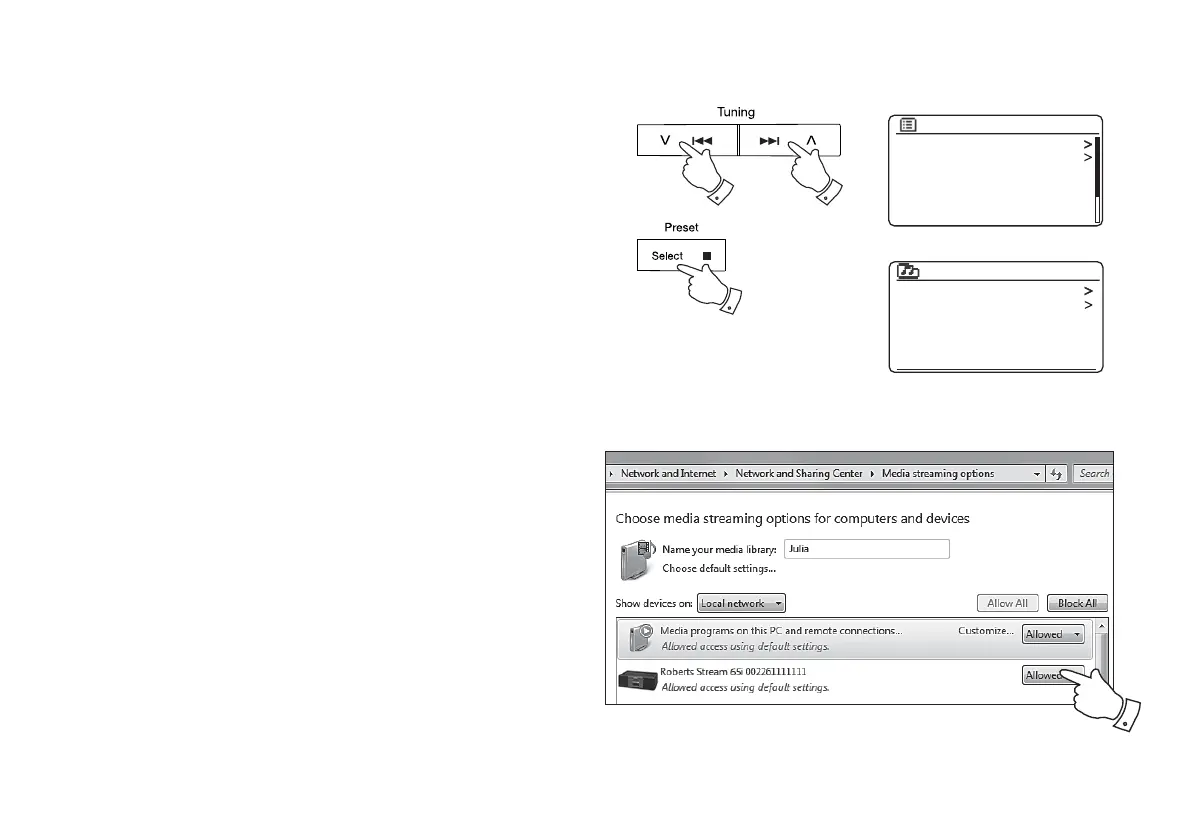
4. Press the Menu Up or Down buttons until 'Shared media' is highlighted
and press the Select button to select. The sound system will scan for
all available UPnP servers. It may take a few seconds for the sound
system to complete its scan. The sound system will display '<Empty>'
if no UPnP servers are found.
5. After scanning, select your UPnP server using the Menu Up or Down
and Select buttons. If you allowed automatic connection previously,
your sound system should now connect and you may skip to the next
page.
If you did not permit automatic connections, your sound system will
then normally display 'Unauthorised' at this stage.
6. Your PC may prompt you that there has been a connection to your
UPnP server. Whether prompted or not, in order that the sound system
may access the music fi les, you will need to click the 'Library' tab in
WMP 12 and select the 'Stream…' item to open the 'Media Streaming'
window. Select 'Automatically allow devices to play my media' then
select 'Automatically allow all computer and media devices'.
Alternatively select 'More Streaming options' to enable sharing on a
'per device' basis.
7. In the 'More streaming options' window, the sound system may be listed
as a blocked device. Click on the button shown to select 'Allowed'.
Note: If you are using Microsoft's Windows' fi rewall software, this
should be correctly confi gured by WMP 12. If you are using third party
fi rewall software you may need to manually confi gure it to allow your
unit and WMP 12 to communicate (see the 'Troubleshooting' section
on page 123).
8. On the sound system, select the named server again using the
Menu Up or Down and Select buttons. If WMP 12 is now able to
communicate with your sound system you will be presented with some
media selection options on the display.
4-8
4-8 4-8
Shared media
My playlist
Repeat play: Off
Shuffle play: Off
Clear My playlist
Prune servers
Music player
JENNY: Jenny’s music
HOME_PC: Mum’s music
Shared media



 To Next Page