60
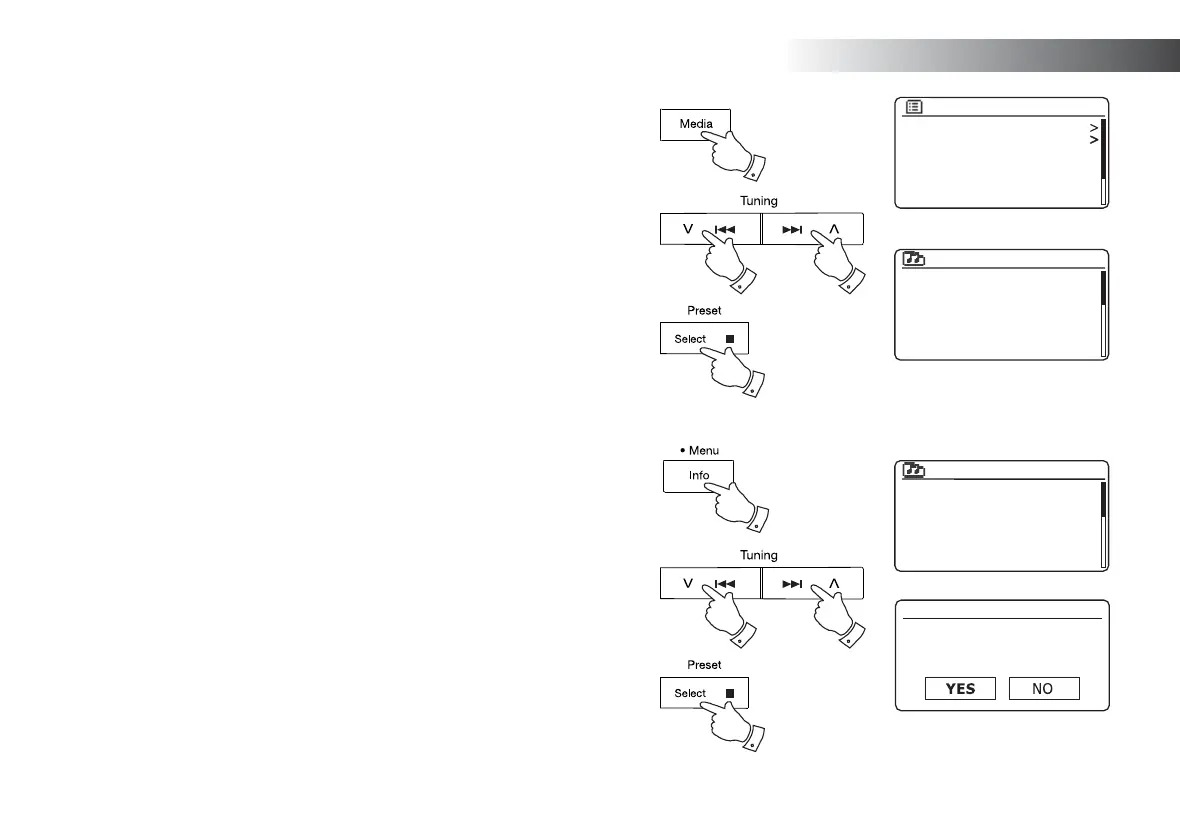
Viewing your playlist
1. Press the On/Standby button to switch on the unit. Press the Media button
as needed until the Music Player mode display is shown. The Music Player
menu will then be shown on the display.
2. Press the Menu Up or Down buttons until 'My Playlist' is highlighted on the
display. Press and release the Select button to enter the playlist.
3. Press the Menu Up or Down buttons to scroll through the playlist. Tracks
which are served via UPnP will show their track name.
Erasing a track from the playlist
1. Press and hold the Menu button to enter the main Music Player menu.
2. Press the Menu Up or Down buttons until 'My Playlist' is highlighted on the
display. Press and release the Select button to enter the playlist.
3. Press the Menu Up or Down buttons until the track you wish to erase is
highlighted. Press and hold the Select button.
4. You will be asked to confi rm the deletion. To delete the track press the Menu
Up or Down buttons until 'YES' is highlighted on the display then press and
release the Select button to confi rm the deletion.
5. If you do not wish to delete the track from the list, press the Menu Up or
Down buttons to highlight 'NO' and press and release the Select button to
cancel the operation.
Shared media
My playlist
Repeat play: Off
Shuffle play: Off
Clear My playlist
Prune servers
Music player
1
1
2
2,3 2,3
2-5
2-5 2-5
Love Me Do
From Me to You
She Loves You
I Want to Hold Your Hand
Can’t Buy Me Love
A Hard Day’s Night
My playlist
My playlist
Delete from
My playlist?
Love Me Do
From Me to You
She Loves You
I Want to Hold Your Hand
Can’t Buy Me Love
A Hard Day’s Night
My playlist
Music Player



 To Next Page