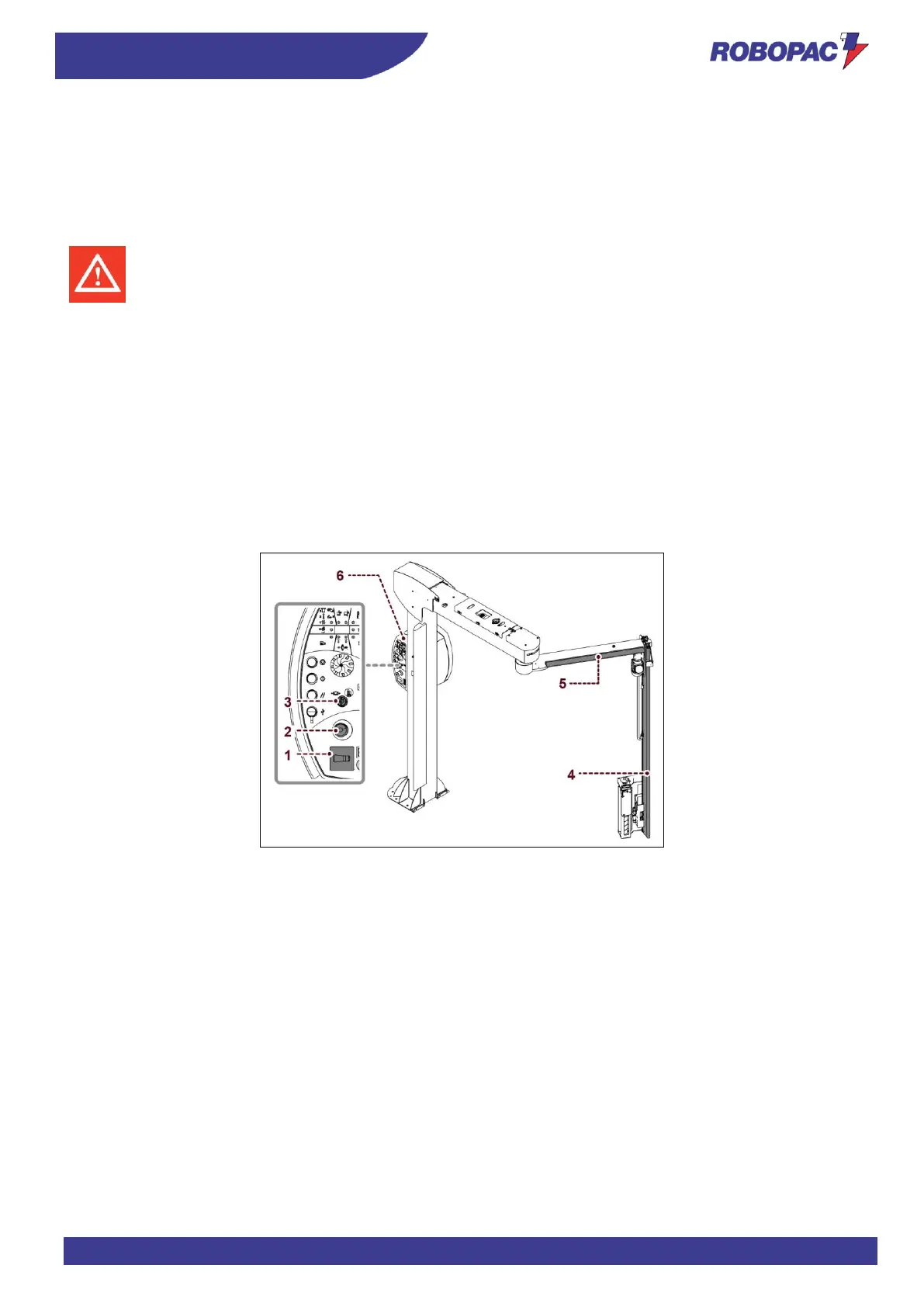
3.3. SAFETY DEVICE DESCRIPTION
The figure shows the position of the devices on the machine.
1. Main switch:
It enables and disables the power supply. It can be locked to prevent unauthorised persons from enabling it
during machine adjustment and maintenance phases.
2. Emergency stop: when pressed, it immediately stops the machine in emergency conditions.
3. Key-operated switch:
- Carriage emergency override
Rotate the key clockwise in hold to run position: the user interface screen will display the page “emergency
override” and this allows the carriage alone to be lifted by simultaneously pressing the “multi-function selector”.
- Rotary arm brake release
Rotate the key counter-clockwise (stable position): it is used to release the rotary arm and move it manually
(see “Safety device description”).
4. Sensible edge: safety device that stops the rotation in case of impact with people and/or objects placed in the
range of action of the arm.
5. Sensible edge: safety device that stops the rotation in case of impact with people and/or objects placed in the
range of action of the arm.
6. Acoustic signal: it signals the wrapping cycle start.







 To Next Page