45
Menu List
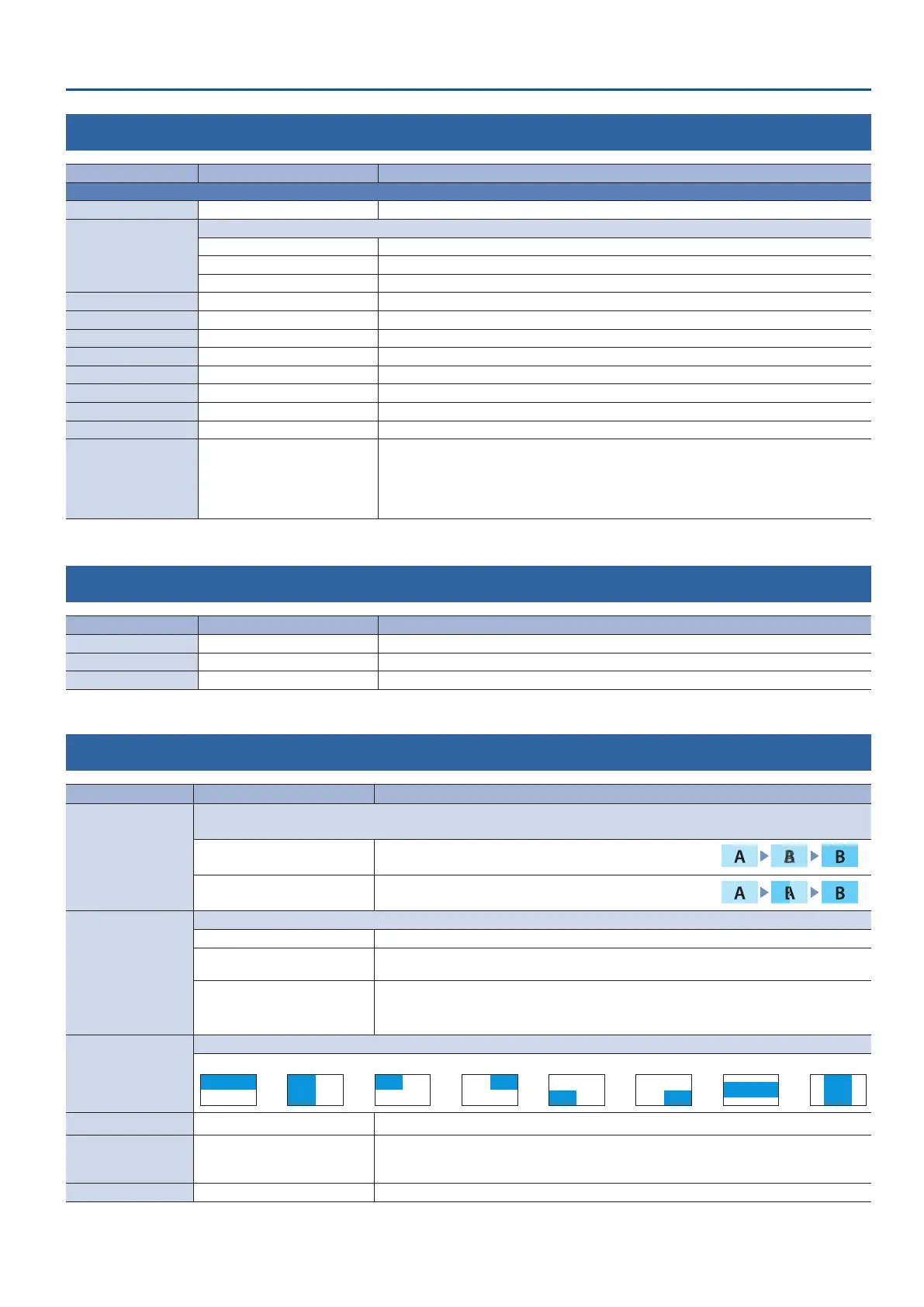
2: VIDEO OUTPUT
Menu item Value (bold text: default value) Explanation
OUTPUT 1, 2 Adjusts the video that is output from the OUTPUT 1 and 2 connectors.
OUTPUT STATUS — Shows the connection status of the OUTPUT connector.
OUTPUT ASSIGN
Species the output bus that is assigned to the OUTPUT connector.
PROGRAM Final output video. This is the default setting for “OUTPUT 1.”
PREVIEW Preview output video (the video to be output next)
MULTI-VIEW Multi-view. This is the default setting for “OUTPUT 2.”
COLOR SPACE YPbPr, RGB (0–255), RGB (16–235) Species the color space (system for representing colors in video).
DVI-D/HDMI SIGNAL HDMI, DVI-D Species the type of output signal.
BRIGHTNESS -64–0–63 Adjusts the brightness.
CONTRAST -64–0–63 Adjusts the contrast.
SATURATION -64–0–63 Adjusts the saturation.
RED -64–0–63 Adjusts the red level.
GREEN -64–0–63 Adjusts the green level.
BLUE -64–0–63 Adjusts the blue level.
REC CONTROL OFF, ON
Turns the REC control on/o. If this is “ON,” REC START/STOP commands can be sent to a
recorder that supports REC control functionality.
* To use the REC control function, the REC START/STOP functions must be assigned to the [DSK
PVW] or the [DSK ON] button. Set the “DSK PVW SW ASSIGN” or “DSK ON SW ASSIGN” in the
SYSTEM menu to “REC START/STOP.”
3: TRANSITION TIME
Menu item Value (bold text: default value) Explanation
MIX/WIPE TIME 0.0–1.0–4.0sec Species the video transition time.
PinP TIME 0.0–1.0–4.0sec For PinP compositing, species the fade-in/out time for the inset screen.
DSK TIME 0.0–1.0–4.0sec For DSK compositing, species the fade-in/out time for the overlay logo or video.
4: MIX/WIPE
Menu item Value (bold text: default value) Explanation
TRANSITION TYPE
Selects the transition eect.
You can also use the [TRANSITION] button to switch between MIX and WIPE.
MIX
The two videos are mixed as the transition occurs.
WIPE
The next video moves across to replace the original video.
MIX TYPE
Species the transition pattern for mix.
MIX The two videos are mixed as the transition occurs.
FAM
Video transitions are made with the luminance levels of the two video streams maintained
unchanged. This is an abbreviation of “full additive mix.”
NAM
The two video streams are compared, and transitions are made with display during transition
starting with levels of high luminance. This is an abbreviation of “non-additive mix.”
WIPE TYPE
Species the transition pattern for wipe.
HORIZONTAL VERTICAL UPPER LEFT UPPER RIGHT LOWER LEFT LOWER RIGHT H-CENTER V-CENTER
WIPE DIRECTION NORMAL, REVERSE, ROUND TRIP Species the direction of wipe.
WIPE BORDER COLOR
WHITE, YELLOW, CYAN, GREEN,
MAGENTA, RED, BLUE, BLACK,
SOFTEDGE
Species the color of the border added to the edge of the wipe area.
If this is set to “SOFTEDGE,” the wipe border is blurred.
WIPE BORDER WIDTH 0–3–14 Species the width of the border added to the edge of the wipe area.



 To Next Page