32
Audio Operations
Adjusting the Input Gain (Sensitivity)
Here’s how to adjust the input gain so that the audio is at the appropriate level.
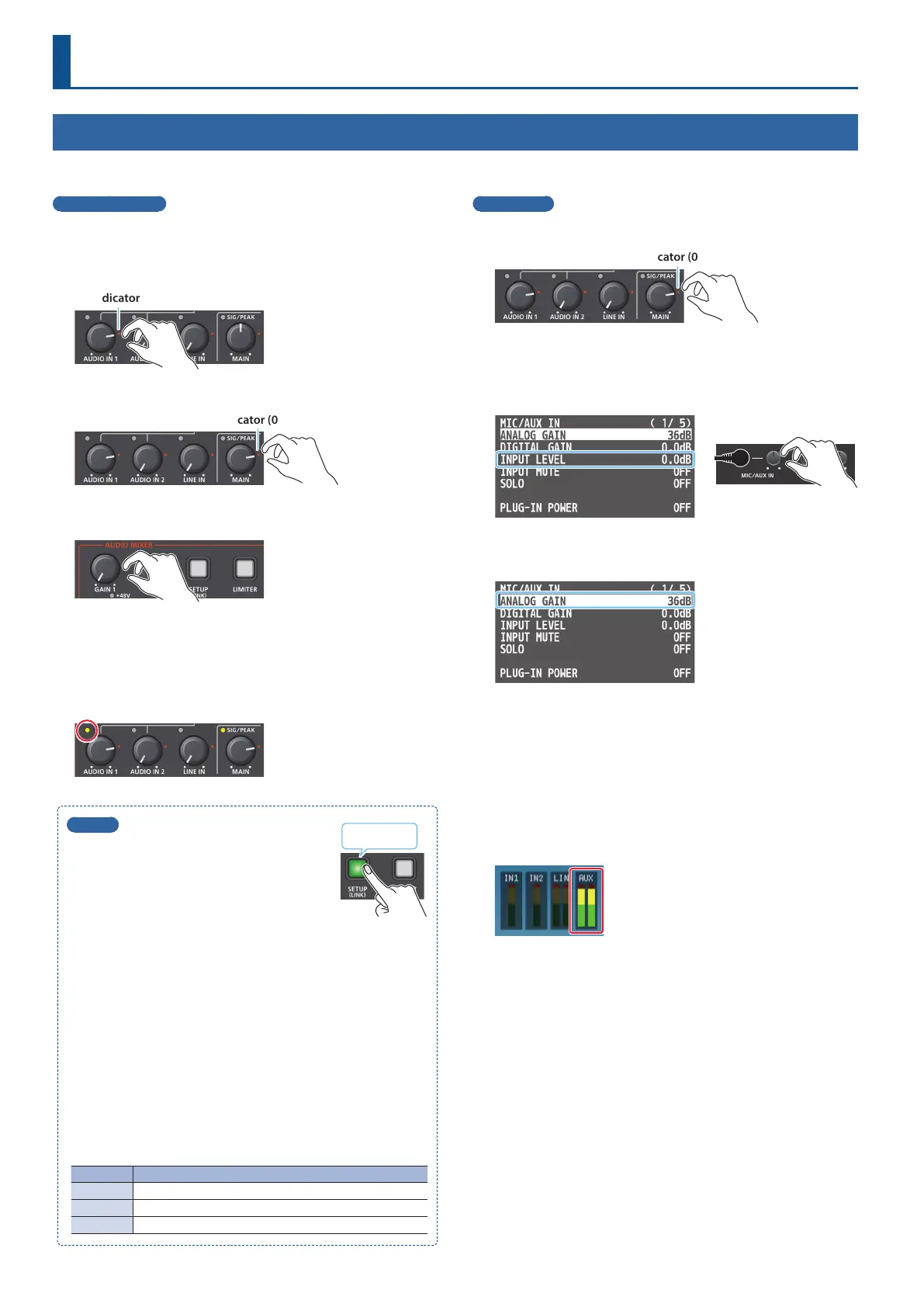
AUDIO IN 1 and 2
Here we explain using the AUDIO IN 1 audio as an example.
1. Move the [AUDIO IN 1] knob to a position near the
indicator (0 dB).
Indicator (0 dB)
2. Move the [MAIN] knob to a position near the indicator (0 dB).
Indicator (0 dB)
3. Turn the [GAIN 1] knob fully counter-clockwise,
minimizing (0 dB) the input gain.
4. While producing the sound that will actually be input,
slowly turn the [GAIN 1] knob clockwise to adjust the
input gain.
Raise the input gain as high as possible without allowing the SIG/
PEAK indicator of AUDIO IN 1 to light red when the loudest sound
level occurs.
MEMO
Stereo link function
You can link AUDIO IN 1 and 2 to operate them
as a stereo channel.
Long-press the [SETUP] button to turn the
stereo link function on/o.
* When stereo link is turned on, the settings of AUDIO IN 1 are
applied to AUDIO IN 2.
* When stereo link is on, the [GAIN 2] and [AUDIO IN 2] knobs are
disabled.
* When phantom power is on and you switch the stereo link
setting on/o, phantom power automatically turns o.
Adjusting the mic position (pan)
The left/right positioning of the sound is called “pan.” If you’re
using two mics to stream a performance, panning the two mics
to left and right will give the sound a more spacious feel.
To make adjustments, use the [SETUP] button
0
“AUDIO IN 1” or
“AUDIO IN 2”
0
“PAN.”
SIG/PEAK indicator
Indicator Explanation
Red Lit when excessive input occurs (0 dB or higher).
Yellow Lit when audio is input (-20– -1 dB).
Green Lit when audio is input (-50– -21 dB).
Long-press
MIC/AUX IN
1. Move the [MAIN] knob to a position near the indicator (0 dB).
Indicator (0 dB)
2. [SETUP] button
0
select “MIC/AUX IN,” and press the
[VALUE] knob.
3. Use the [MIC/AUX IN] knob to set “INPUT LEVEL” to “0.0dB.”
4. Use the [VALUE] knob to select “ANALOG GAIN,” and
press the [VALUE] knob.
5. Turn the [VALUE] knob fully counter-clockwise,
minimizing (0 dB) the input gain.
6. While producing the sound that will actually be input,
slowly turn the [GAIN 1] knob clockwise to adjust the
input gain.
Raise the input gain as high as possible without allowing the level
meter to light red when the loudest sound level occurs.
* The level meter is displayed in the multi-view.
7. Press the [MENU] button several times to close the menu.



 To Next Page