55
Menu List
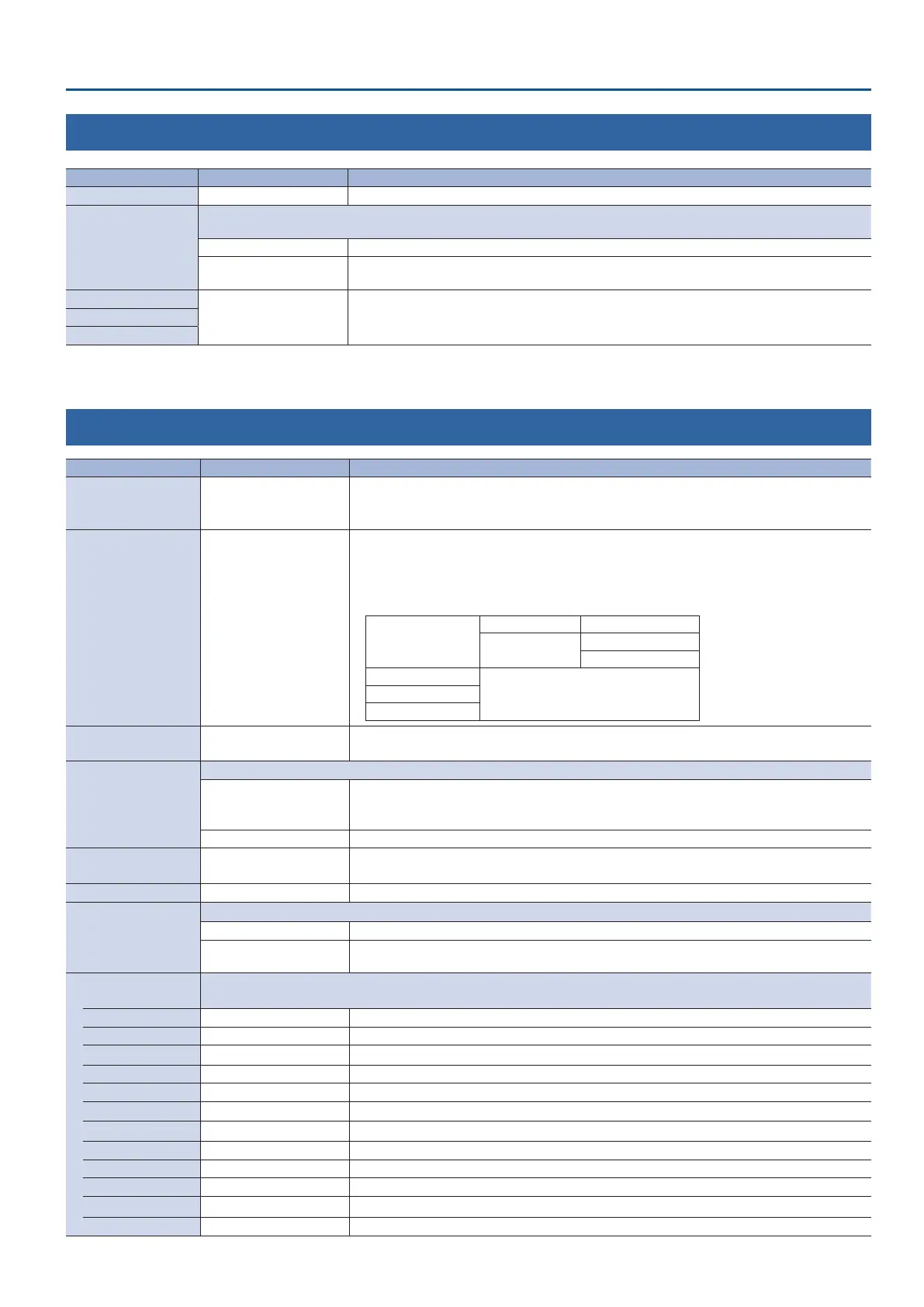
10: AUDIO FOLLOW
Menu item Value (bold text: default value) Explanation
ALL AUDIO FOLLOW OFF, ON Turns on/o the audio follow function for INPUT 1–4 in a single action.
INPUT 1–4
Turns the audio follow function on/o. Audio follow is a function that automatically switches the audio output in tandem with
video switching.
OFF The audio is always output regardless of the video selection.
ON
The audio is output only when the video is selected. The audio is automatically muted if another
video is selected.
AUDIO IN 1, 2
OFF, INPUT 1–4
For each audio source, these settings specify the input video (INPUT 1–4) that will use the audio
follow function. Audio is output only when the specied input video is selected.
If this is “OFF,” the audio is always output regardless of the video selection.
LINE IN
MIC/AUX IN
11: PRESET MEMORY
Menu item Value (bold text: default value) Explanation
LOAD MEMORY 1–8
Selects the preset memory to load.
Pressing the [VALUE] knob lets you load the preset memory.
When the [MODE] button is lit up blue, you can recall the preset memories with the [1/5]–[4/8] buttons.
SAVE MEMORY 1–8
Selects a preset memory for saving settings.
Pressing the [VALUE] knob lets you save the settings to the preset memory.
When the [MODE] button is lit up blue, long-press one of the [1/5]–[4/8] buttons to save the settings
to the respective preset memory.
* The following settings are not saved in preset memory.
AUDIO OUTPUT PHONES OUTPUT LEVEL
AUDIO IN 1, 2
SETUP (LINK) SW
PHANTOM +48V
PRESET MEMORY
All menu itemsSTILL IMAGE
SYSTEM
INITIALIZE MEMORY 1–8
Selects the preset memory to be initialized.
Press the [VALUE] knob to initialize the preset memory.
START UP
Species the settings loaded at startup.
LAST MEMORY
Restores the state that was in eect immediately before the power was turned o (Last Memory
feature).
The current settings (Last Memory values) are saved every 4 seconds, and when you exit a menu.
MEMORY 1–8 Recall the settings at the selected preset memory.
MEMORY PROTECT OFF, ON
If this is “ON,” prohibits settings from being saved or initialized. This protects the preset memories.
* Protected preset memories are erased if you perform a factory reset.
PinP FADE TIME 0.0–1.0sec Species the fade-in time for the inset screen when recalling a memory that includes a PinP composite.
PRIORITY
Species whether the preset memory values are applied to the knobs when recalling a preset memory.
PANEL Keeps the existing values. The preset memory values are not applied to the knobs.
MEMORY
The values saved in the memory are applied. The positions of the faders and knobs might dier
from the actual values.
LOAD PARAMETER
Species whether to recall the following items when recalling a preset memory.
Items that are turned o are excluded from the preset memories that are recalled.
VIDEO INPUT OFF, ON VIDEO INPUT menu
VIDEO OUTPUT OFF, ON VIDEO OUTPUT menu
TRANSITION TIME OFF, ON TRANSITION TIME menu
MIX/WIPE OFF, ON MIX/WIPE menu
SPLIT OFF, ON SPLIT menu
PinP OFF, ON PinP menu
DSK OFF, ON DSK menu
VIDEO CROSSPOINT OFF, ON Cross-point button state
STILL IMAGE OUTPUT OFF, ON Still image output (the states of buttons [1/5]–[4/8] when the [MODE] button is lit red)
AUDIO INPUT OFF, ON AUDIO INPUT menu
AUDIO OUTPUT OFF, ON AUDIO OUTPUT menu
AUDIO FOLLOW OFF, ON AUDIO FOLLOW menu



 To Next Page