57
Menu List
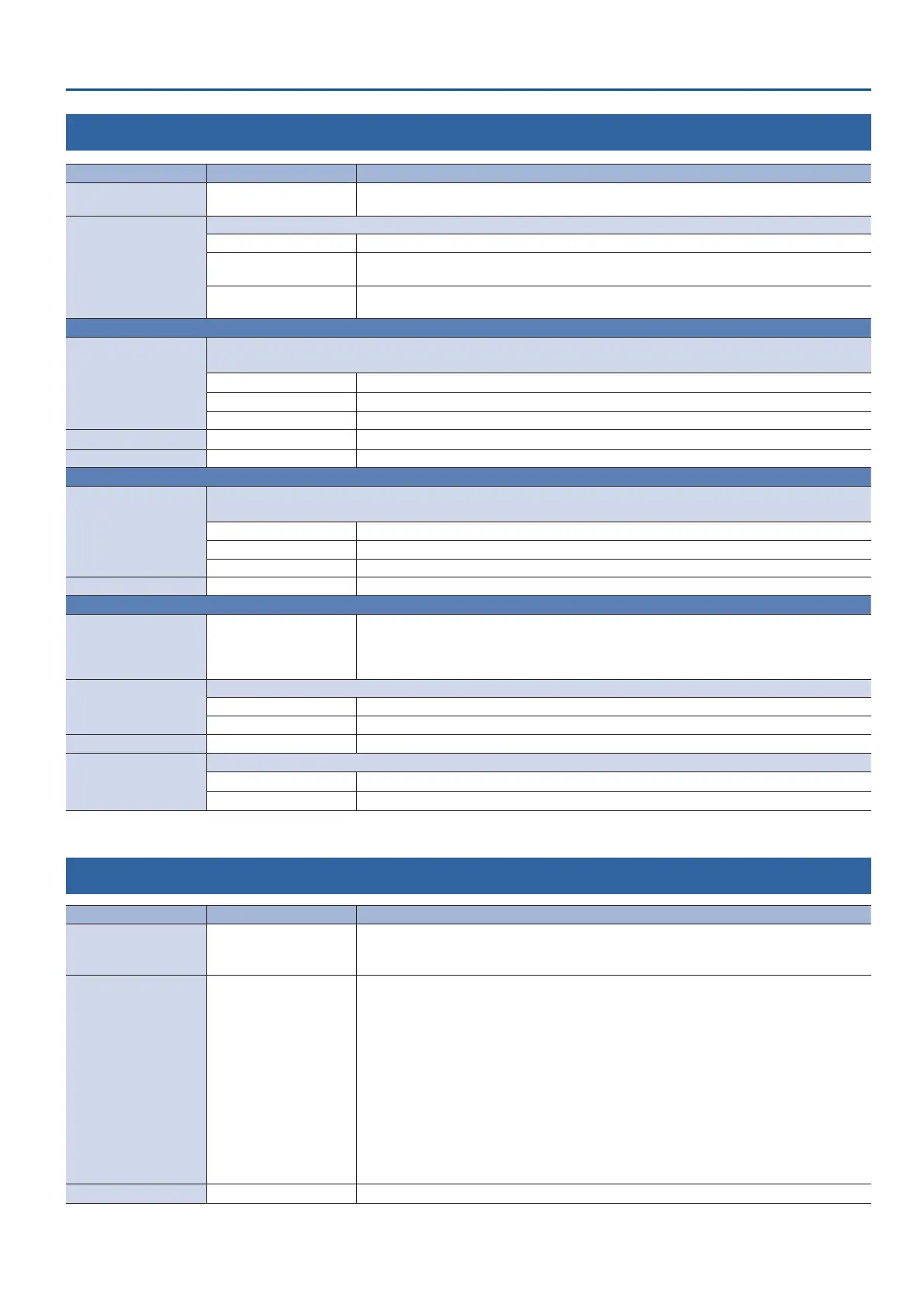
14: AUTO SWITCHING
Menu item Value (bold text: default value) Explanation
AUTO SWITCHING OFF, ON
Turns the auto switching function on/o. If this is “ON,” the video or preset memory are switched
automatically.
TYPE
Species the operation mode for auto switching.
INPUT SCAN Automatically switches to the video of INPUT 1–4 when the specied interval.
PRESET MEMORY SCAN
Automatically recalls preset memories 1–8 at the specied interval. The video and audio are
switched according to the settings that are saved in each preset memory.
BPM SYNC
Synchronizes the PGM/A bus and PST/B bus video, so that they switch automatically in sync with
the BPM (number of beats per minute) you set.
When TYPE = INPUT SCAN
SCAN SEQUENCE
Species the order in which video signals are shown.
* If there is no video input, this is skipped.
NORMAL
Switches in the order of INPUT 1
0
4.
REVERSE
Switches in the order of INPUT 4
0
1.
RANDOM Switches randomly.
SCAN TRANSITION TIME 0.0–1.0–4.0sec Species the video transition time.
INPUT 1–4 TIME OFF, 1–5–120sec Species the time that the video is shown. Turn this “OFF” to skip.
When TYPE = PRESET MEMORY SCAN
SCAN SEQUENCE
Species the order in which preset memories are switched.
* Preset memories in which no settings have been saved are skipped.
NORMAL
Switches in the order of preset memory 1
0
8.
REVERSE
Switches in the order of preset memory 8
0
1.
RANDOM Switches randomly.
MEMORY 1–8 TIME OFF, 1–5–120sec Species the time it takes to switch to the next preset memory. Turn this “OFF” to skip.
When TYPE = BPM SYNC
BPM 20–120–250
Species the BPM (number of beats per minute).
If the “BPM TAP” function is assigned to the [DSK PVW] or the [DSK ON] button, you can set the
BPM according to the tempo at which you press the button. The button ashes in sync with the
current BPM setting.
MODE
Species how the video is switched.
TRANSITION The video switches using the currently selected transition eect (mix or wipe).
CUT The video switches as a cut.
SPEED x1/4, x1/2, x1, x2 Species the video switching speed as a multiple of the specied BPM.
TAP RESET
Species how the video switches while you edit the BPM with the [DSK PVW] or [DSK ON] buttons.
OFF Changes to the BPM are applied while the video continues to switch.
ON Resets the switch and starts switching at the new BPM you entered.
15: USB MEMORY
Menu item Value (bold text: default value) Explanation
RESTORE ALL SETTINGS ENTER
Shows a list of the setting les (.V1P) that are on the USB ash drive.
You can select a setting le and restore the settings into the unit. The current settings are
overwritten.
BACKUP ALL SETTINGS ENTER
Shows a list of the setting les (.V1P) that are on the USB ash drive.
You can select the settings le used to back up the current settings to the USB ash drive.
When you select an existing le, the le is overwritten. To save the settings as a new le, select
“NEW FILE...”
Content that is not saved to the le
5 The SYSTEM menu settings “TEST PATTERN” and “TEST TONE.” The unit always starts with these
“OFF.”
5 The FREEZE menu settings “FREEZE.” The unit always starts with these “OFF.”
5 The state of the [DSK PVW] and [DSK ON] buttons, to which the “STILL 1–4 OUTPUT” and “REC
START/STOP” functions have been assigned. These buttons are always dark when the unit starts up.
5 The state of the [OUTPUT FADE] knob.
5 The still images loaded into the unit.
FORMAT EXEC
Formats the USB ash drive.



 To Next Page