54
Menu List
9: AUDIO OUTPUT
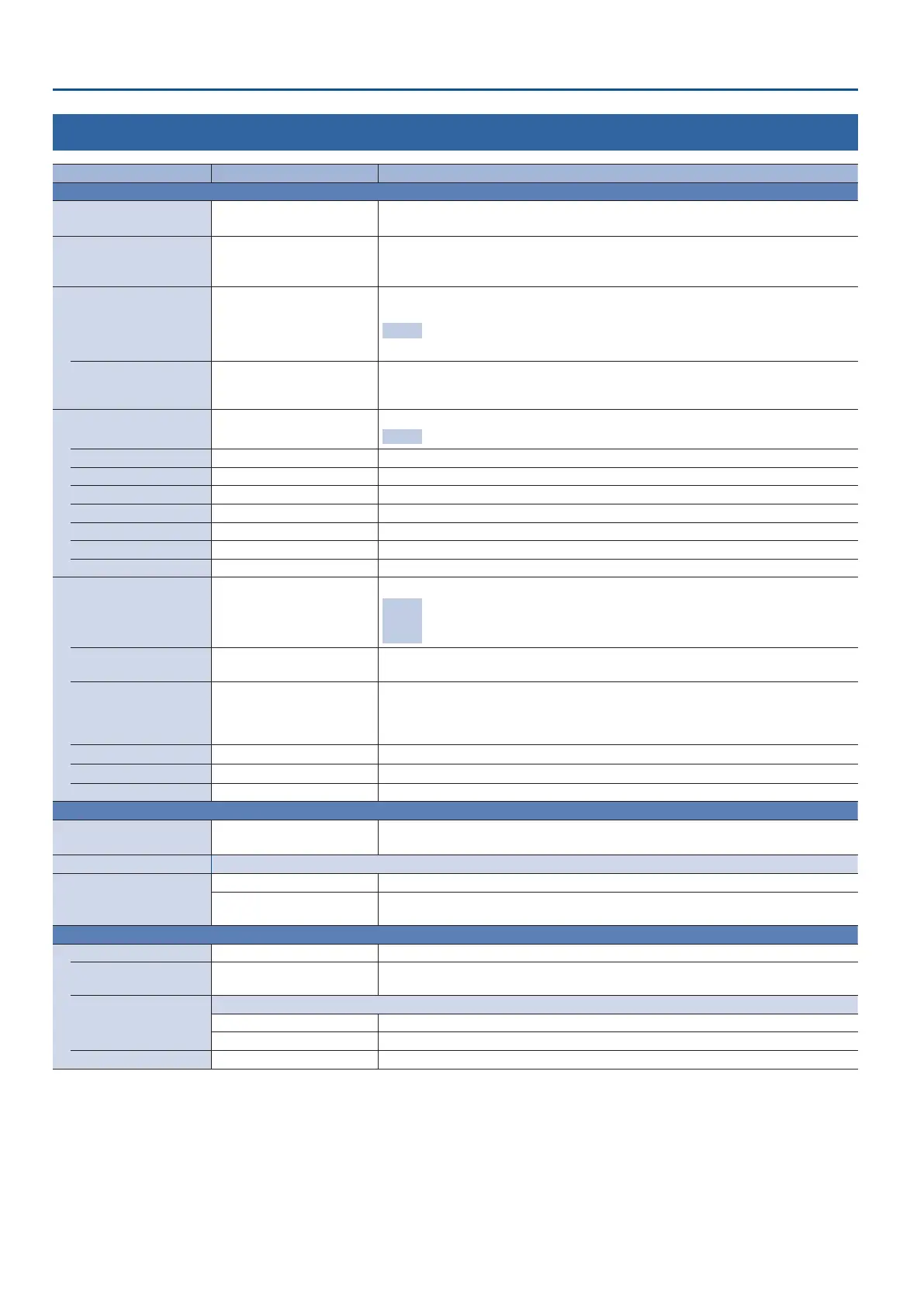
Menu item Value (bold text: default value) Explanation
MAIN OUTPUT Adjusts the audio that is output from the AUDIO OUT jacks.
OUTPUT LEVEL -INF–0.0–10.0dB
Adjusts the output volume.
This can also be adjusted by the [MAIN] knob.
OUTPUT MUTE OFF, ON
Turns the mute function on/o. If this is “ON,” the output audio is temporarily silenced.
If the mute function is assigned to the [DSK PVW] or [DSK ON] button, you can also switch
this by pressing the button.
LIMITER OFF, ON
Turns the limiter on/o.
You can also use the [LIMITER] button to turn this on/o.
Eect
Limits the output volume so that is does not exceed the specied threshold level.
* Distortion will occur if audio that exceeds the allowable range of the limiter is input.
THRESHOLD -40.0– -6.0–0.0dB
Adjusts the level that becomes the threshold at which the limiter is applied. Compression
is applied to audio that exceeds the threshold. The volume level of audio that is output is
limited so as to stay to below the threshold.
EQUALIZER OFF, ON
Turns the equalizer on/o.
Eect Adjusts the volume for each frequency band.
Hi GAIN -15.0–0.0–15.0dB Boosts or attenuates the high band.
Hi FREQUENCY 1.0–10.0–20.0kHz Adjusts the center frequency when changing the volume in the high band.
Mid GAIN -15.0–0.0–15.0dB Boosts or attenuates the middle band.
Mid FREQUENCY 20.0Hz–500Hz– 20.0kHz Adjusts the center frequency when changing the volume in the middle band.
Mid Q 0.5–1.0–16.0 Adjusts the width of the frequency band when boosting or attenuating the middle band.
Lo GAIN -15.0–0.0–15.0dB Boosts or attenuates the low band.
Lo FREQUENCY 20.0Hz–500Hz–20.0kHz Adjusts the center frequency when changing the volume in the low band.
COMPRESSOR OFF, ON
Turns the compressor on/o.
Eect
Audio that exceeds the specied threshold level is compressed. This reduces the
dierence between the maximum volume and minimum volume, making the
audio more comfortable for listening
THRESHOLD -40.0–-20.0–0.0dB
Species the level used as the threshold at which the compressor is applied. Compression is
applied to audio that exceeds the threshold.
RATIO
1.00 : 1, 1.12 : 1, 1.25 : 1, 1.40 : 1,
1.60 : 1, 1.80 : 1, 2.00 : 1, 2.50 : 1,
3.20 : 1, 4.00 : 1, 5.60 : 1, 8.00 : 1,
16.0 : 1, INF : 1
Species the degree of compression applied to the audio. The state in which no
compression is applied is dened as “1.”
ATTACK 0.0–30–100ms
Species the time until compression starts when audio exceeding the threshold is input.
RELEASE 30–250–5000ms
Adjusts the length of time until compression ends after audio falls below the threshold.
MAKEUP GAIN -40–0–40dB Adjusts the nal output volume level after applying the compressor.
PHONES Settings the audio that is output from the PHONES jack.
OUTPUT LEVEL 0.0–127
Adjusts the output volume.
This can also be adjusted by the [PHONES] knob.
SOLO SETUP Species how to select the HDMI audio that is targeted by the solo function.
HDMI SOLO
NORMAL The solo function is turned on/o from the AUDIO menu.
USE CROSS-POINT SW
The solo function turns on while
holding down the crosspoint button. You can monitor the
audio of the nal output video or preview output video while the button is pressed.
REVERB Adds reverberation to the sound.
REVERB OFF, ON Turns reverb on/o.
LEVEL 0–127
Species the amount of sound that is returned from the reverb (return level). This adjusts
the depth of the overall reverb.
TYPE
Species the reverb type.
ROOM Produces the natural-sounding reverberation of a room.
HALL Produces the reverberation that is typical of a performance in a concert hall.
SIZE 1–10–20 Species the size of the room. The larger the value, the longer the reverb time.



 To Next Page