20
Video Operations
Loading a Still Image
You can load a still image, and output it in the same way as video (p. 22) or use it as a source for DSK compositing (p. 29). There are two ways to
load a still image: you can load from a USB ash drive, or you can capture from input video.
You can save up to four still images in the unit.
* When still images are saved in the unit, startup takes longer time according to image size and the number of still images saved.
Loading a Still Image from a USB Flash Drive
Here’s how to load a still image from a USB ash drive into the unit.
NOTE
5
Still images cannot be scaled. In advance, you must prepare
still images of the resolution that is appropriate for your
output format.
5
When using a USB ash drive for the rst time, you must
format it using this unit (p. 39).
5
Never turn o the power or remove the USB ash drive while
the message “PLEASE WAIT” is shown.
5
Depending on the USB ash drive, recognition of the ash
drive might take some time.
Formats supported for loading
Format
Windows Bitmap le (.bmp), 24-bit color, uncompressed
PNG le (.png), 24-bit color
* Alpha channel is not supported.
Resolution Maximum 1920 x 1080 pixels
File name
No more than 28 single-byte alphanumeric characters
* The extension “.bmp” or “.png “ must be added.
Loading a still image
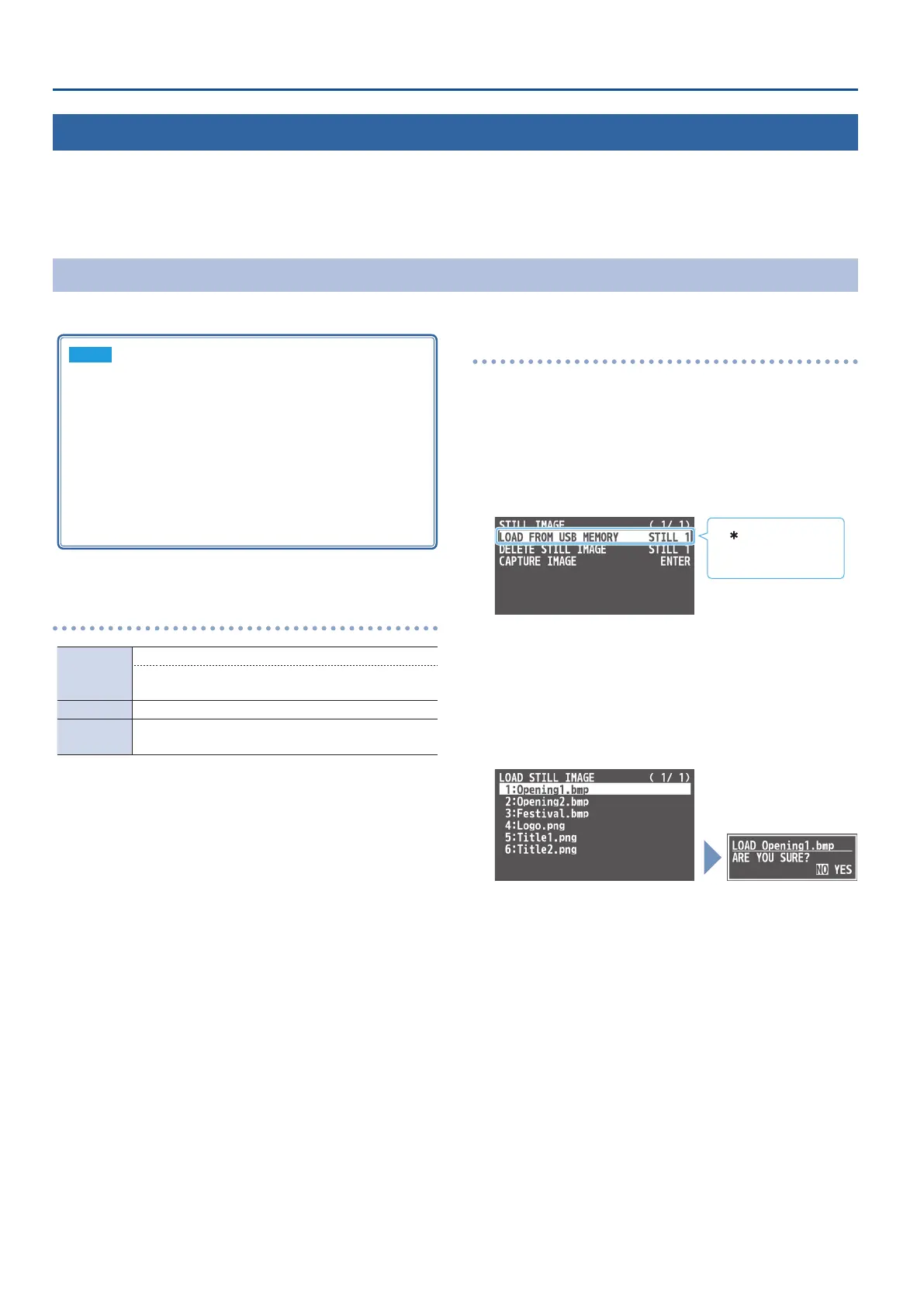
1. Save the still image in the root directory of the USB ash
drive.
2. Connect the USB ash drive containing the still image to
the USB MEMORY port.
3. [MENU] button
0
“STILL IMAGE”
0
select “LOAD FROM
USB MEMORY,” and press the [VALUE] knob.
A “ ” symbol is displayed
for memory where a still
image is already saved.
4. Use the [VALUE] knob to select the loading destination
for the still image (STILL 1–4), and press the [VALUE] knob.
A list of the still images in the USB ash drive is shown.
5. Use the [VALUE] knob to select the still image le you
want to load, and press the [VALUE] knob.
A conrmation message appears.
* If you want to cancel the operation, press the [MENU] button.
6. Use the [VALUE] knob to select “YES,” and press the
[VALUE] knob.
The still image is loaded into the unit. When the operation is
nished, the message “COMPLETE” appears.
* Large-size still-image les and PNG les might take some time to
load.
7. Press the [MENU] button several times to close the menu.



 To Next Page