38
Reference Manual
00809-0100-4803, Rev GA
Configuration
September 2017
Configuration
2.7 Variable configuration
2.7.1 Flow rate
(Fully compensated mass and energy flow feature board only)
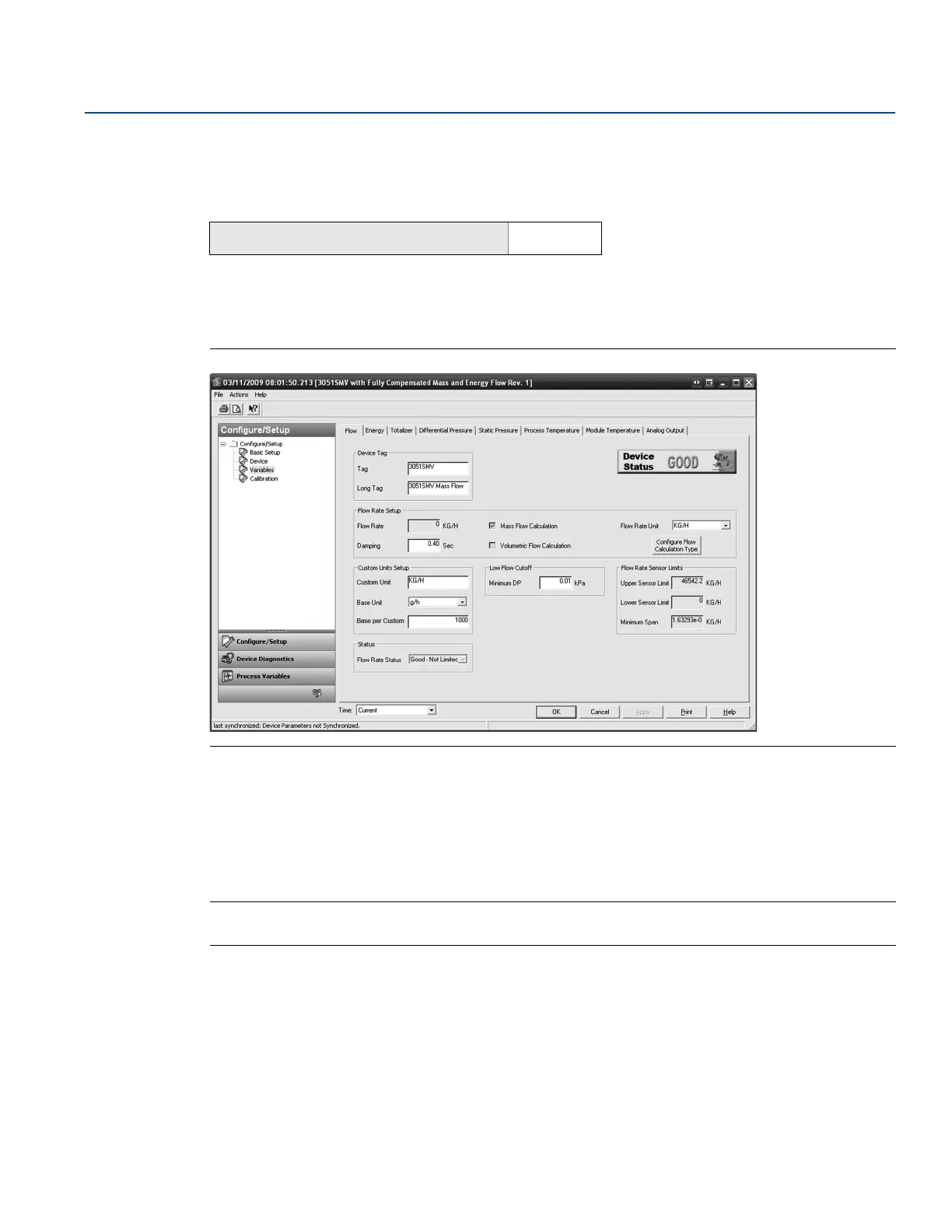
The Flow tab is used to configure the settings associated with the Flow Variable. Fluid and primary
element information which defines the flow calculation is configured using Engineering Assistant.
Figure 2-27. Variables - Flow Tab
Under the Flow Rate Setup heading, the type of flow calculation is indicated by the check boxes next to
either Mass Flow Calculation or Volumetric Flow Calculation. To edit the flow calculation type, select the
Configure Flow Calculation Type button.
Edit the Flow Rate Units and Damping value as needed. The flow calculation within the device uses
undamped process variables. Flow rate damping is set independently of the measured process
variables.
Note
If the flow calculation type is changed, the totalizer will be stopped and reset automatically.
Under the Low Flow Cutoff heading, edit the current Minimum DP Value as needed. The unit for this
value is the user-selected DP unit. If the measured DP value is less than the minimum DP value, the
transmitter will calculate the Flow Rate value to be zero.
The Sensor Limits and Minimum Span can be viewed under the Flow Rate Sensor Limits heading.
Mass and energy flow Fast Keys
1, 4, 1, 1











 To Next Page