49
Reference Manual
00809-0100-4803, Rev GA
Configuration
September 2017
Configuration
2.7.3 Totalizer
(Fully compensated mass and energy flow feature board only)
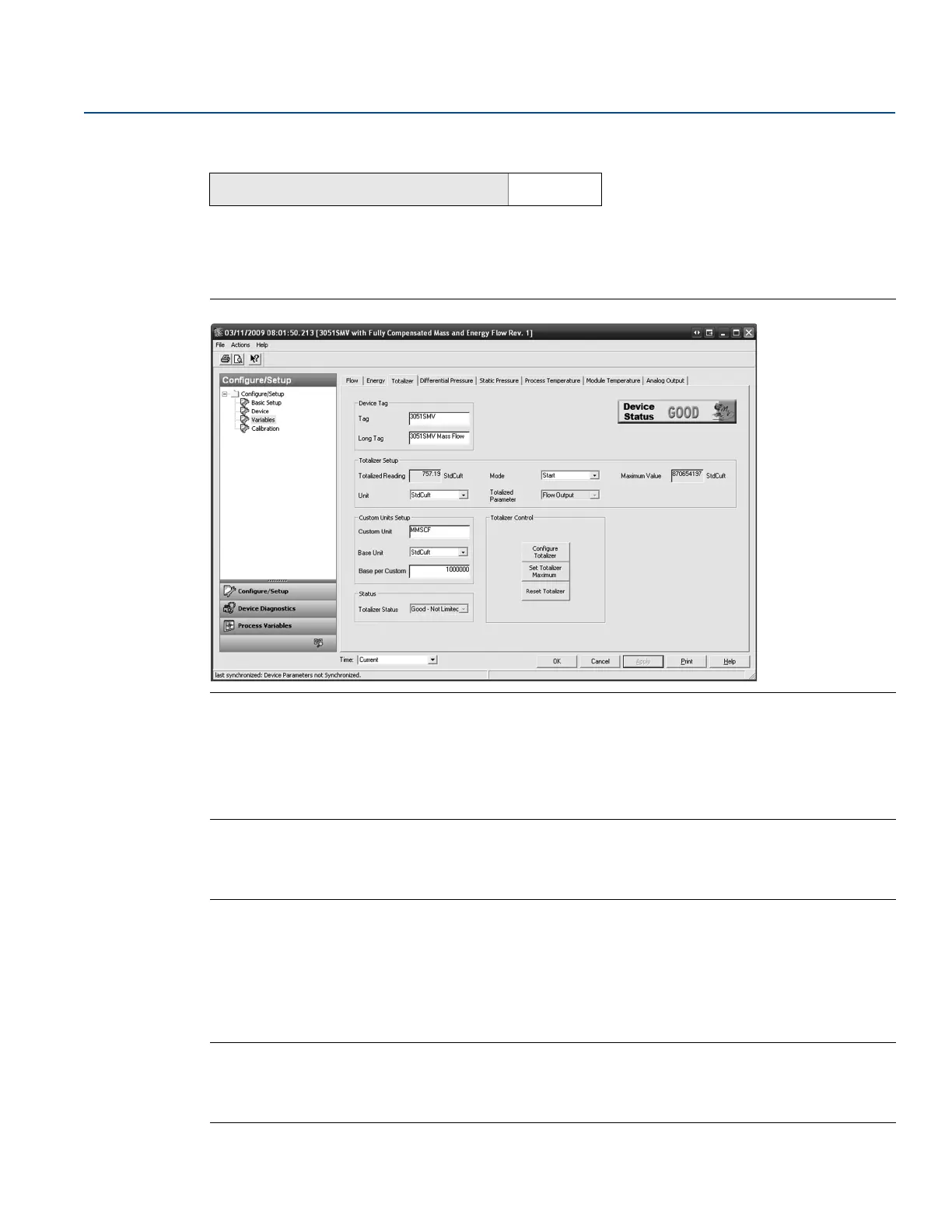
The Totalizer tab is used to configure the settings associated with the totalizer functionality within the
transmitter.
Figure 2-34. Variables - Totalizer Tab
1. To turn the totalizer functionality on or off, select Start or Stop from the Mode drop down menu
under the Totalizer Setup heading. The totalizer Units may also be edited under this heading.
2. Verify the Totalized Parameter and the Totalizer Maximum value. To edit the Totalized Parameter, select
the Configure Totalizer button under the Totalizer Control heading.
Note
When the totalizer reaches its maximum value, it automatically resets to zero and continues totalizing.
The default maximum is a value equivalent to 4.29 billion pounds, actual cubic feet, or BTU. To edit the
Totalizer Maximum value, select the Set Totalizer Maximum button under the Totalizer Control heading.
3. To reset the Totalized Reading to zero, select the Reset Totalizer button under the Totalizer Control
heading.
4. Under the Custom Units Setup heading, the user may configure a custom unit for the Totalized Reading.
Custom units allow the totalizer rate to be displayed in units of measure that are not standard in the
Rosemount 3051SMV.
Note
If the totalizer rate is configured as the primary variable and is being output via the 4–20 mA signal, verify
the 4–20 mA range (LRV and URV) after completing the custom unit configuration. For more
information on verifying the 4–20 mA range, see “Basic device configuration” on page 24.
Mass and energy flow Fast Keys
1, 4, 1, 3











 To Next Page