Getting to Know the Access Point Features
SmartCell SC8800-S Outdoor Access Point
Ruckus Wireless Outdoor AP 100.1.0 User Guide, 800-70863-001 Rev A 15
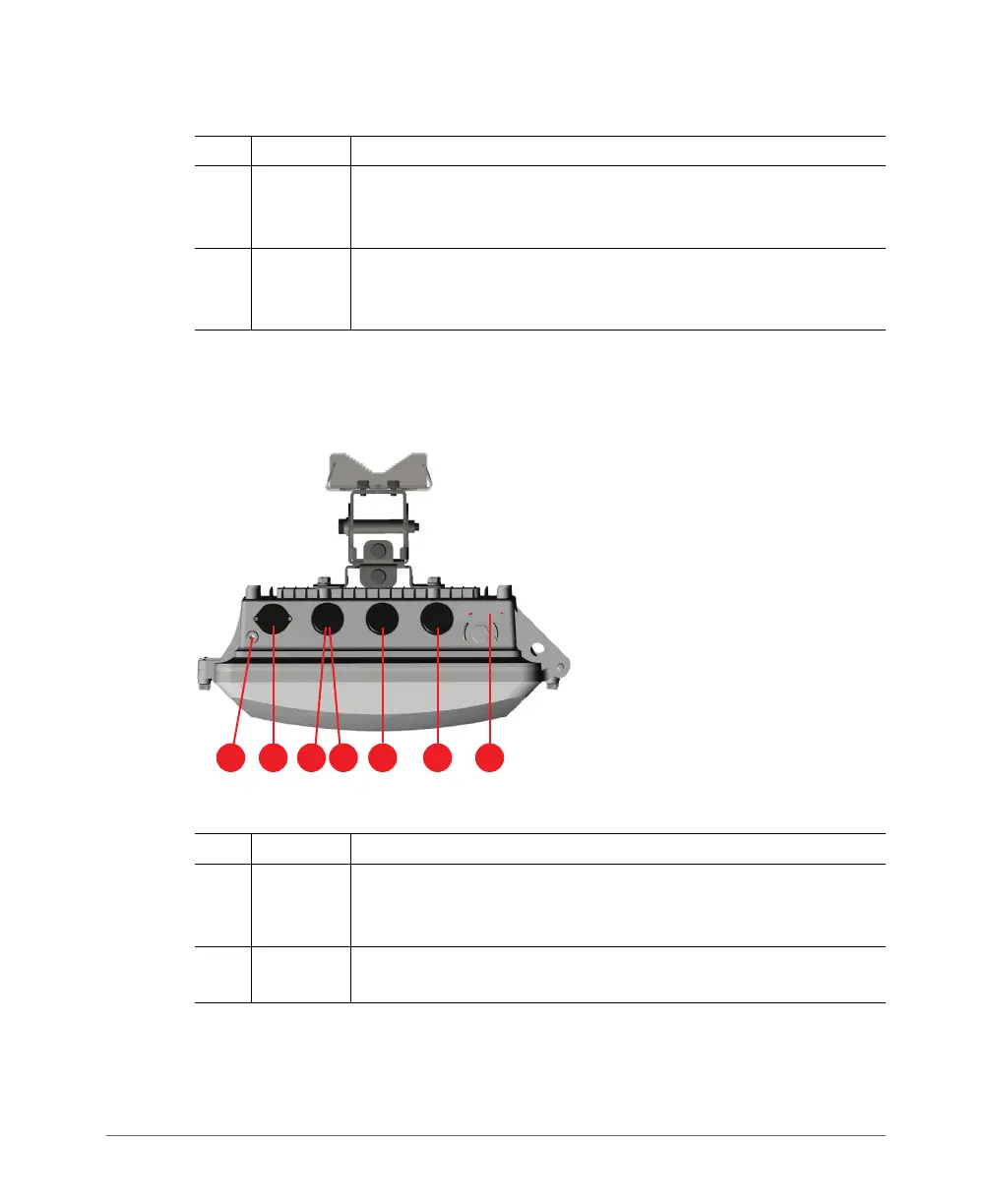
Figure 2 identifies the AP bottom-panel connectors and LED locations on the AP.
Tab l e 4 describes these connectors and LEDs.
Figure 2. SC8800-S bottom-panel connectors and LED locations
3
2.4 GHz
ANT 0
port
2.4GHz 50-ohm N-type connector. Can be used with an external
antenna for operator-defined coverage areas and point-to-point
deployments.
4
5GHz
ANT 2
port
5GHz 50-ohm N-type connector. Can be used with an external
antenna for operator-defined coverage areas and point-to-point
deployments.
Table 4. SC8800-S bottom-panel connectors
No. Label Description
1
Earth
ground
screw
Use this screw to attach an earth ground to the AP as required by
local regulations.
2
AC
power
connector
You can use AC to supply power to the AP, in addition to using PoE.
Table 3. SC8800-S top-panel connectors (Continued)
No. Label Description













 To Next Page