Getting to Know the Access Point Features
SmartCell SC8800-S Outdoor Access Point
Ruckus Wireless Outdoor AP 100.1.0 User Guide, 800-70863-001 Rev A 17
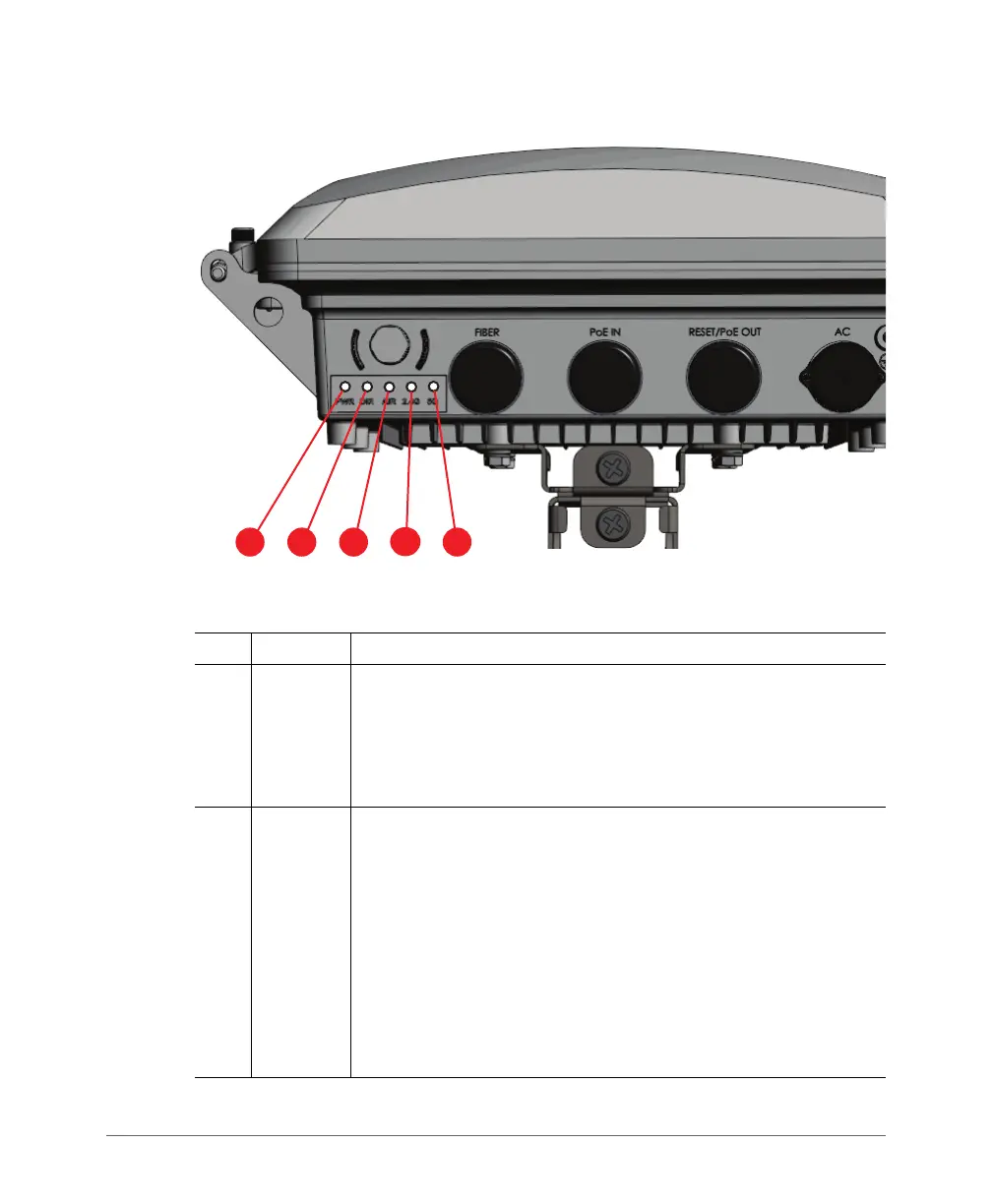
Figure 3. SC8800-S LEDs
Table 5. SC8800-S LED descriptions
No. Label Description
1
PWR
LED • Off: No power is available, or the AP is not connected to a power
source.
•
Solid Red: The AP is powering on.
•
Solid Green: The AP is connected to a power source and has
completed its power-on sequence.
2
DIR
LED • Off: The AP is NOT managed by ZoneDirector (standalone
mode).
•
Solid Green: The AP is managed by ZoneDirector and
connection to ZoneDirector has been established.
•
Fast Flashing Green (twice per second): The AP is managed
by ZoneDirector and is currently receiving configuration settings
(provisioning) or a update.
•
Slow Flashing Green (once every two seconds): The AP is
managed by ZoneDirector, but is currently unable to
communicate with ZoneDirector.













 To Next Page