Section 4 - Operations
48 SCHWARZE HYPERVAC HV-18 revised 11/18
Sweep/Standby Operation
The Schwarze Hypervac comes with pre-programed
settings for the sweeper. Follow these instructions to
operate the sweeper simply by selecting one of its pre-
sets:
1. Start chassis engine and run until the compressed air
system has filled.
Note: An on-screen low air warning will notify the operator
that the chassis air is too low to operate the sweeper.
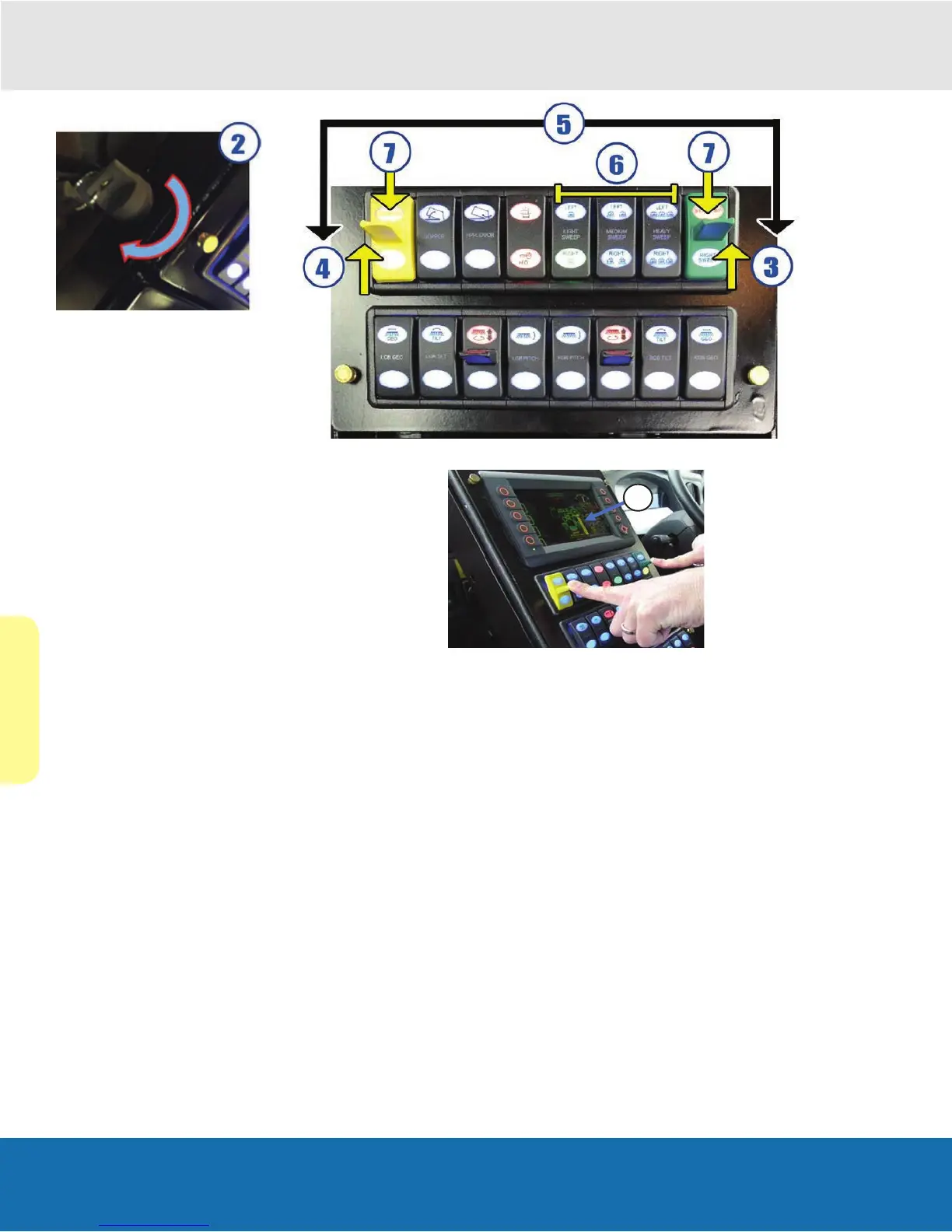
2. Turn the auxiliary sweeper engine key clockwise until
the engine starts.
Important: follow the procedures in the previous section
Starting The Auxiliary Engine to prevent damage to the
engine.
Choose 1 of the following 3 options:
3. To initiate right sweeping, move the right standby
switch up.
4. To initiate left sweeping, move the left standby switch
up.
5. To initiate dual sweeping, move both the left and right
standby switches up or down together until the sweep
icon changes to yellow.
Note: Hold both sweep switches down again until the icon
changes back to green to turn off dual sweeping.
1. Based on sweeping conditions, select one of the
six presets (see section 4.4 Standard Presents)
or operate each function manually by utilizing the
controls on the aux switch banks if equipped.
Note: The simple way to operate the unit is to choose a
preset and make your adjustments to that preset.
2. Press either Right Sweep, Left Sweep, or both for
Dual Sweep to get started.
To suspend sweeping, press the sweep switch up to the
standby position.
To resume sweeping, press the standby switch down to
the sweep position.
Note: Broom pitch and tilt will redeploy to standardized
broom angles that achieve the 10 and 2 o’clock broom
patterns. If extreme tilt or pitch was being utilized, these
will need to be manually re-set after resuming from
standby.
Press standby twice to release the preset so another
sweep setting can be selected.


 To Next Page