Section 4 - Operations
50 SCHWARZE HYPERVAC HV-18 revised 11/18
4.5 Manual Operation
Along with the presets, the sweeper may be operated
manually as well.
Note: Some of the manual functions may require the aux
switch panels.
These controls will work after the presets are used, but will
not change the presets. See your supervisor or Schwarze
dealer for instructions on how store new settings in the
presets.
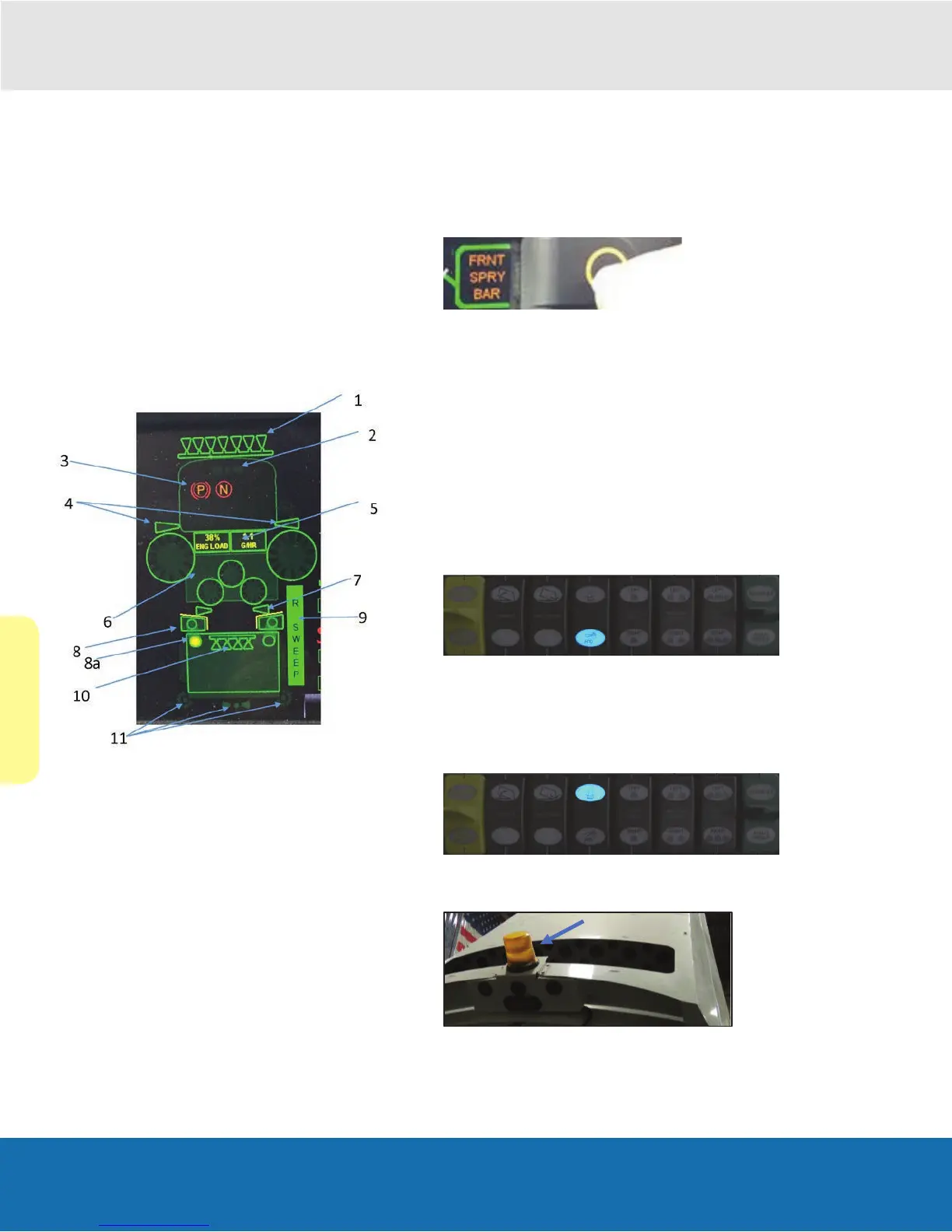
Operational Icon Screen
1. FRONT SPRAY BAR (fills in blue when enabled)
2. FRONT BEACON (optional) (amber when active)
3. CHASSIS STATUS (park, neutral and (i) sweeper
active)
4. GUTTER BROOM WATER (fills in blue when enabled)
5. ENGINE LOAD DATA
6. BROOM SPEED PERCENTAGE, DOWN PRESSURE,
AND GEO PERCENTAGE VALUES
7. INTAKE WATER (fills in blue when enabled)
8. GATE VALVE AND HEAD (yellow line indicates door is
down. no line = door is up and active)
9. GATE VALVE (yellow circle indicates shut)
10. SWEEP SIDE BLOCK (indicates unit sweep selection.
right, left or dual.)
11. HOPPER SPRAY BAR (fills in blue when enabled)
12. REAR DUMP LIGHTS AND REAR BEACON (amber
when active)
During Sweeper-operation, the operator may select/adjust
the following functions if conditions require.
Front Spray Bar Button
The Front Spray Bar can be turned on/off by selecting the
Front Spray Bar button on the main screen.
1. Push once to expose button.
2. Push once more to toggle.
Note: The Front Spray Bar icon will ll in blue when active.
Note: Using excess water to dampen leaves and other
light debris tends to make them stick to the sweeping
surface. Sometimes neither the blast force nor the vacuum
suction can remove every bit of lightweight debris in this
condition.
Low Pressure Water
•
Press this switch to turn the low-pressure pump (dust
control) on or off.
This switch will enable or disable all water during operation
Rear Beacon Light Switch
•
Press this switch to enable or disable the rear beacon
light.


 To Next Page