Section 4 - Operations
54 SCHWARZE HYPERVAC HV-18 revised 11/18
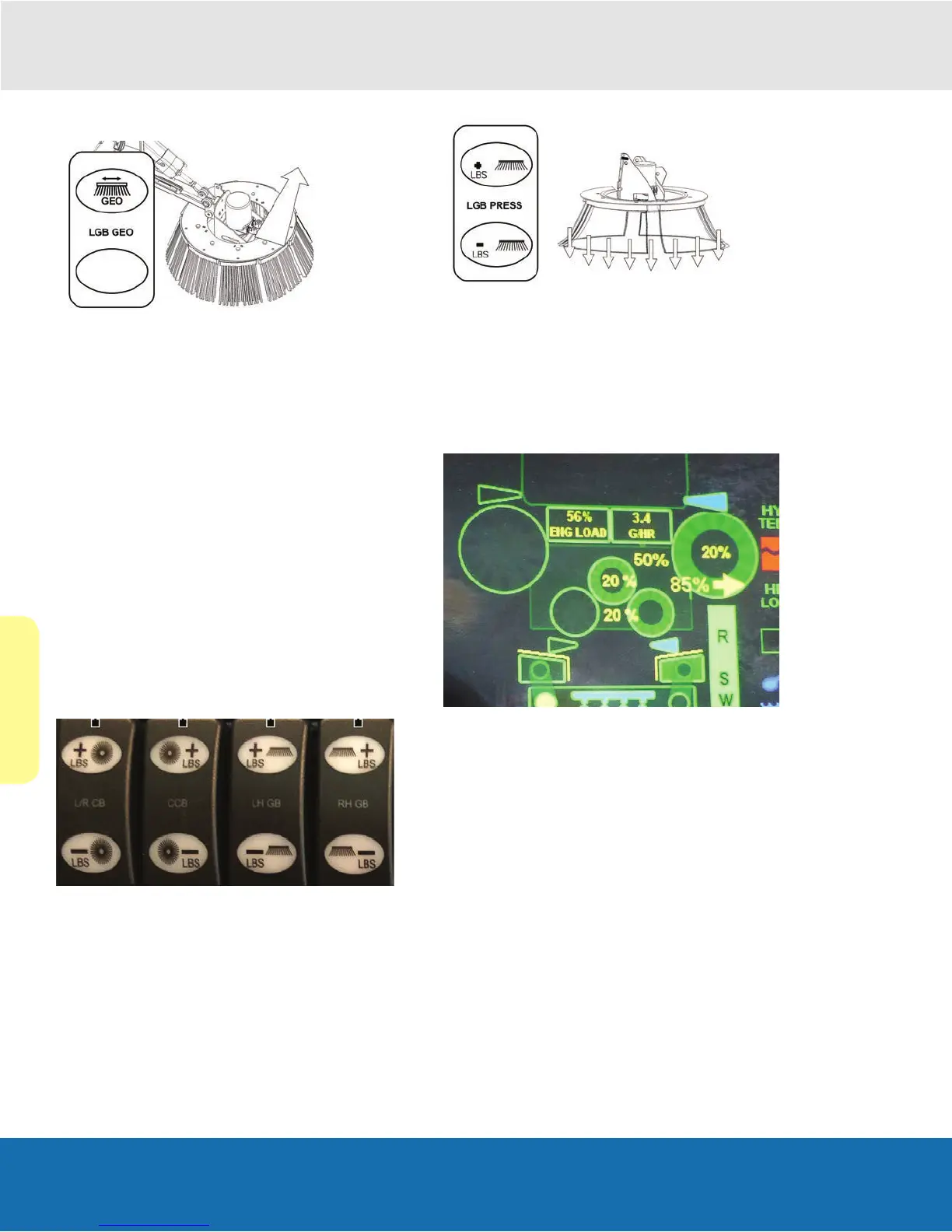
Gutter Broom Extension Override
The extension override (GEO) allows the operator to
override the side broom extension and retract it from its
normal operating position inward under the truck so it can
scrub the surface in front of the pickup nozzle.
Note: Use of this function requires the side broom to be on
the surface and spinning.
Activating GEO and retracting the side broom
1. Locate the switch on the cab console control panel.
2. Press the toggle switch to the “up” position to extend.
3. Press the switch to the down position to retract.
Returning the side broom to its extended sweeping
position
1. Press the toggle switch to the “down” position.
Note: If broom does not extend properly, adjusting the tilt
slightly can remedy the issue.
Broom to Pavement Contact switches (Down Pressure)
1. Press up on these switches to increase broom down
pressure.
2. Press down on these switches to decrease broom
down pressure.
Note: Down pressure will be displayed on screen as a
percentage (%). Down pressure is set at 50% in the image
below.
Note: Use of this function requires the auxiliary engine
to be turned on, the gutter broom operation switch to be
toggled in the “on” position and the gutter broom to be on
the surface


 To Next Page