Section 4 - Operations
56 SCHWARZE HYPERVAC HV-18 revised 11/18
Hopper Door
Warning: Operator must ensure no personnel or objects
are near the door before operating.
Opening the Door
1. Apply parking brake.
2. Push the switch up until the door has been opened to
the desired level.
Note: An indicator icon will display on screen when the
door is open.
Important: After Door open icon disappears to ensure that
the door locking ngers are properly engaged, a safety
prop should be placed on the door to ensure door will not
fall in the event of a malfunction.
Closing the Door
Important: Before closing, remove any safety props used
to secure door.
Push the door switch down until the door has been closed
to the desired level.
Note: When closing door, the switch should be pressed for
several seconds.
4.7 Maintenance Key Code Screen
Accessing
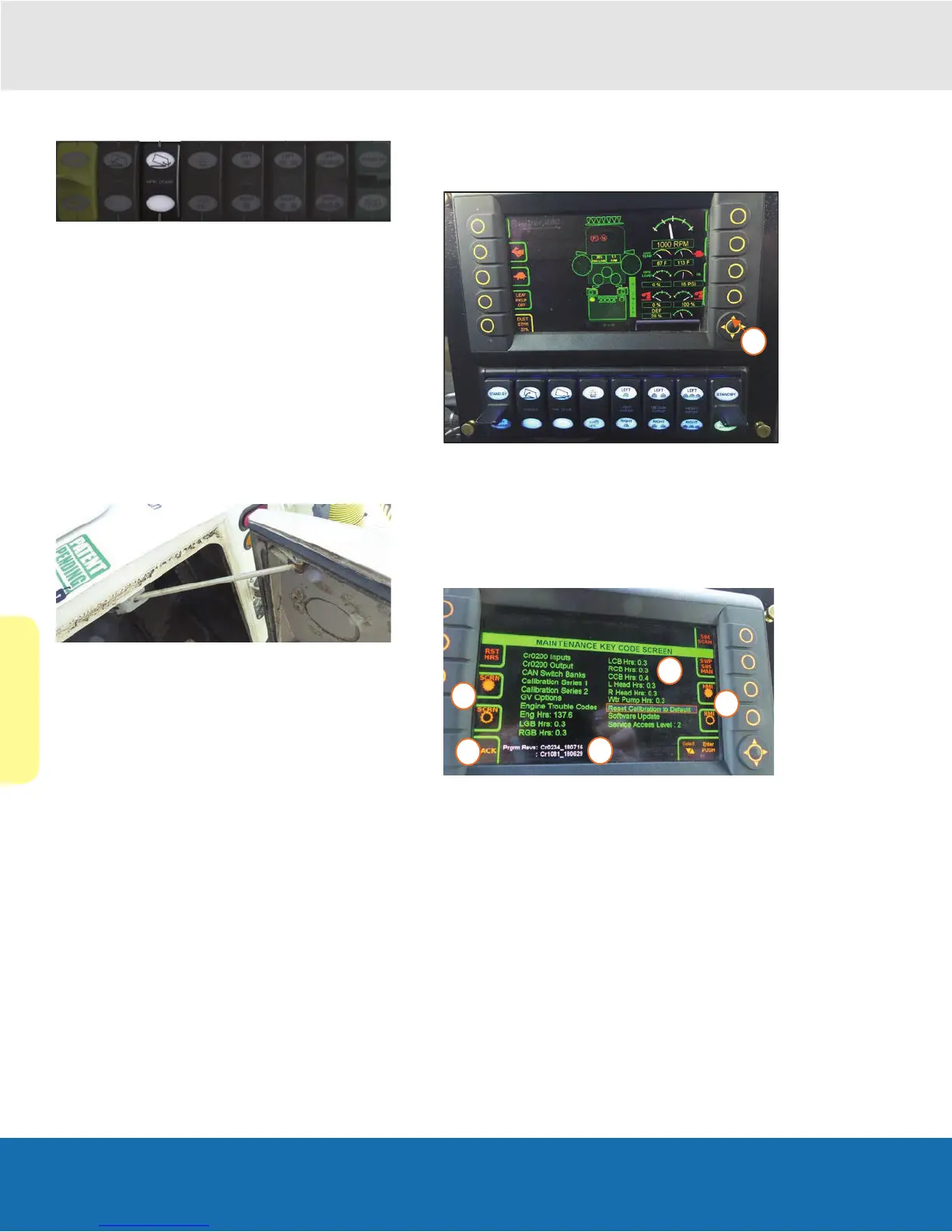
1. From the main screen, access the maintenance
screens by pressing the center button on the arrow
array key.
Maintenance Key Code Screen
Press the corresponding SCRN button to adjust the screen
brightness.
1. Press the corresponding HMI butoon adjusts the
switches brightness.
2. The lower left button is used to go back to the main
screen.
3. Software version is listed at the bottom of the screen.
4. Service hours information is available on this screen.
5. Engine trouble codes and cat cleaning is available on
this screen..
Note: the remaining information on this screen is for
dealer service only. Please contact your dealer for more
information.


 To Next Page