Audio and Media Mode
●
Press the Infotainment button and
then press the Images function button.
●
Press the SOURCE function button to select
the source where the pictures in question are
located.
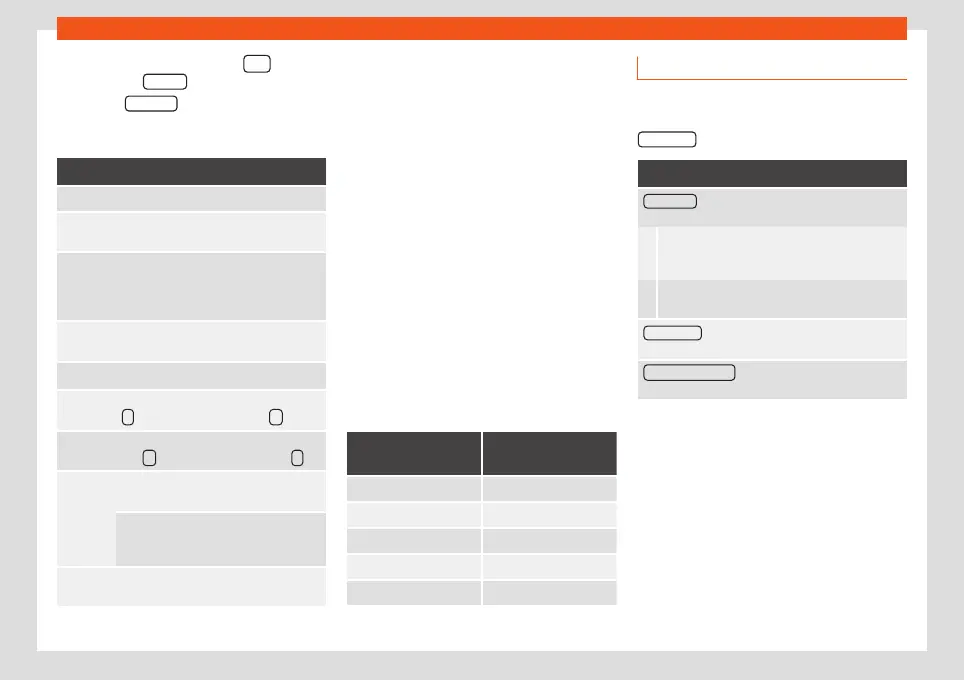
Function button: function
SOURCE
Viewing and selecting the source.
SELEC-
TION
Opens a list of image files.
The image viewed was obtained via GPS
localisation and upon pressing this func-
tion button, the navigator menu opens to
start a route to this destination.
/
Rotate the view of the image to the left or
the right.
Reset the view of the image.
To stop the playback of a slideshow. The
function button changes to
.
To continue the playback of a slideshow.
The
function button changes to
.
/
To change to the PREVIOUS or NEXT im-
age.
The same function can be performed by
sliding your finger horizontally across
the screen.
SET-
TINGS
Open the Image settings menu.
Enlarging or reducing the view
To enlarge or reduce the view of the image
displayed:
●
Turn the adjustment knob.
●
OR: Stretch or reduce the image on the
screen using 2 fingers.
Rotating the view/image
To rotate an image, in addition to the buttons
provided for this (
/
), you can also press
on the screen (e.g. with your thumb) and,
while continuing to press with your thumb,
slide another finger (e.g. your index finger)
around it like a compass either clockwise (to
rotate the image to the right) or anti-clock-
wise (to turn the image to the left). This will ro-
tate the image 90° with respect to its current
position.
Requirements for viewing images
Image files
Maximum resolu-
tion
BMP 4MP
JPEG 4MP (Progressive Mode)
JPG 64MP
GIF 4MP
PNG 4MP
Image settings
Open the
Image settings
menu
●
In the Images main menu, press the
SETTINGS function button.
Function button: function
Image view : To adjust the viewing format of the im-
age.
Automatic: The images are shown in scale in
relation to the size of the screen (the image may
not be displayed in its entirety).
Full: The full images are displayed on the
screen.
Display time : To adjust the display time of the images
during a slideshow.
Repeat slideshow : The active slideshow will be re-
peated indefinitely.
57



 To Next Page