Audio and Media Mode
The reading time may vary considerably de-
pending on the condition of the data medium
(copying and deleting actions), folder struc-
ture and file type.
Playlists only determine a certain playing or-
der. There are no files stored in a playlist. The
unit will not play a playlist if the files are not
on the data medium at the locations referred
to by the playlist (relative file paths).
A cover can only be displayed when the
name starts with “Cover”, “Folder” or “Al-
bum”.
Note
●
Do not use memory card adapters.
●
SEAT assumes no liability for any deterio-
ration or loss of files on data storage devi-
ces.
Playing order of files and folders
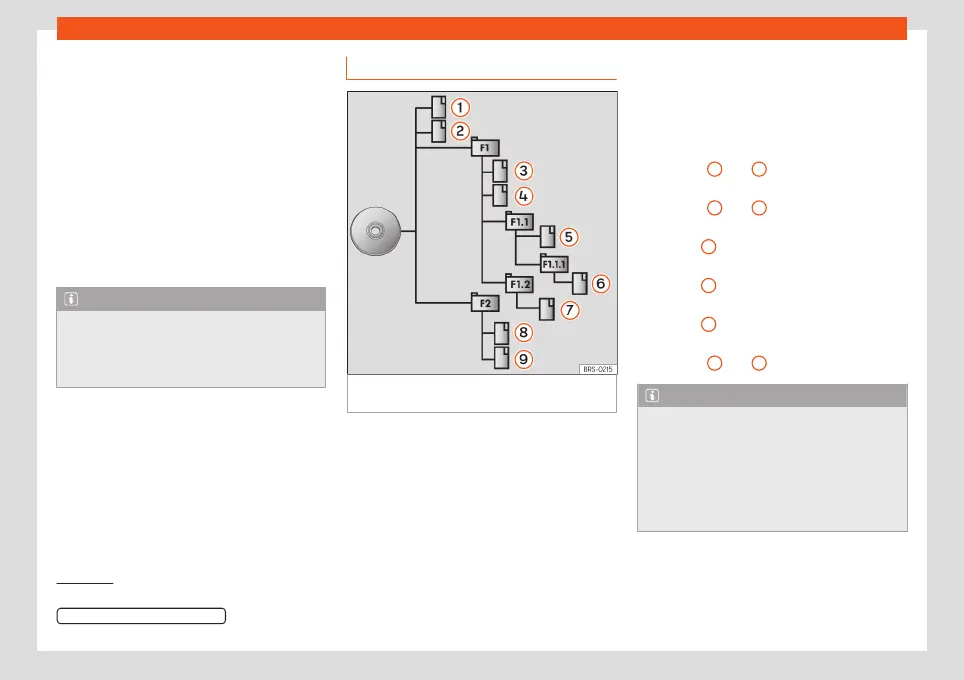
Fig. 30
Possible structure on an audio data
CD
The audio files
stored on data storage de-
vices are often organised by means of folders
and playlists
to determine a certain
playing order.
Tracks, folders and playlists on a data stor-
age device are sorted by name in alphanu-
meric order.
The image shows a standard CD with audio
data which contains tracks , folders and
subfolders
›››
Fig. 30.
In this case, the tracks are played in this man-
ner
1)
:
Tracks
1
and
2
in the CD's root direc-
tory
Tracks
3
and
4
in the first folder F1 in
the CD's root directory
Track
5
in the first subfolder F1.1 of the
folder F1
Track
6
in the first subfolder F1.1.1 of the
subfolder F1.1
Track
7
in the second subfolder F1.2 of
the folder F1
Tracks
8
and
9
in the second folder F2
Note
●
The play order can be modified by se-
lecting different playback modes
›››
page 43.
●
Playlists are not played automatically,
instead they have to be specifically selec-
ted via the track selection menu
›››
page 46.
1.
2.
3.
4.
5.
6.
1)
In the
Media Settings
menu, the
Mix/Repeat including subfolders function must be
activated
›››
page 56.
42



 To Next Page