Audio and Media Mode
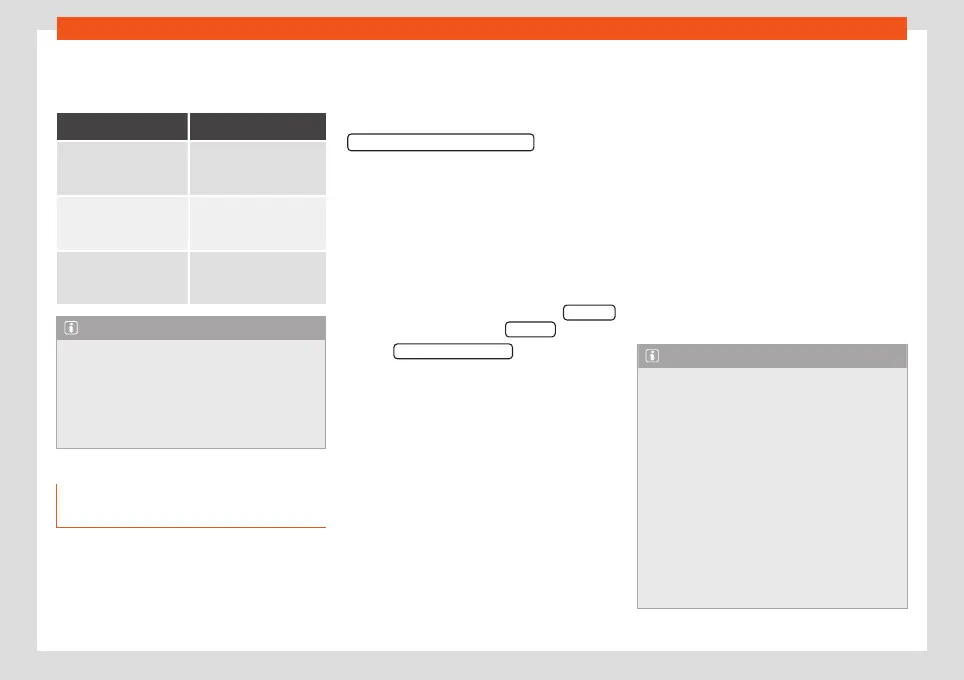
Information on operating an external au-
dio source connected to the AUX-IN multi-
media socket
Operation Effect
Selection of another au-
dio source from the Info-
tainment system.
The external audio
source continues to run in
the background.
Stopping playback on
the external audio
source.
The infotainment system
remains in the
AUX
menu.
Disconnecting the plug
from the AUX-IN multi-
media socket.
The infotainment system
remains in the
AUX
menu.
Note
●
Please read and observe the manufac-
turer's instruction manual for the external
audio source.
●
Interference noise may be heard if the ex-
ternal audio source is powered from the 12-
volt power socket of the vehicle.
Connecting an external audio
source via Bluetooth
®
Bluetooth
®
Audio mode allows you to listen to
audio files being played on a Bluetooth
®
au-
dio source (e.g., a mobile telephone) connec-
ted via Bluetooth
®
(audio playback by Blue-
tooth
®
) over the vehicle speakers.
Conditions
●
The Bluetooth
®
audio source must support
the A2DP Bluetooth
®
profile.
●
In the
Bluetooth® settings
menu, the
Bluetooth® Audio (A2DP/AVRCP) function
must be activated
›››
page 89.
Starting Bluetooth
®
audio transfer
●
Activate Bluetooth
®
visibility on the external
Bluetooth
®
audio source (e.g., mobile tele-
phone).
●
Lower the base volume on the Infotainment
system.
●
In the MEDIA main menu, press the SOURCE
function button and select BT audio .
●
Press
Search for new device
in order to con-
nect an external Bluetooth
®
audio source for
the first time
›››
page 80.
●
OR: Select a Bluetooth
®
external audio
source from the list.
●
Please refer to the instructions on the
screen of the Infotainment system and on the
Bluetooth
®
audio source regarding the rest of
the procedure.
You may still need to manually start playback
on the Bluetooth
®
source.
When playback on the Bluetooth
®
audio
source is stopped, the Infotainment system
remains in Bluetooth
®
Audio mode.
Controlling playback
The extent to which the Bluetooth
®
audio
source can be controlled via the Infotainment
system depends on the connected Blue-
tooth
®
audio source.
The available functions will depend on the
Bluetooth
®
Audio profile that the connected
external player supports.
With media players that support the AVRCP
Bluetooth
®
profile, playback on the Blue-
tooth
®
audio source can be automatically
started or stopped when the unit is switched
to Bluetooth
®
Audio mode or to a different au-
dio source. In addition, it is possible to view or
change the track via the Infotainment system.
Note
●
Due to the large number of possible Blue-
tooth
®
audio sources, it is not possible to
guarantee fault-free operation of all de-
scribed functions.
●
Always switch off the warning and serv-
ice tones on a connected Bluetooth
®
audio
source, e.g. key tones on a mobile tele-
phone, to prevent possible interference
noise and malfunctions.
●
To play music, do not link the external
media player simultaneously to Bluetooth
®
and the USB interface of the infotainment
system, as this can cause limitations during
playback.
»
51



 To Next Page