Setup
Setup
Menu and system settings
Main menu System settings
The selection of possible settings will depend
on the country, the unit in question and the
vehicle equipment.
●
Press the Infotainment button and
then press the SETTINGS function button.
●
To adjust the settings for a certain function,
press the appropriate function button in the
main menu. Changes are automatically stor-
ed when a menu is closed.
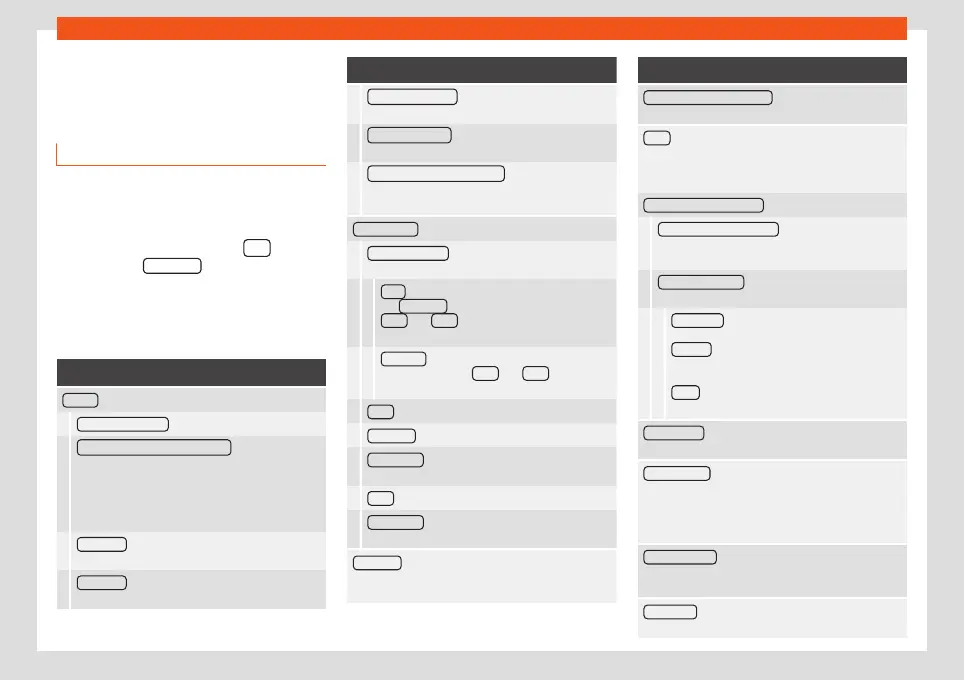
Function button: function
Screen : To perform screen setup.
Select display mode : Grid or Carousel.
Switch off screen (in 10 seconds) : If this function is
active and the Infotainment system is not in use,
the screen will switch off after approx. 10 seconds.
Pressing the screen or pressing one of the Info-
tainment system buttons will switch the screen
back on.
Brightness : To select the brightness level of the
screen.
Day/Night : To select the display type (Day,
Night
or
Automatic
).
Function button: function
Touchscreen tone : Confirmation tone for pressing
a function button is activated.
Proximity sensor : The proximity sensors are acti-
vated. Also see
›››
page 13, Proximity sensors.
Show clock in standby mode : In standby mode,
the current time is shown on the Infotainment sys-
tem display.
Date and time : To alter the time and date.
Clock time source : To select the time source (GPS
or manual).
GPS : The date and time can be selected using
the Time zone function button. In this case, the
Date and Time function buttons for manually
entering the data will not be active.
Manually : The date and time can be manually
adjusted using the Date and Time function
buttons.
Time : To manually alter the time.
Time zone : To change to the desired time zone.
Time format : To select the time display format (12-
or 24-hour clock).
Date : To adjust the current time.
Date format : To select the display format for the
date (
DD.MM.YYYY
,
YY-MM-DD
or
MM-DD-YY
).
Language : To select the desired language for the
texts and announcements in the voice control sys-
tem.
Function button: function
Additional keypad languages : To select the additional
keypad languages.
Units : To set the measurement units for the vehicle
displays.
Distance
,
vehicle speed
,
temperature
,
volume
,
consumption
and
pressure
.
Mobile device data transfer
Data transfer for SEAT apps : Allows the exchange of
information between the vehicle and SEAT appli-
cations. These are not personal data.
Operation via apps : Changes the level of interac-
tion with the applications.
Deactivate : Limits specific functions that re-
quire a higher level of security.
Confirm : Allows 100% functionality of the App
but with certain actions relating to the Infotain-
ment system requiring confirmation.
Allow : Allows the execution of all the available
functions from the App.
Voice control : To perform the voice control setup
›››
page 15.
Remove safely : To eject the data storage device (SD
card 1/SD card 2/USB) from the system. After cor-
rectly ejecting the data storage device from the sys-
tem, the function button becomes inactive (grey col-
our).
Factory settings : When resetting factory settings, all
entries and changes made are deleted, depend-
ing on the selected setup.
Bluetooth® : To perform Bluetooth
®
settings
›››
page 89.
92



 To Next Page