Car menu
Sport*
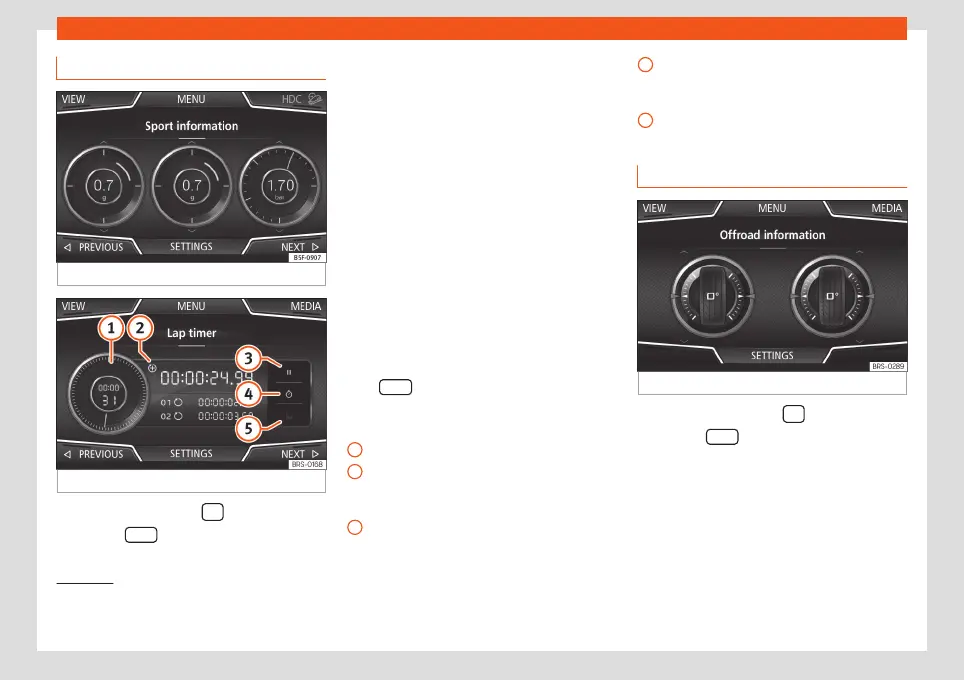
Fig. 59
SPORT menu
Fig. 60
Lap Timer SPORT menu
●
Press the infotainment
button.
●
Press the
VIEW
function button and then
select SPORT.
If the corresponding equipment is available,
the information that appears in the Sport op-
tion is the following
›››
Fig. 59:
Instantaneous power expressed in kW
G forces
Turbo pressure, expressed in bar (“bar”),
kilopascals (“kPa”) or in pounds per
square inch (“psi”). Press the Setup but-
ton to change the units of pressure.
›››
page 92
Coolant temperature
Oil temperature
Only 3 of these items of information can be
displayed at the same time, but the user
chooses which to display, and in what order,
by moving the finger vertically over the dials.
If the NEXT
button is pressed, the Lap timer
1)
menu is displayed; this is described below
›››
Fig. 60:
Analogue lap timer.
A new lap timer recording is started by
pressing on the surface of the digital lap
timer
+
.
Stop lap timer/Partial time.
1.
2.
3.
4.
5.
1
2
3
The analogue lap timer stops for 5 sec-
onds. After 5 seconds, the analogue lap
timer goes back to showing the real time.
Statistics/delete last lap timer recording.
Offroad*
Fig. 61
CAR Menu Offroad.
●
Press the infotainment
button.
●
Press the VIEW function button and then
select
OFFROAD
.
If the corresponding equipment is available,
the information that appears is the following:
Compass.
Altimeter: altitude above sea level.
»
4
5
1.
2.
1)
This lap timer is independent of the one that
appears on the instrument panel
›››
Booklet In-
struction Manual
75



 To Next Page