Telephone management system
●
From the Telephone main menu, press the
Calls function button.
●
Press the FILTER function button.
●
Select the desired call list: All , Missed ,
Dialled or Received .
If a phone number has been stored in the
phonebook, the call list will display the name
stored instead of the number.
If the name stored in the phonebook has an
assigned photo, it can be displayed in the call
list next to the name
›››
page 89.
Possible displays in the Calls menu
Display: Meaning
Missed calls : Displays the numbers of missed
and unanswered calls.
Dialled numbers : Indicates the numbers dial-
led on the mobile telephone and on the Info-
tainment system telephone management
system.
Received calls : Indicates the numbers of the
calls received on the mobile telephone and
on the Infotainment system telephone man-
agement system.
Note
The availability of the call lists will depend
on the mobile phone used.
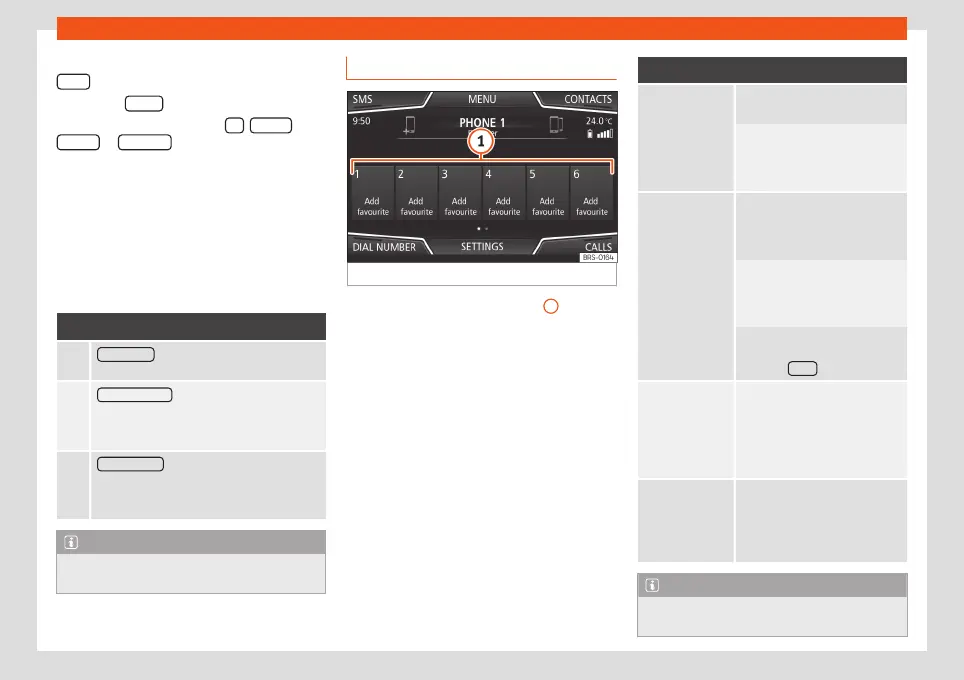
Speed dial buttons
Fig. 77
Phone main menu.
The speed dial buttons
›››
Fig. 77
1
may
each be used to store a telephone number
from the phonebook.
If the name stored in the phonebook has an
assigned photo, it can be displayed on the
speed dial button
›››
table on page 88.
All the speed dial buttons must be manually
edited and will be assigned to a user profile.
Up to 12 contacts can be added to the speed
dial buttons (15 in systems with the 6.5"
screen).
Possible functions
Assigning
speed dial but-
tons
Press a free speed dial button
from the Telephone main menu.
Select the desired contact from
the list. If the selected contact
has several telephone numbers,
select the desired number.
Editing as-
signed speed
dial buttons
Press and hold a used speed di-
al button in the Telephone main
menu until the Contacts menu
opens.
Select the desired contact from
the list. If the selected contact
has several telephone numbers,
select the desired number.
To close the Contacts menu
without applying the changes,
press the BACK function button.
Deleting as-
signed speed
dial buttons
The telephone numbers stored in
the speed dial buttons can be
deleted in the menu
User pro-
file settings
>
Manage
favourites
›››
table on
page 89.
Dialling with
speed dial but-
tons
Briefly press an assigned speed
dial button from the Telephone
main menu to call the telephone
number that has been stored on
it.
Note
The contacts stored on the speed dial but-
tons DO NOT update automatically. If a
88



 To Next Page