Audio and Media Mode
Change the media source
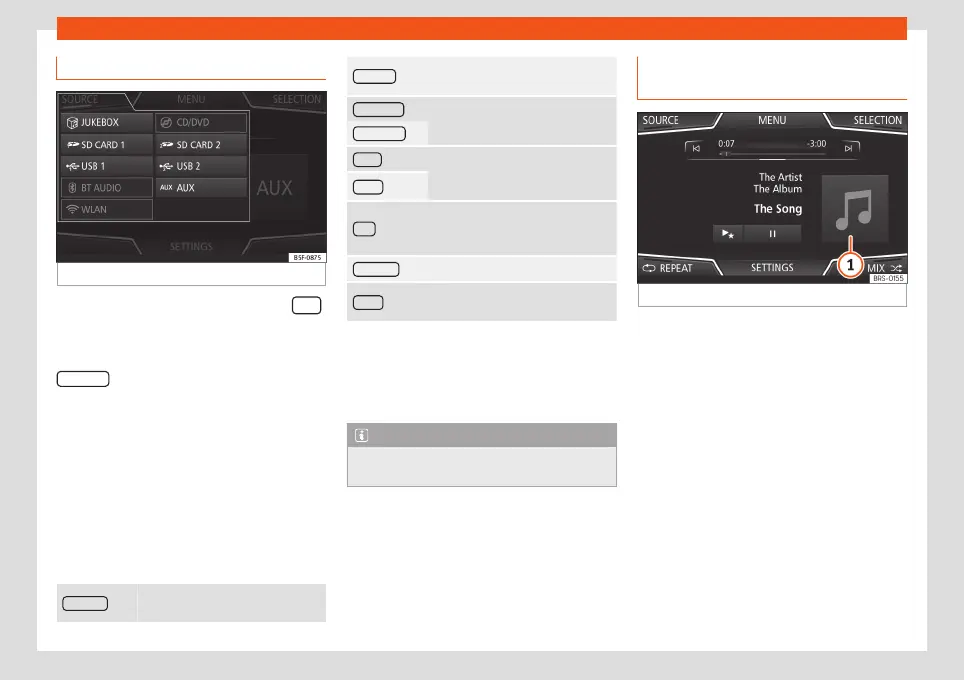
Fig. 32
MEDIA mode: change media source.
●
From the MEDIA main menu, press the
Infotainment button repeatedly to cycle
through the available media sources.
●
OR: From the MEDIA main menu, press the
SOURCE function button
›››
Fig. 32 and se-
lect the desired media source.
In the pop-up window, the Media sources not
selected are shown as deactivated (in grey).
When a Media source that has already been
played is selected again, playback is re-
sumed from the point at which it was stop-
ped.
Optionally selectable media playback
sources
JUKEBOX
a)
Internal hard drive (SSD)
›››
page 52.
CD/DVD
b)
Internal CD/DVD drive
›››
page 48.
SD CARD 1
SD memory card
›››
page 49.
SD CARD 2 *
USB 1 External data storage device con-
nected to the USB port
›››
page 49.
USB 2 *
AUX
External audio source connected to
the AUX-IN multimedia socket
›››
page 50.
BT AUDIO Bluetooth
®
audio
›››
page 51.
WLAN
c)
External audio source connected by
WLAN
›››
page 53
a)
Only available for the model: “Navi System Plus”.
b)
The DVD drive is only available for the model: “Navi
System Plus”.
c)
Only available for the model: “Navi System” (with
WLAN connection) and “Navi System Plus”.
Note
The Media source can be changed in the
Track list view
›››
page 46.
Changing track in the MEDIA main
menu
Fig. 33
MEDIA main menu.
It is possible to browse through the tracks of
the Media source that is currently playing us-
ing the arrow buttons.
It is not possible to exit a playlist or start the
playback of a playlist using the arrow but-
tons. Both actions must be performed man-
ually from the track selection menu
›››
page 46.
»
45



 To Next Page