Telephone management system
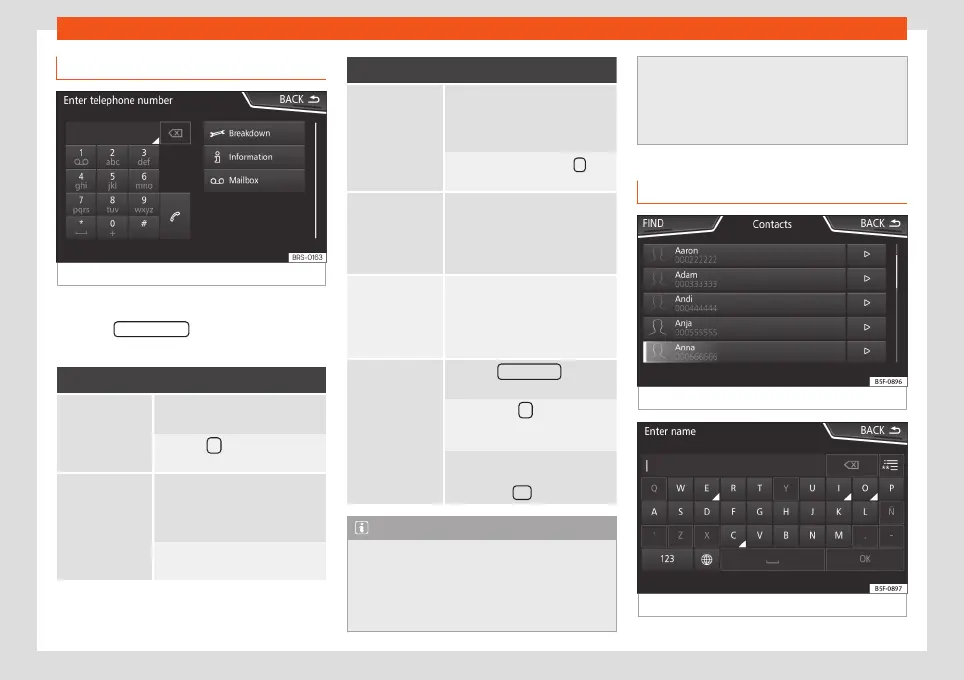
Enter telephone number menu
Fig. 72
Enter telephone number menu.
Open the
Enter telephone number menu
Press the DIAL NUMBER
function button from
the PHONE main menu.
Possible functions
Enter telephone
number
Entering a phone number with
the keypad.
Press the function button to
make a call.
Select a con-
tact from the
list
Enter the first letters of the con-
tact to find using the keypad.
The available entries appear in
the phonebook.
Select the desired contact from
the phonebook to make the call.
Possible functions
Enter the coun-
try code
To enter a country code, instead
of the first two digits (interna-
tional access code e.g. “
00
”)
you can enter the character “
+
”.
Press the function button 0 for
approx. 2 seconds to add the
+
.
Breakdown
service call
Press the function button to ob-
tain help in the event of break-
down. For this the network of
SEAT dealerships is available to
you with their Mobile Service.
Information call
Press the function button to ob-
tain information on the SEAT
brand and the additional serv-
ices contracted related to traffic
and travel.
Call mailbox
Press the Voice mail function
button to make the call.
OR: Press the function button
for about 2 seconds to make a
call.
If the number for the mailbox has
not yet been stored, enter it and
confirm with OK .
Note
●
Breakdown service and information calls
can incur an additional cost on your tele-
phone bill.
●
The Roadside Assistance and Information
services might not work properly, for exam-
ple, if the vehicle and the operator of the
connected mobile telephone are in differ-
ent countries. If you are not able to use
these services contact an authorised SEAT
workshop.
Phonebook Menu (contacts)
Fig. 73
Contacts Menu.
Fig. 74
Search window.
»
85



 To Next Page