Telephone management system
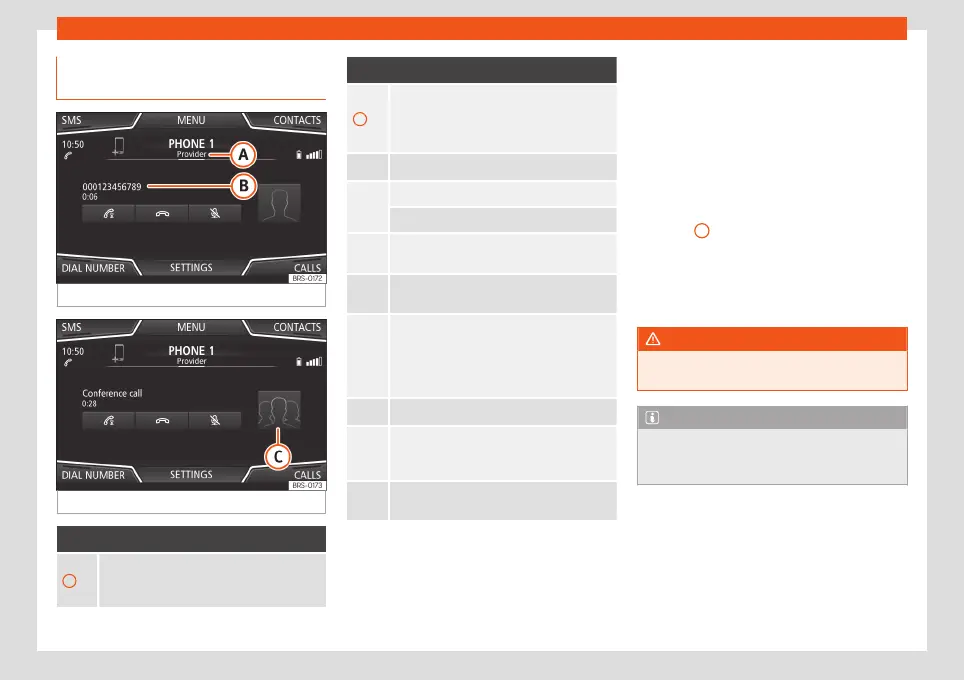
Display and symbols of the tele-
phone management system
Fig. 70
Active call.
Fig. 71
Simultaneous calls.
Display: Meaning
›››
Fig. 70
A
Name of the mobile network operator (pro-
vider) to which the mobile telephone is con-
nected.
Display: Meaning
›››
Fig. 70
B
View of stored telephone number or name. If
the name stored in the phonebook has an
assigned photo, it can be displayed
›››
page 89.
Press to accept a call.
Press to end a call.
OR: Press to reject an incoming call.
Press to mute or to reactivate the ring tone
during an incoming call.
Press to mute the microphone during an ac-
tive call and to reactivate it.
This button keeps the call active. While the
call is on hold the listener will not hear the
conversation. To reactivate it, press the call
accept button
. To reject it, press the reject
button
.
Press to add a participant to the active call.
Charge status of a mobile telephone con-
nected via “Hands-free profile” (HFP) Blue-
tooth
®
.
Strength of coverage signal received by the
mobile telephone.
Multiple calls
The telephone management system allows
the user to interact with a maximum of three
calls on the screen .
Only one of the calls may be active.
Simultaneous calls
The user can merge various calls into a con-
ference call by pressing the
button. To do
this there must be at least two calls. Once the
conference call has begun, the user can add
up to a maximum of 5 participants.
Once the conference call has been set up,
the user can consult the list of participants by
pressing the Simultaneous calls image
›››
Fig. 71
C
.
Depending on the mobile device, you can
hang up the call with one of the conference
call participants or remove them from it while
keeping them on a separate call.
WARNING
Remember that the driver must not operate
the mobile telephone while driving.
Note
Multiple call and simultaneous call func-
tions are subject to the services associated
with the user's SIM card.
84



 To Next Page