Navigation
Function button: function
Note: National border crossed : Displays the speed
limits of the country in question when crossing the
border.
Demo mode : When Demo mode is activated
and route guidance is started, virtual guidance to
the entered destination can be initiated
›››
page 69.
Define demo mode starting point : if demo mode is
activated, a fictitious starting point for virtual
route guidance can be defined when the vehi-
cle is stationary.
Waypoint mode
b)
: To start Offroad navigation.
a)
This function depends on the country.
b)
Only available for the model: “Navi System Plus”.
Navigation in Offroad mode*
Introduction
3
Only available for the model: Navi System Plus
Offroad* navigation is a function for offroad
driving that provides directions in “non-digi-
tised areas” at low speeds.
Non-digitised areas are areas about which
the system does not have information for the
streets or terrain. It does not detect streets,
buildings or natural limits such as mountains
or rivers, although they may be shown on the
map.
Offroad* navigation is not suitable for driving
on conventional roads as it does not detect
one-way streets, motorway entries or similar.
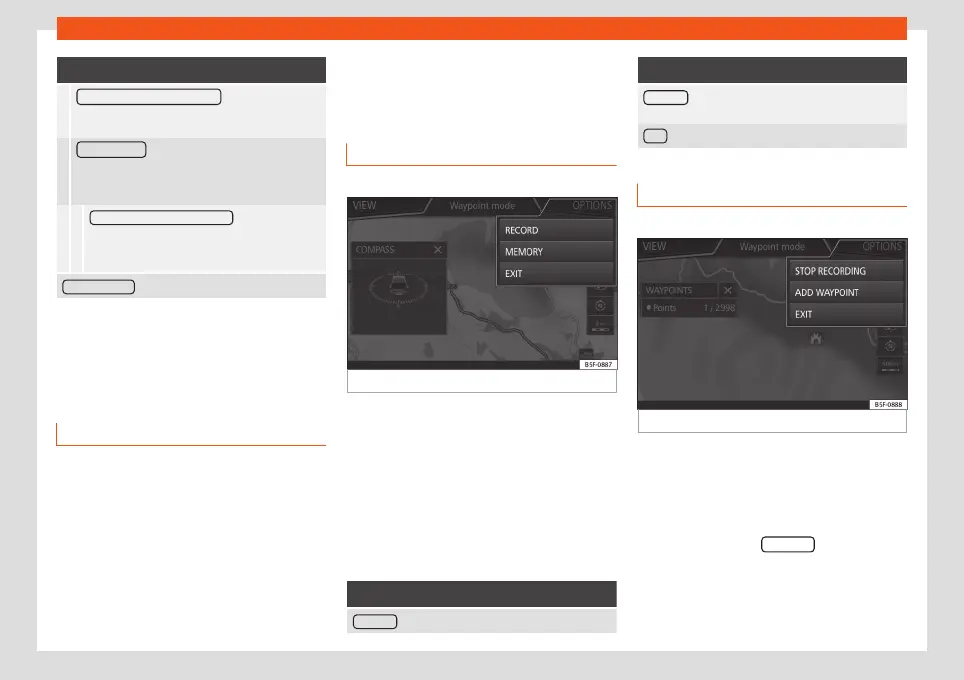
Offroad Navigation Menu
3 Only available for the model: Navi System Plus
Fig. 54
Offroad Navigation Menu start
Press the SETTINGS function button in the
main Navigation menu.
●
In the menu, press the Waypoint mode
function button.
●
The Offroad Navigation menu opens
›››
Fig. 54.
Function buttons in the Offroad Navigation
menu
Function button: function
RECORD : Initiates the plotting of an Offroad tour.
Function button: function
MEMORY : Opens a list allowing the selection of a
stored Offroad tour.
EXIT : Ends Offroad navigation.
Recording an Offroad tour
3 Only available for the model: Navi System Plus
Fig. 55
Recording an Offroad tour
An Offroad tour is formed by a series of stor-
ed waypoints.
Starting recording
●
In the Offroad Navigation menu, in the pop-
up window press the RECORD pop-up button.
●
In the pop-up window, the user is able to
plot the tour with a given destination or start
plotting the route without giving a final desti-
nation.
»
71



 To Next Page