4.1. HOW TO CONFIGURE THE ASTERX-U FOR RTK
Step 3: Configure the NTRIP connection
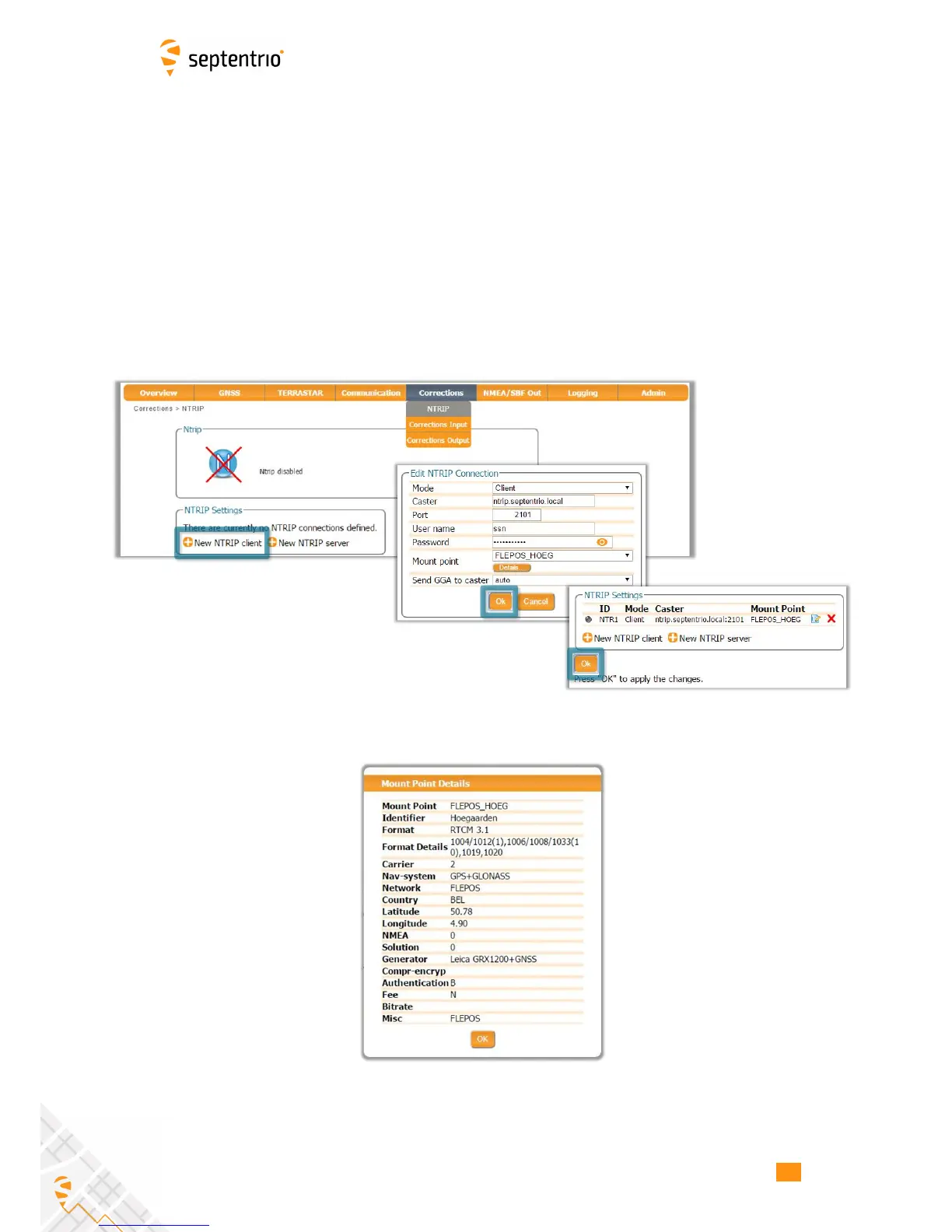
Using a cellular connection you can get RTK correction data from an NTRIP service. Figure 4-7
shows the settings required to retrieve correction data from the Septentrio NTRIP Caster.
Select ‘Client’ from the drop-down Mode menu. The Caster, Port, User Name and Password
should be provided by the NTRIP service. NTRIP Casters typically provide multiple correction
data streams known as Mount Points. When a connection has been made to the Caster, the
‘Mount Point’ drop-down list will become active. In this example, the FLEPOS_HOEG stream
has been selected the details of which are shown in Figure 4-8.
When using correction data from a virtual base station it is often necessary to provide your
position to the NTRIP Caster in the form of a NMEA GGA message. This can be configured in
the ‘Send GGA to caster’ drop-down list.
Figure 4-7: Configuring the NTRIP connection
Figure 4-8: Details of the selected mount Point
37



 To Next Page