46
Operating Instructions – MOVIFIT® basic
6
Parameterization with the PC
Startup
6. Read the parameter set with the button of the MOVIFIT
®
basic.
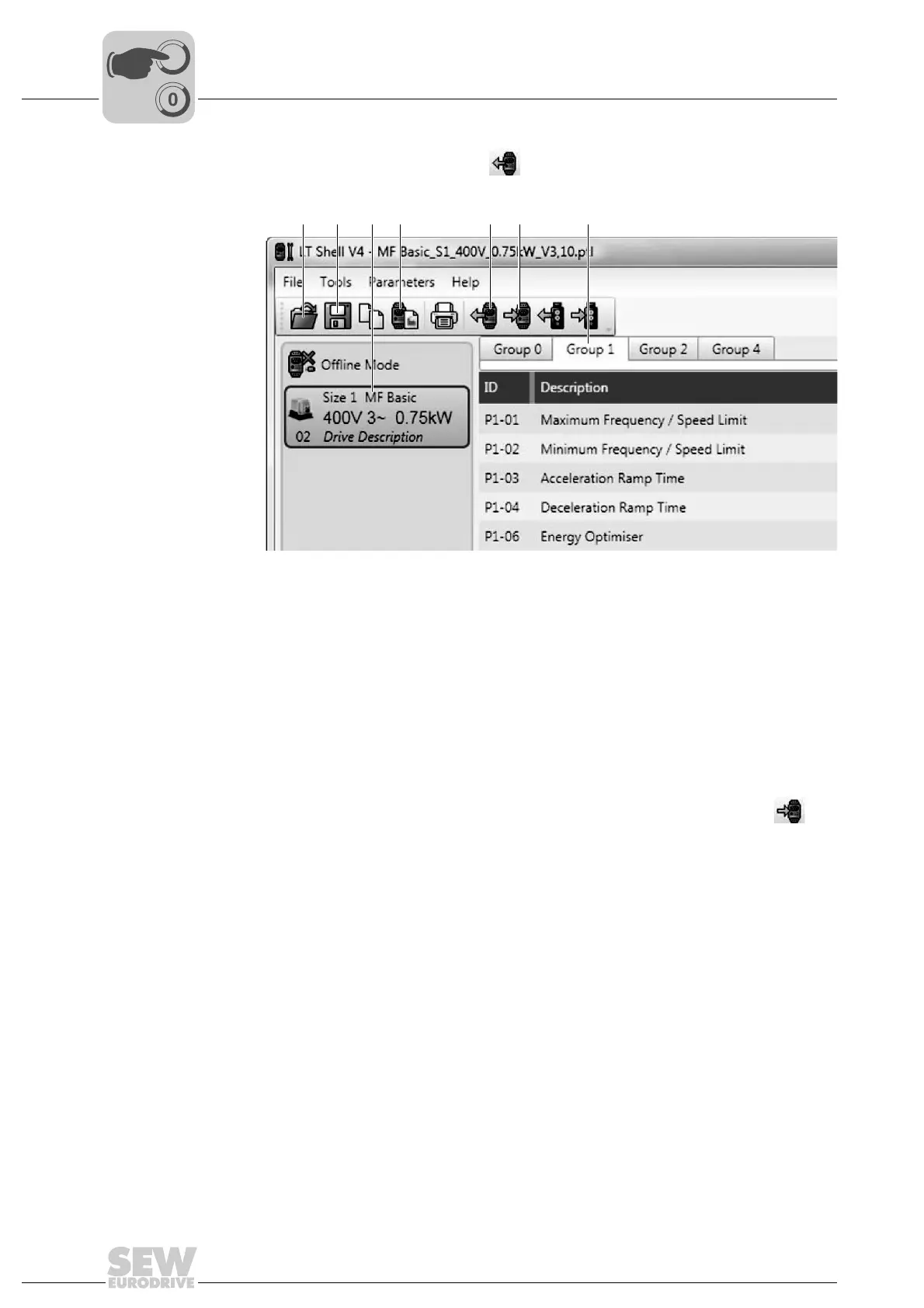
The parameter menu is displayed:
7. Select the required parameter group [7].
8. Double-click the required parameter.
9. Enter the new parameter value into the input field.
10.Transmit the parameter set from the PC to the MOVIFIT
®
basic using the but-
ton.
9007203038730891
[1] Open parameter set
[2] Save parameter set on PC
[3] Shows the units in the network
[4] Restore factory settings of the unit
[5] Read parameter set from MOVIFIT
®
basic unit.
[6] Transmit parameter set to MOVIFIT
®
basic unit.
[7] Select parameter group
[1] [2] [3] [4] [5] [6] [7]



 To Next Page