
 To Next PageTo Next Page
 Need help?
Do you have a question about the Siemens SIMATIC IPC847D and is the answer not in the manual?
 General
| Brand | Siemens |
|---|---|
| Model | SIMATIC IPC847D |
| Category | Industrial PC |
| Language | English |
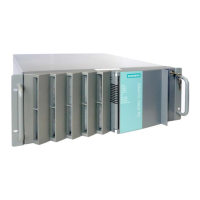
Describes the SIMATIC IPC847D as a high-performance industrial PC.
Describes the physical design and layout of the device.
Describes the various ports and connectors on the rear of the device.
Explains the meaning of front and rear status LEDs.
Lists available optional accessories for the device.
Provides essential safety guidelines for handling and operating the device.
Offers important notes and precautions for using the device correctly.
Covers steps before installing the device, like checking the package.
Details the physical mounting procedures and guidelines.
Guides on connecting power and other essential cables.
Details how to connect the device to the power source.
Covers essential information before starting the commissioning process.
Guides on the procedure for switching on the device for the first time.
Provides specific notes for various device configurations.
Describes how to replace hard disks, especially in RAID systems.
Covers device monitoring capabilities like temperature and fan status.
Explains how to monitor device temperature using sensors.
Describes the watchdog function for monitoring program runtime.
Introduces Intel Active Management Technology for remote maintenance.
Provides instructions for adding or replacing components in the device.
Details the procedure for safely opening the device.
Guides on upgrading the device's RAM modules.
Step-by-step instructions for memory module replacement.
Information about installing and managing hard drives and optical drives.
Guide for replacing a faulty drive in a RAID configuration.
General guidelines and warnings for performing repairs.
Information on routine maintenance tasks.
Recommended intervals for replacing wear-prone components.
Procedures for installing and removing hardware components.
Guide to replacing the CMOS backup battery.
Covers the installation of operating systems and drivers.
Procedure for installing Windows 7 or Server 2008 R2.
Lists certifications and approvals for the device.
Details compliance with various directives and standards.
Guidelines for handling electrostatic sensitive devices (ESD).
Provides dimensional drawings of the device and its components.
Comprehensive technical data for the device.
Lists general technical specifications like dimensions, weight, and power.
Specifies operating and storage conditions for the device.
Details power consumption and current requirements.
Describes the hardware components of the device.
Details the motherboard structure and functions.
Describes the bus board and its function.
Information about the CP 1616 onboard communication processor.
Explains the BIOS setup program and its functions.
Guides on how to access the BIOS Setup menu.
Procedure for updating the device's BIOS.
Details Intel Active Management Technology for remote PC management.
Steps to enable and configure AMT on the device.
Information on how to get technical support and find resources.
Provides guidance on diagnosing and resolving common problems.
Explains the meaning of front panel LED error indicators.