Programming and Operating Manual (Milling)
280 6FC5398-4DP10-0BA6, 09/2017
Opens the program simulation window to check the programming results before machining
Recompiles the current cycle or contour selected with cursor by reopening the previous programming window
Executes the current program
Automatically assigns block numbers (Nxx) to all blocks
Opens the block search dialog box
Inserts a marker at the cursor position for copying/deleting the program blocks selected with the cursor
Copies the selected program blocks to the buffer memory
Pastes the copied program blocks at the current cursor position
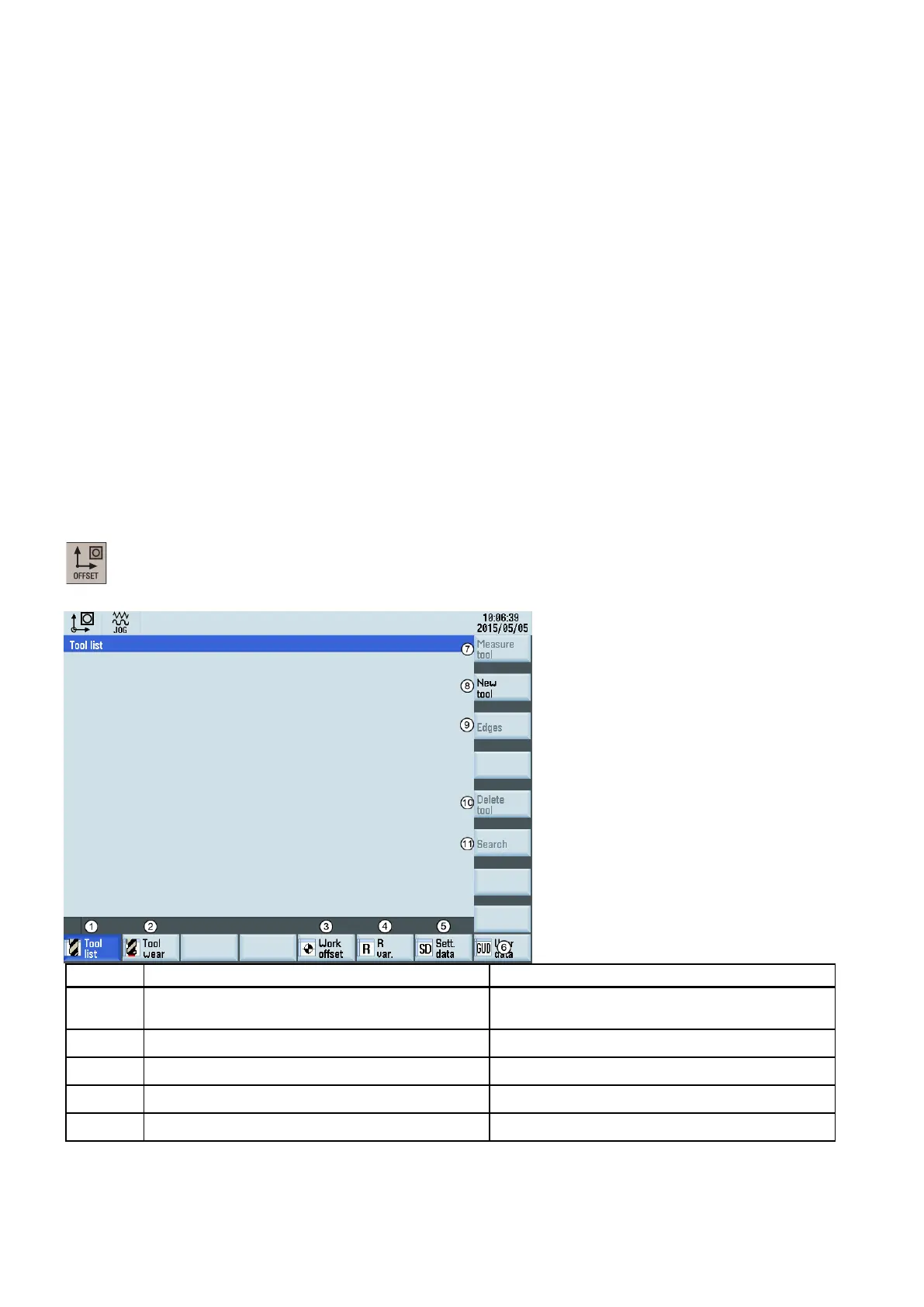
When working with the CNC, you need to set up the machine and the tools, etc. as follows:
● Create the tools and cutting edges.
● Enter/modify the tool and work offsets.
● Enter the setting data.
his key on the PPU allows you to open the following window:
①
Displays and modifies the tool offsets • "Creating a tool (Page 21)"
•
"Creating/changing a cutting edge (Page 22)"
Displays and modifies the tool wear data "Entering the tool wear offsets (Page 49)"
Displays and modifies the workpiece offsets "Entering/modifying workpiece offsets (Page 59)"
Displays and modifies the R variables "Setting R parameters (Page 63)"
⑤
Configures and displays lists of setting data "Entering/modifying the setting data (Page 60)"














 To Next Page