EasyManua.ls Logo

Singer 560 - Knitting on the Knitter Using the YC-5

Singer 560
124 pages
Print Icon
To Next Page IconTo Next Page
To Previous Page IconTo Previous Page
Loading...
0
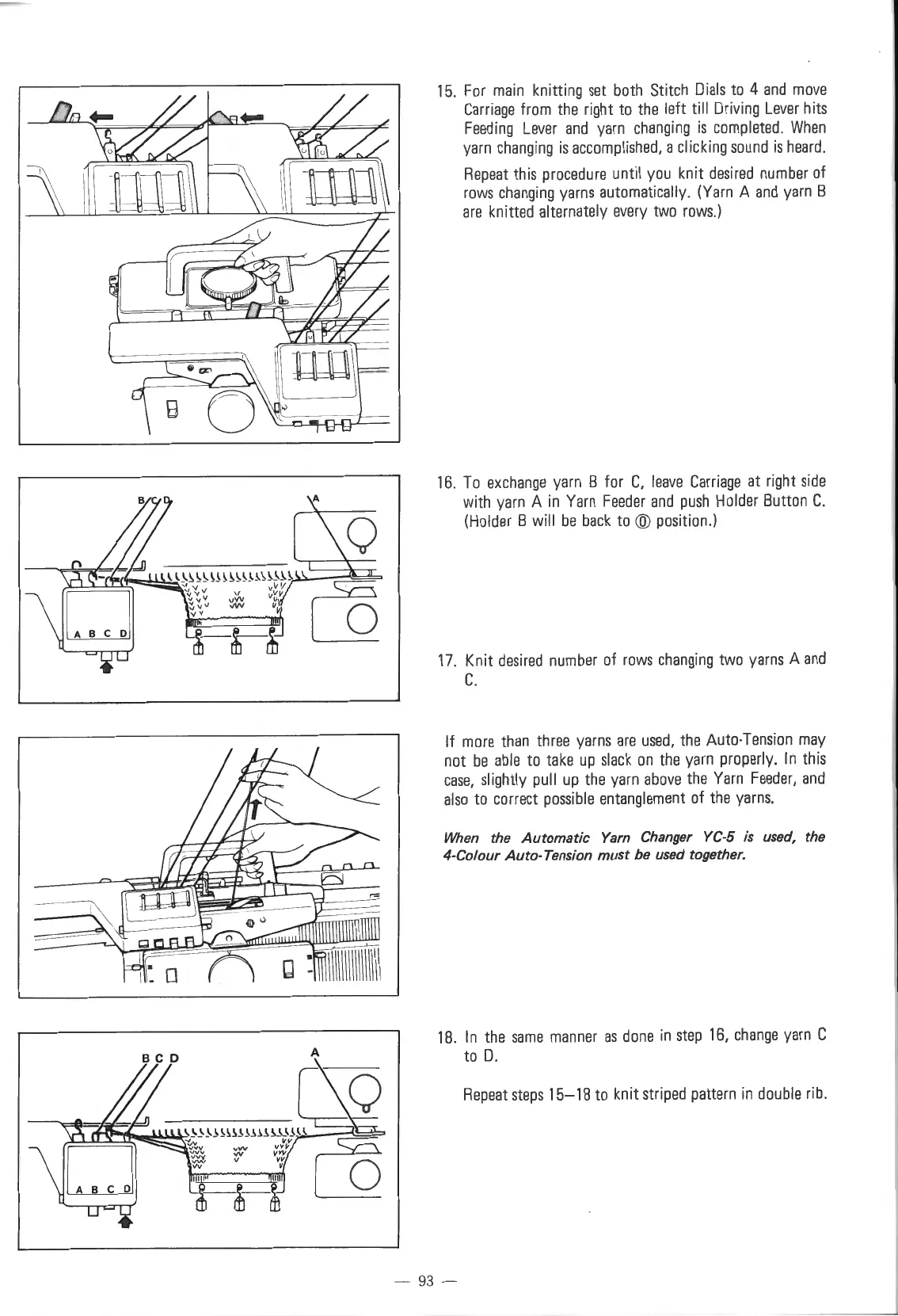
15.
For
main
knitting
set
both
Stitch
Dials
to
4
and
move
Carriage
from
the
right
to
the
left till
Driv
i
ng
Lever
hits
Feeding
Lever
and
yarn
changing
is
completed.
When
yarn
changing
is
accomplished,
a clicking
sound
is
heard
.
Repeat
this
procedure
until
you
knit
desired
number
of
rows
changing
yarns
automatically.
(Yarn
A
and
yarn
B
are
knitted alternately
every
two
rows.)
16
.
To
exchange
yarn
B for
C,
leave
Carriage
at
right
side
with
yarn
A
in
Yarn
Feeder
and
push
Holder
Button
C.
(Holder
B will
be
back
to
@
position
.)
17
. Knit
desired
number
of
rows
changing
two
yarns
A
and
C.
If
more
than
three
yarns
are
used,
the
Auto-Tension
may
not
be
able
to
take
up
slack
on
the
yarn
properly.
In
this
case,
slightly
pull
up
the
yarn
above
the
Yarn
Feeder,
and
also
to
correct
possible
entanglement
of
the
yarns.
When the Automatic
Yarn
Changer YC-5
is
used, the
4-Co/our Auto-Tension
must
be
used together.
18
.
In
the
same
manner
as
done
in
step
16,
change
yarn
C
to
D.
Repeat
steps
15-18
to
knit
striped
pattern
in
double
rib.
-
93
-

Table of Contents

Other manuals for Singer 560

Related product manuals