12
Electronic Controller
Service Manual
SKOPE BME-N ActiveCore
4 Electronic Controller
Overview
The cabinet is fitted with a Wellington Drive SCS Connect electronic controller. The controller
is located below the door/s and visible from the outside of the cabinet.
Controller servicing can be performed via the controller faceplate, or the SCS Connect Field
app.
Controller Faceplate
Buttons and
Display
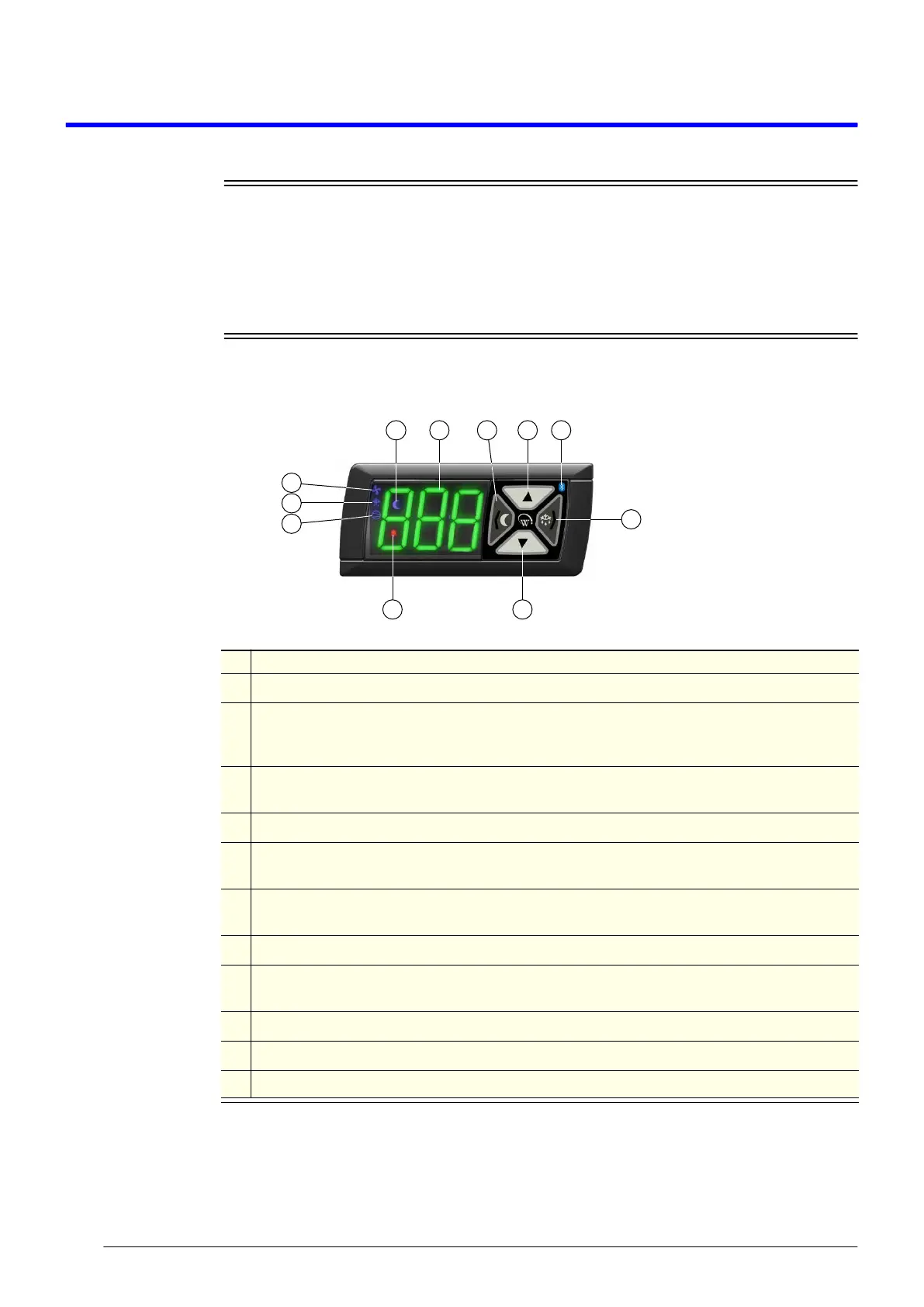
The controller faceplate includes the front display panel and interface buttons.
Service Mode Service mode can be accessed and used via the SCS Connect Field app (see “Wellington
Drive SCS Field App” on page 13), or the controller faceplate (see below).
Note: A 9 digit pin code is required to access service mode via the controller buttons. Contact
your User Manager or SKOPE Customer Services to receive your activation code.
1
2 3 4 5
8 7
11
10
9
6
Table 2: Controller faceplate
No. Description
1 Night Mode: Indicator. On during the cabinet’s night mode.
2
Display: Indicator. Digital display of cabinet air temperature or messages. The temperature is
what the sensor inside the cabinet detects, and not necessarily the product temperature. However,
they may be very close depending on how the controller is set to sense temperature.
3
Light Switch - Night Mode (back/abort): Button. Press to switch the lights on or off. Press and
hold to switch the cabinet between day and night mode. Used during programming.
4 Up: Button. Used for programming.
5
Bluetooth: Indicator. On when ready to connect to a device. Flashing when connected to a
device.
6
Defrost Cycle (next/enter): Button. Press and hold to initiate manual defrost. Used during
programming.
7 Down: Button. Used for programming.
8
Fault - Alarm: Indicator. On during fault or alarm. Note: Alarm message is also shown on the
display during alarm.
9 Compressor: Indicator. On when the compressor is running.
10 Defrost Mode: Indicator. On during defrost cycle.
11 Fan: Indicator. ON when evaporator fan running.


 To Next Page