15
SKOPE BME-N ActiveCore
Electronic Controller
Service Manual
App
Categories
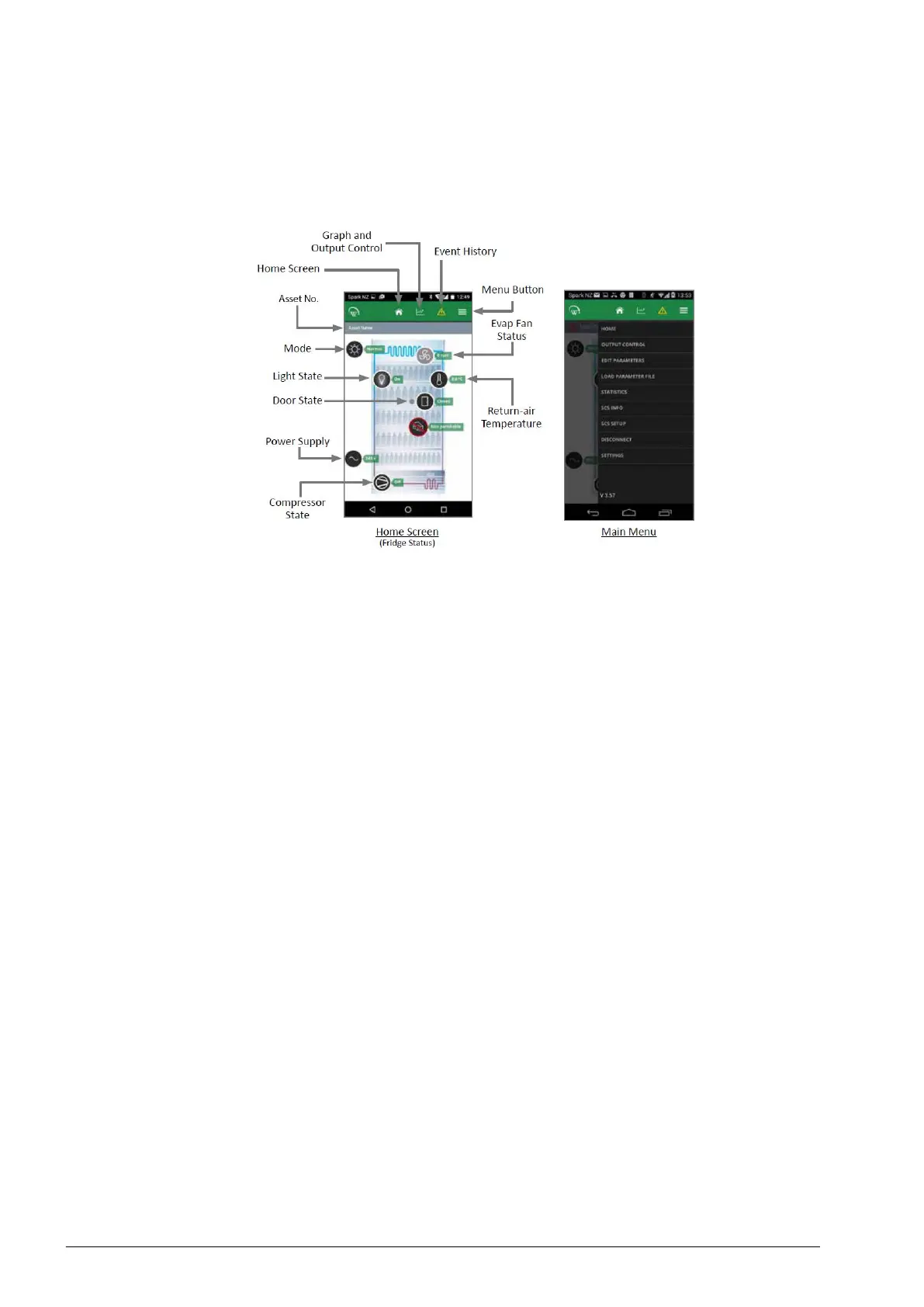
Various options are available in the app menu to provide information about the connected
controller and its cabinet. Depending on user access level, some menu options may not be
available.
Home screen
The home screen shows a graphic representation of the current state of the cabinet being
controlled.
Output control
Provides control of the controller input sensors and switches, and output relays.
Edit parameters
Provides access and editing of individual controller parameters.
Note: Parameter changes must be recorded on warranty/job card.
It is not recommended that parameters are changed unless absolutely necessary. If incorrect
parameter settings are suspected, reload the complete parameter set. Note: Updated
parameters are not applied until DISCONNECT has been selected from the menu (after
loading new parameter set).
Load parameter file
Allows you to reload the default parameter set or change to new parameter set. See
“Replacing the Controller” on page 39 for instructions. Note: Updated parameters are not
applied until DISCONNECT has been selected from the menu (after loading new parameter
set).
Statistics
Information from the past seven days on the cabinet’s activity including temperatures, door
openings and alarms.
SCS info
Controller version and asset information.
SCS setup
Add or change SCS info (see above).
Disconnect
Disconnect from currently connected controller.
Settings
Change app general settings.


 To Next Page