9
SKOPE BME-N ActiveCore
Installation
Service Manual
Sign Assembly
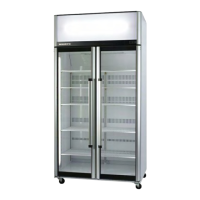
Depending on the model, the cabinet may be fitted with a lit sign. The sign can be removed for
transporting or moving through doorways or confined spaces. Refer to the procedures below
to remove and refit the sign assembly.
For sign lighting information, refer to page 24.
Door Handles
Fitting Door
Handles
For transit purposes the door handles may be packed separately inside the cabinet. If the door
handles are packed separately, follow the steps below to fit them to the door/s.
Procedure 1: To remove the sign assembly
1. Disconnect the cabinet from the mains power supply (see page 22).
2. Unplug the sign plug (located behind the sign assembly).
3. Lift the sign assembly off the cabinet.
4. The sign sides can also be removed if required. Remove the sign back strip and loosen the sign
side fixing screws to remove the sign sides.
Procedure 2: To refit the sign assembly
1. Refit the sign sides and sign back strip (if removed).
2. Slot the sign assembly onto the front of the sign sides.
3. Reconnect the sign plug.
Procedure 3: To fit a door handle
1. Remove the handle/s from inside the cabinet by carefully cutting the cable ties securing the
handle, and remove the packaging.
2. A metal spring clip is fitted inside the handle
mounts at each end of the handle.
Ensure that the spring clips point up.
3. Place BOTH handle mounts simultaneously onto
both door brackets.
4. Then push the handle down onto the brackets,
until the handle locks into place.
Troubleshooting
• If the handle does not lock into place, check that the spring clips are pointing up and try again.
• If only one end of the handle locks into place, unscrew the door handle (see over page), and refit
ensuring both of the handle mounts are located onto the brackets before pushing the handle down
and locking into place.
Handle mount
Spring clip
(pointing up)
Handle
Bracket
Front
of
door
Bracket
CAUTION
Ensure BOTH handle mounts are positioned before pushing down.


 To Next Page