EasyManua.ls Logo

Sky-Drones SMARTAP PRO - Flying with SmartAP GCS

Sky-Drones SMARTAP PRO
152 pages
Print Icon
To Next Page IconTo Next Page
To Previous Page IconTo Previous Page
Loading...
Modes overview
Transmitter commands
Flying with SmartAP GCS
World Pane overview
Getting the video feed
Autonomous Flights
Waypoints flight
Guided flight
Flying with RTK GNSS
Geotag images
Logs analysis
Processing the Logs
Flying with SmartAP GCS
World Pane overview
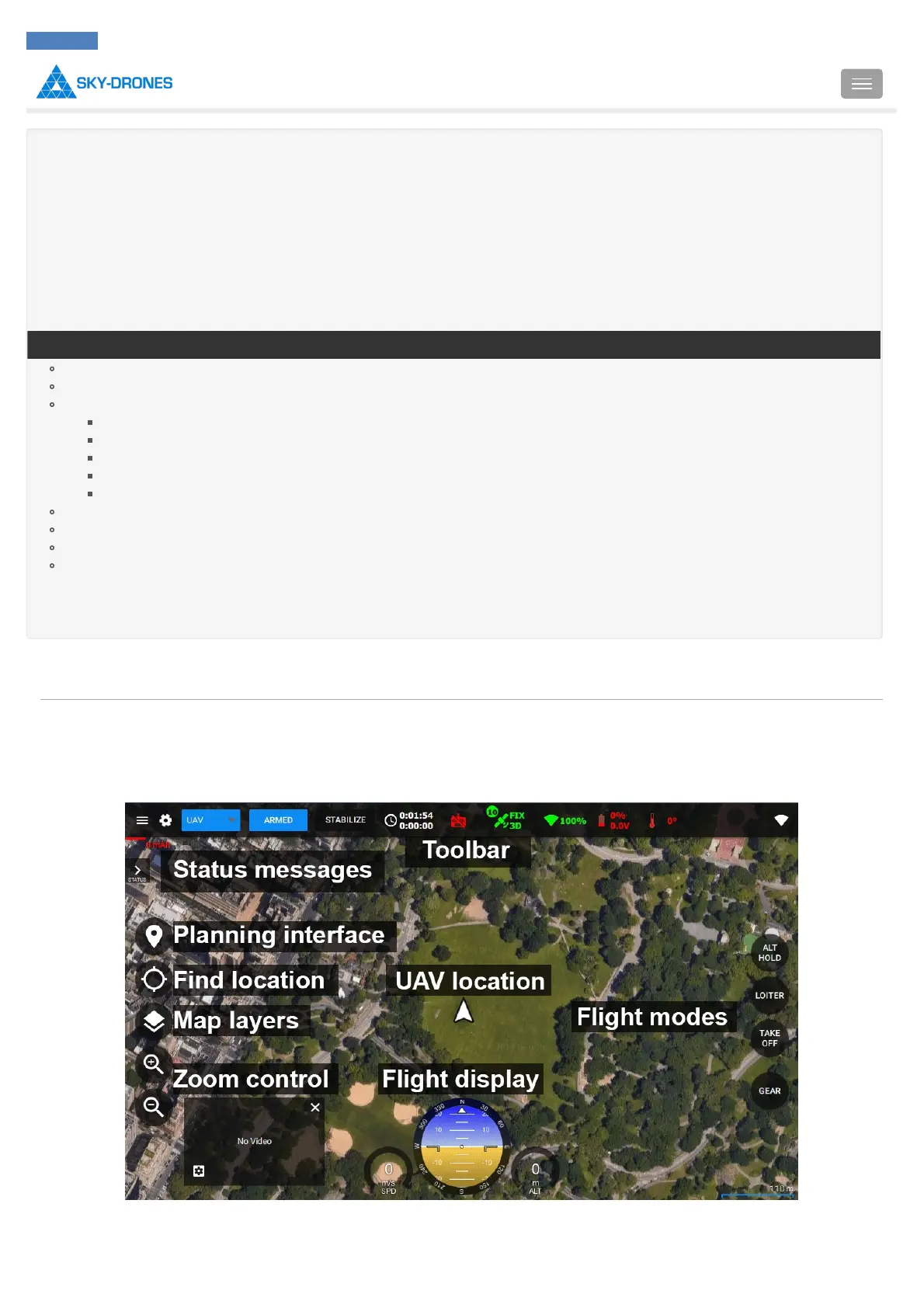
The main pane of the application is called World Pane. Here you can see all general information about the vehicle, switch vehicles, change
modes, plan mission and etc. Here is the brief overview of the information, user interface and control buttons:
Toolbar contains the info about the vehicle status:
Introduction
SmartAP PRO
SmartAP MAX
SmartAP PDB
SmartAP GNSS
SmartLink
Autopilot configuration
Flying
Support
Revision history
SmartAP AutoPilot User’s Guide Flying with SmartAP GCS
Sky-Drones - SmartAP Flight Control Systems 127 / 151

Table of Contents

Related product manuals