5
Skydio X2D INTL - Operator Manual © 2023 Skydio, Inc. All rights reserved.
Overview
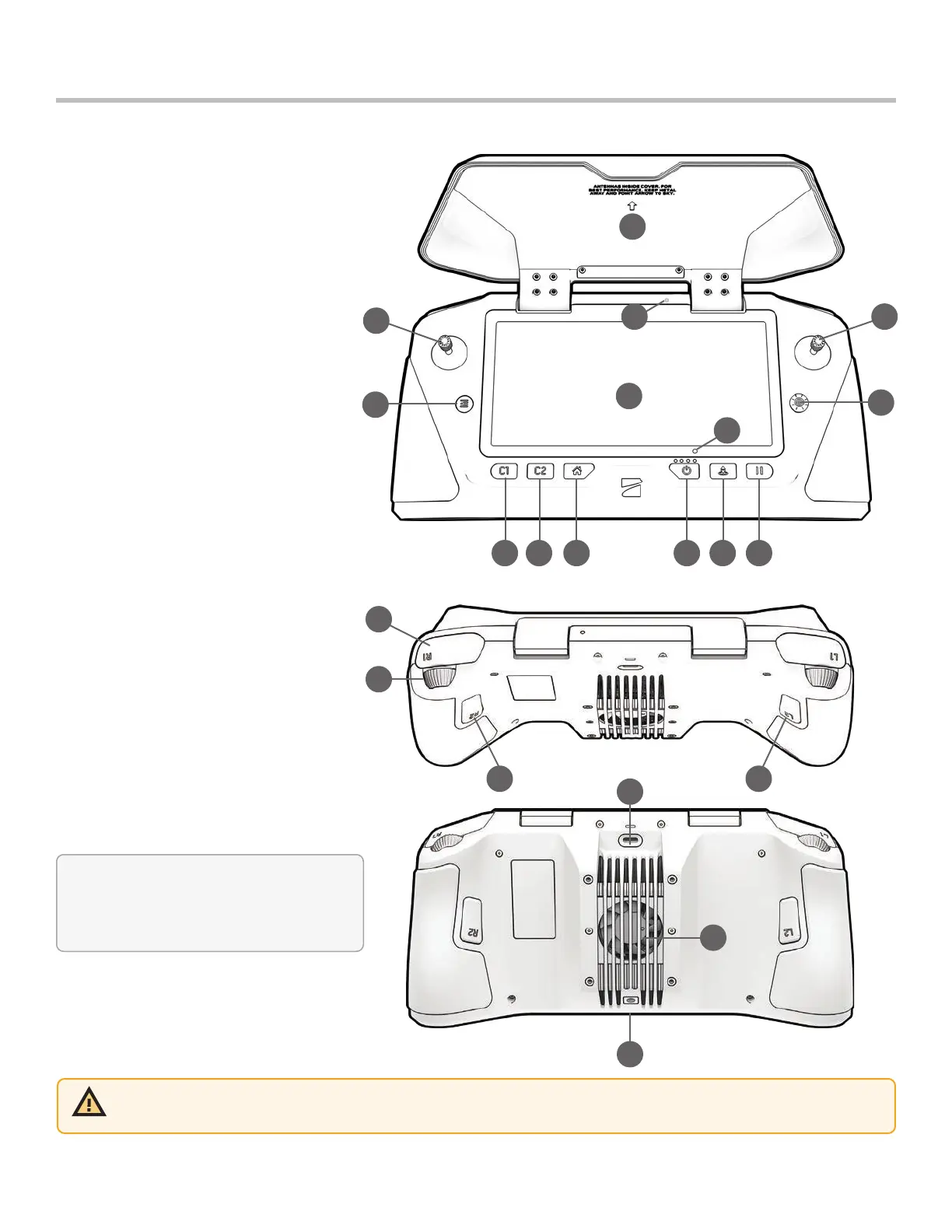
Skydio Enterprise Controller
CAUTION: Skydio Enterprise Controller is not weatherproof. Do not operate in any precipitation, including rain, fog, snow,
or similar environments. Do not rest the controller in sand, dirt or on similar terrain where particles can get trapped in the
fan. Do not use batteries if the magnets or connector pins are damaged.
* Programmable:
Step 1 - Select the Device settings menu
Step 2 - Select the Controller tab
Step 3 - Select Button Mapping
4
12
11
1
3
2
75 6 8 9 10
13
14
17
15
23
22
21
2019
1. Left joystick
2. Right joystick
3. Menu/back button
4. D-pad
5. C1 button - obstacle avoidance
6. C2 button - toggle lights on/o
7. Return to Home button
8. Power button
9. Launch/Land button
10. Pause button
11. Controller clamshell
12. User interface screen
13. Reset button
14. Reset button (alternate)
15. R1 button shutter/record
16. L1 button boost
17. Right wheel zoom*
18. Left wheel gimbal tilt*
19. R2 button toggle map*
20. L2 button toggle thermal to color*
21. USB-C port
22. Cooling fan
23. Neck-strap and tripod (¼-20) mount



 To Next Page