75
Skydio X2D INTL - Operator Manual © 2023 Skydio, Inc. All rights reserved.
Maintenance
Step 1 - Ensure your controller battery is fully charged
• you cannot export and charge your controller
simultaneously
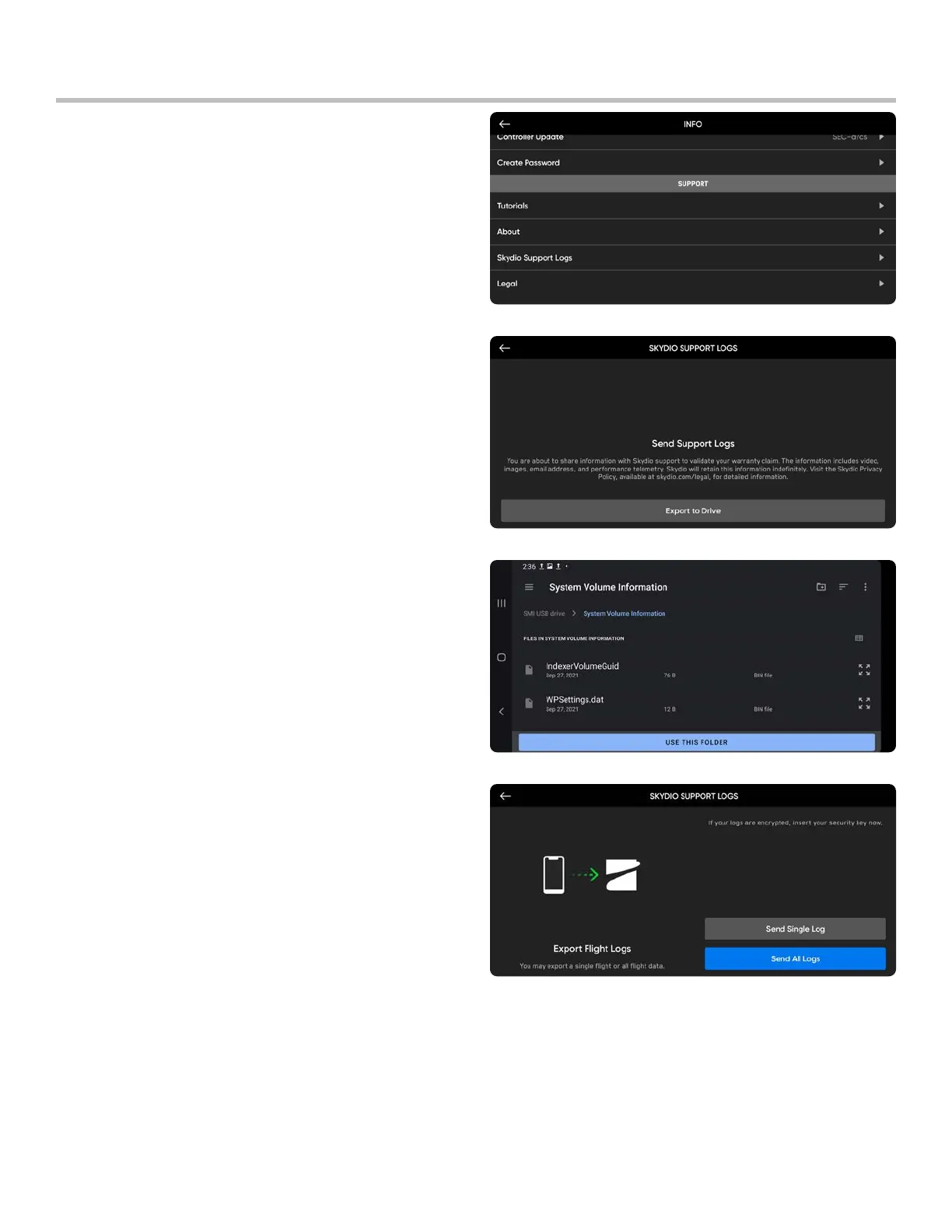
Step 2 - Select the INFO menu
Step 3 - Select Skydio Support Logs
Step 4 - Insert a memory drive into the controller
Step 5 - Select Export to drive
Step 6 - Navigate to the folder you want to export
your flight logs to and select Allow.
You will be prompted to select between exporting a
Single Flight or All Controller Logs:
• Single Flight Log - Includes all logs from a specified
flight. This option will show you the history of all
flights, organized by date and time. Select which
individual flight you wish to upload. This download
may take a few minutes.
• All Flight Logs - Exports all logs saved on the
controller from all flight history. This option allows
you to sync logs whether you are connected to the
vehicle or not.
Export flight logs
To export to a flash drive:



 To Next Page