10
Skydio X2D INTL - Operator Manual © 2023 Skydio, Inc. All rights reserved.
Getting Started
Charging Enterprise Controller
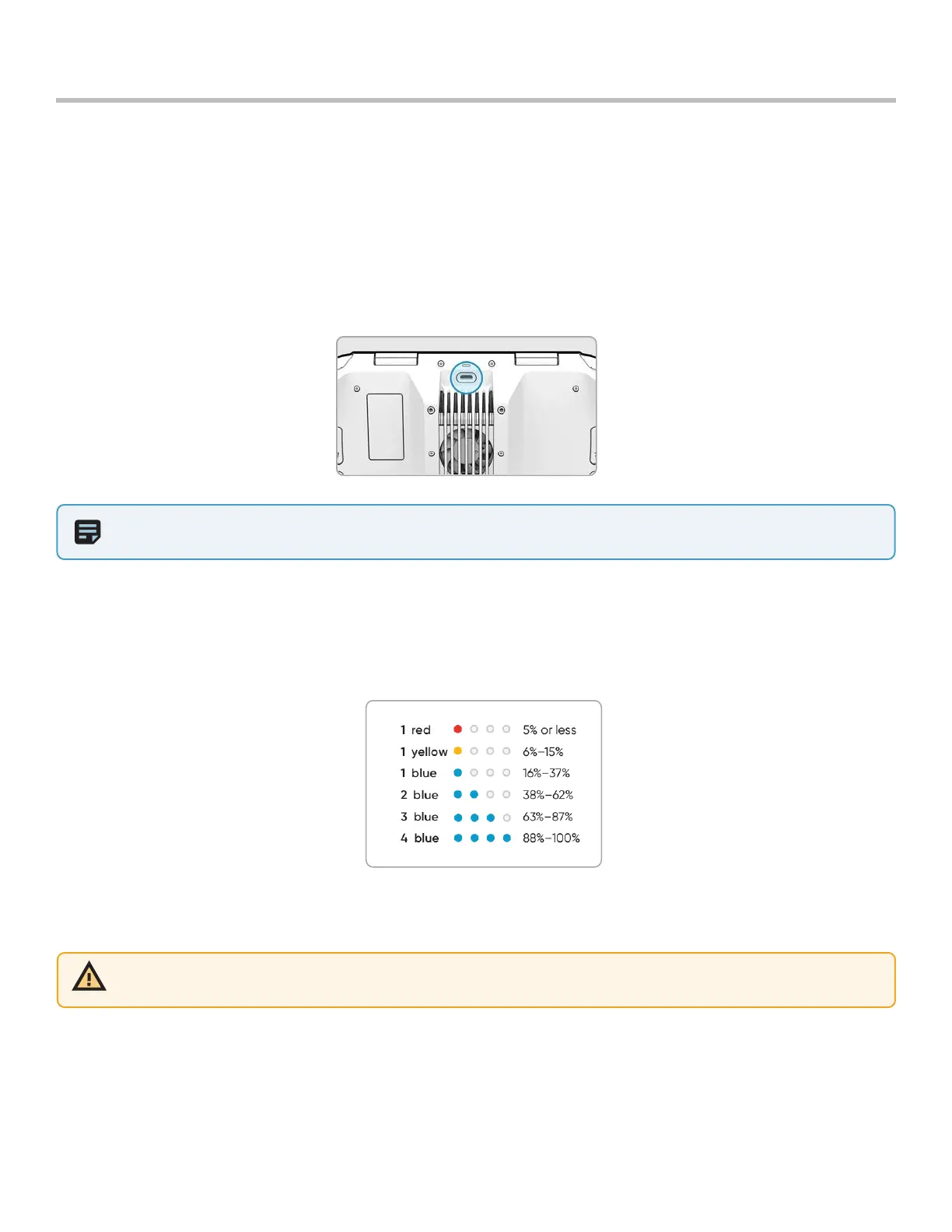
Enterprise Controller Charge Levels
When the controller is powered on or charging, the lights on the front of the controller will indicate the current state
of charge. When the controller is powered o, you can view the controller’s state of charge by pressing the power
button.
NOTE: The Skydio Enterprise Controller supports charging while in use, including flying X2D.
WARNING: Do not fly when the Skydio Enterprise Controller battery is low. If the controller reaches low battery level when
in flight, pilot the drone to a safe location and land immediately.
Step 1 - Connect the controller using the USB-C cable and the 65 W power adapter
• or an o-the-shelf 18 W or above power adapter
Step 2 - Plug the power adapter into a 100-240 V power source
• flashing lights indicate charging
• the controller will power on and display the charge levels
• lights will remain solid blue for 1 minute and X2D will power o indicating that the charging is complete



 To Next Page