5-53
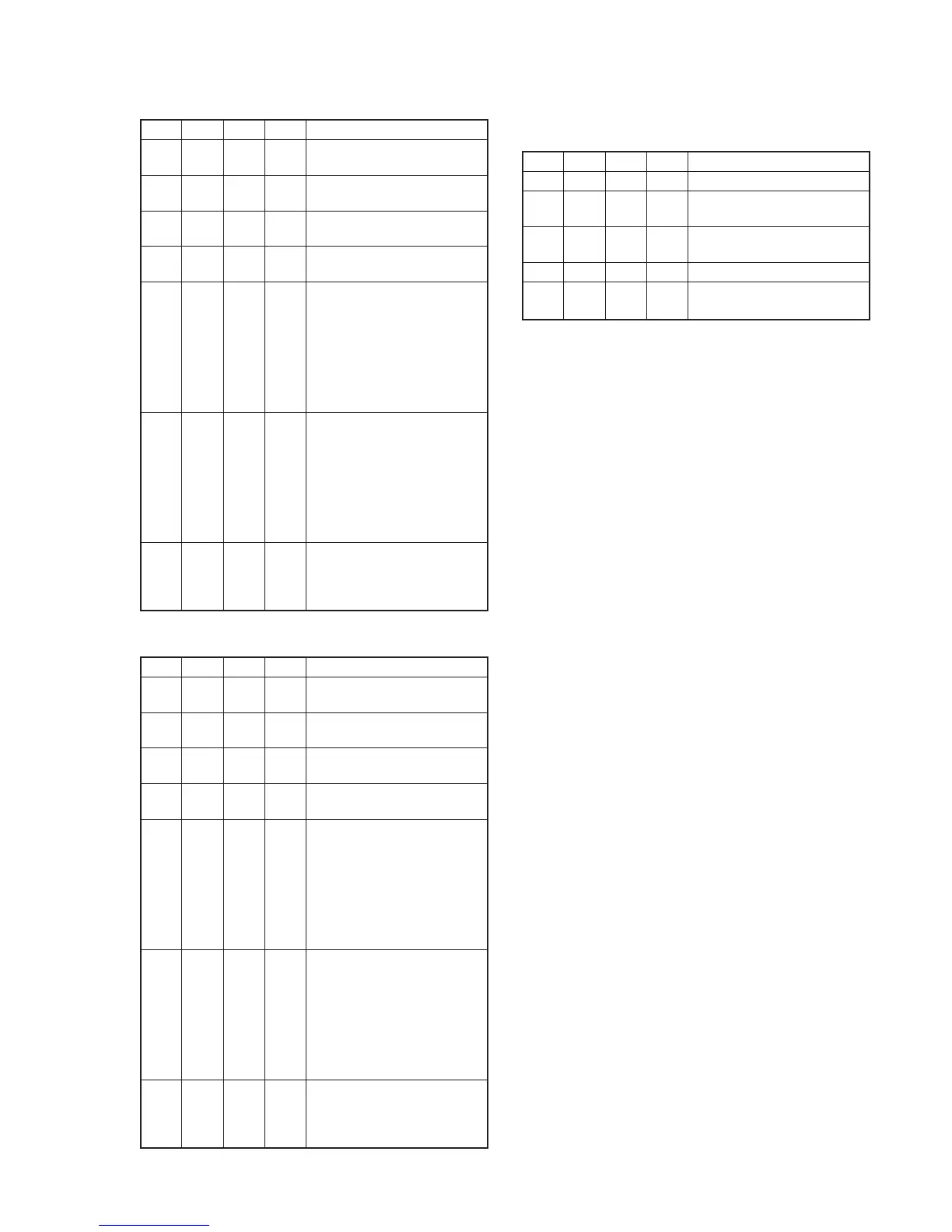
• ENCODER Ca BIST Check
Order Page
Address
Data Procedure
1 3 10 8D Set the data, and press PAUSE
button.
2 3 12 10 Set the data, and press PAUSE
button.
3 3 12 00 Set the data, and press PAUSE
button.
4 3 13 04 Set the data, and press PAUSE
button.
5 3 14 Check that the data is equal to
either of the following values.
And memorize the case number
of the value.
NTSC model:
11 (Case1), 4E (Case2)
PAL model:
E8 (Case1), 7B (Case2)
6 3 15 Check that the data is equal to
the following value which case
number is equal to that of
address 14.
NTSC model:
FD (Case1), 3B (Case2)
PAL model:
62 (Case1), B0 (Case2)
7 3 If the data of address 14 and
address 15 are correct, IC301
ENCODER Ca playback system
is normal.
• ENCODER Cb BIST Check
Order Page
Address
Data Procedure
1 3 10 8E Set the data, and press PAUSE
button.
2 3 12 10 Set the data, and press PAUSE
button.
3 3 12 00 Set the data, and press PAUSE
button.
4 3 13 04 Set the data, and press PAUSE
button.
5 3 14 Check that the data is equal to
either of the following values.
And memorize the case number
of the value.
NTSC model:
5C (Case1), BC (Case2)
PAL model:
96 (Case1), 35 (Case2)
6 3 15 Check that the data is equal to
the following value which case
number is equal to that of
address 14.
NTSC model:
20 (Case1), A8 (Case2)
PAL model:
79 (Case1), 7C (Case2)
7 3 If the data of address 14 and
address 15 are correct, IC301
ENCODER Cb playback system
is normal.
1-6. Processing after Completing Playback System
Check
Order Page
Address
Data Procedure
1 0 01 01 Set the data.
2 C 42 0A Set the data, and press PAUSE
button.
3 8 21 03 Set the data, and press PAUSE
button.
4 0 01 00 Set the data.
5 Turn off the power and turn on
again.















 To Next Page