12
Installation
Installation
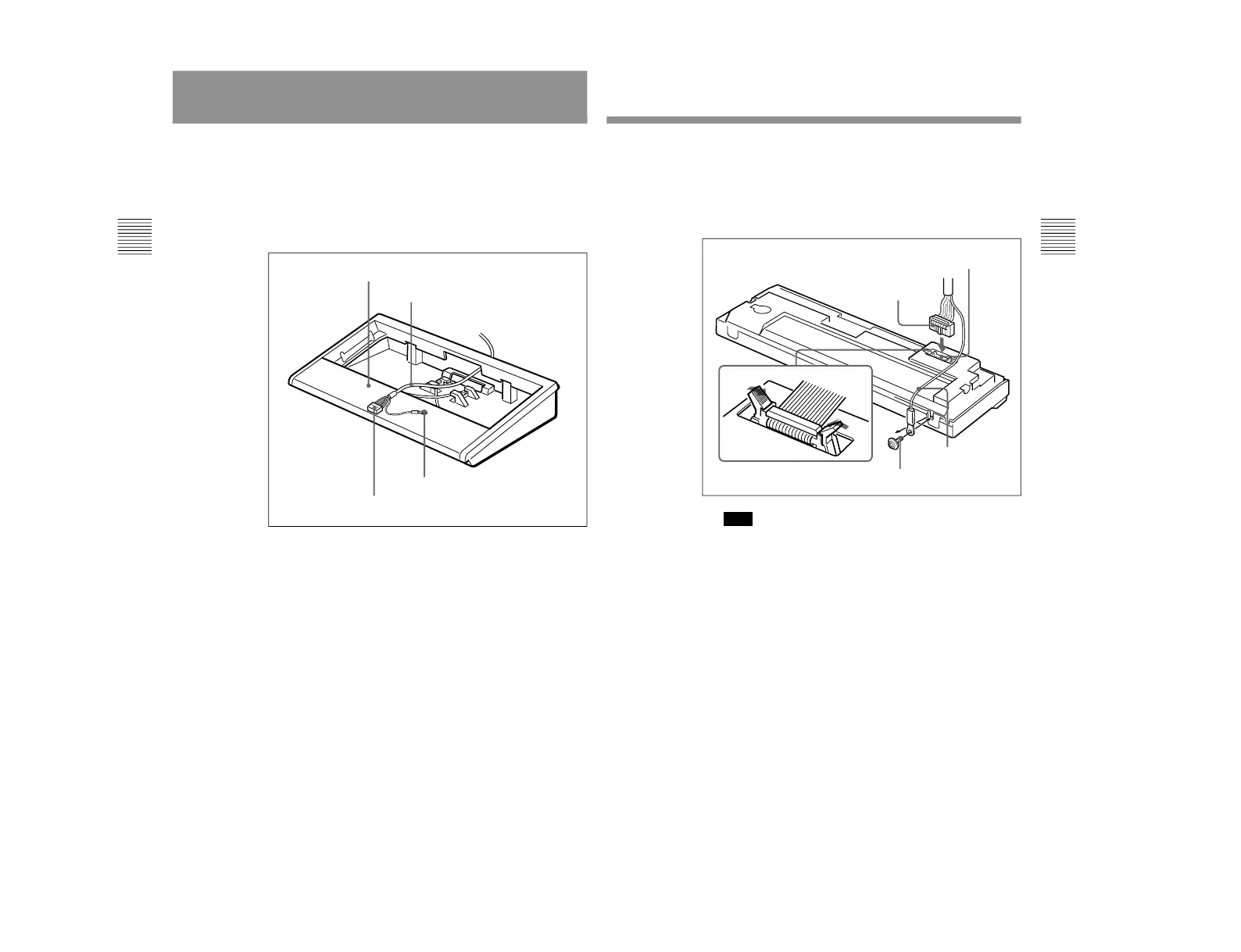
Use the following procedure to install the DSBK-200 Remote
Control Panel in the optional BKNW-121 Control Panel Case.
1
Pass the flat cable connector and ground wire of the
interface cable through the hole at the rear of the bottom of
the control panel case, to the interior of the control panel
case.
Ground wire
Flat cable connector
Control panel case
Interface cable
13
2
Connect the flat cable connector to the connector on the
bottom of the remote control panel, then remove the screw
for grounding and tighten it together with the ground wire.
Fix the flat cable connector in place by fastening the
retaining clips at each end of the connector on the remote
control panel.
Note
Make sure that the projection on the underside of the
connector matches the cutout on the control panel
connector. The connector cannot be inserted upside down.
Flat cable connector
Retaining clips
Connector on the bottom of
the remote control panel
Screw for grounding
Ground wire
(Continued)
1-3. DSBK-200



 To Next Page