Connecting the TV
28
KDF-E42A10/KDF-E50A10
2-597-544-11(1)
D:\WINNT\Profiles\fujii\Desktop\Troy book source\2597544111c20_TROY
Source data\01US04INS.fm
masterpage:3 columns Right
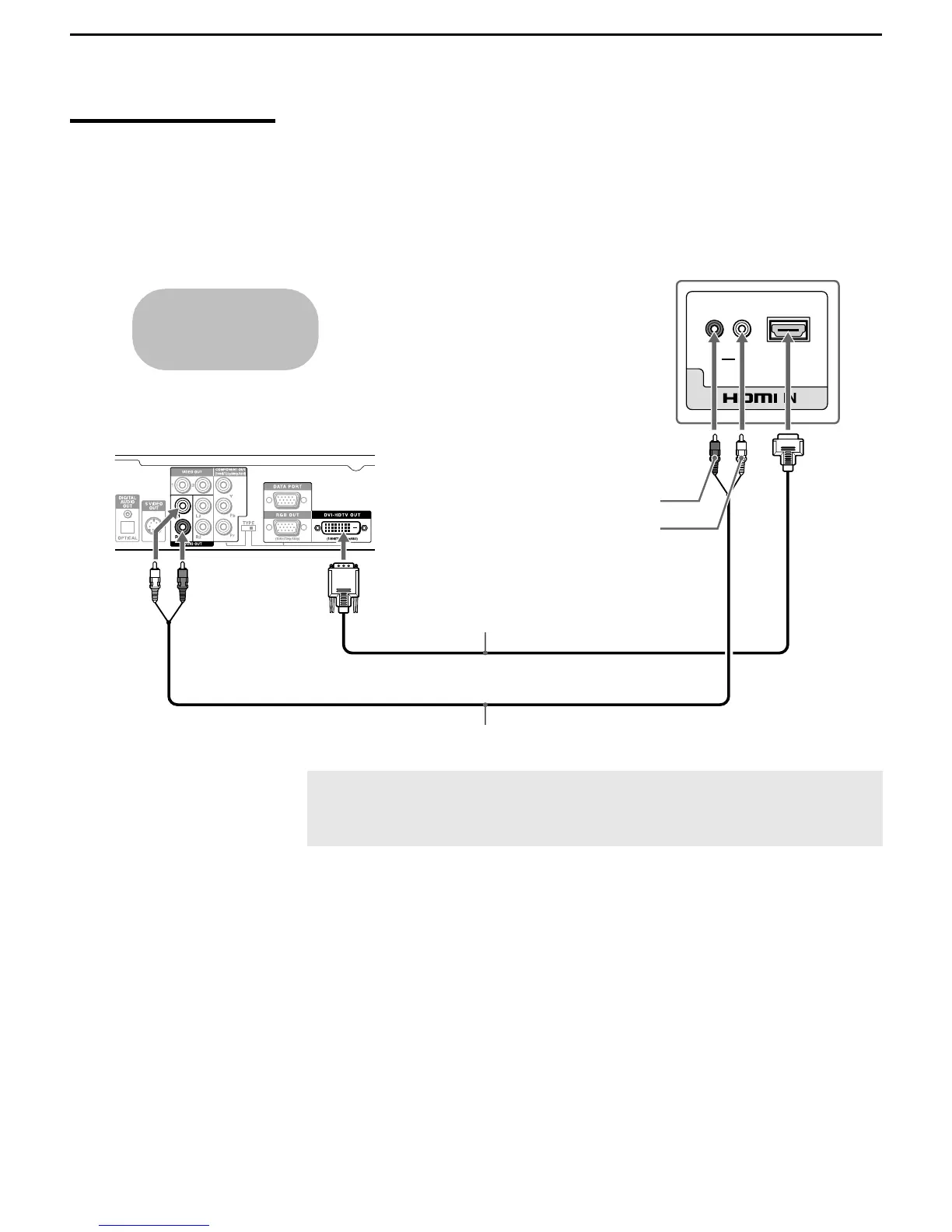
Equipment with DVI
Connection
Disconnect all power sources before making any connections.
If you are connecting with DVI-HDTV output, you can connect to the TV’s
HDMI IN jack by using an HDMI-to-DVI cable or an adapter (both not
supplied).
AUDIO
RL
6
Rear of TV
HDMI-to-DVI cable or adapter
Audio cable
Equipment with DVI output
AUDIO-R
AUDIO-L
Cables are often
color-coded to connectors.
Connect red to red,
white to white, etc.
✍ When using a HDMI-to-DVI cable or an adapter, be sure to connect
the DVI output connector first; then connect to the HDMI input on
your TV.



 To Next Page