Watching the TV
53
Watching the TV
KDF-E42A10/KDF-E50A10
2-597-544-11(1)
D:\WINNT\Profiles\fujii\Desktop\Troy book source\2597544111c20_TROY
Source data\01US05REM.fm
masterpage:3 columns Right
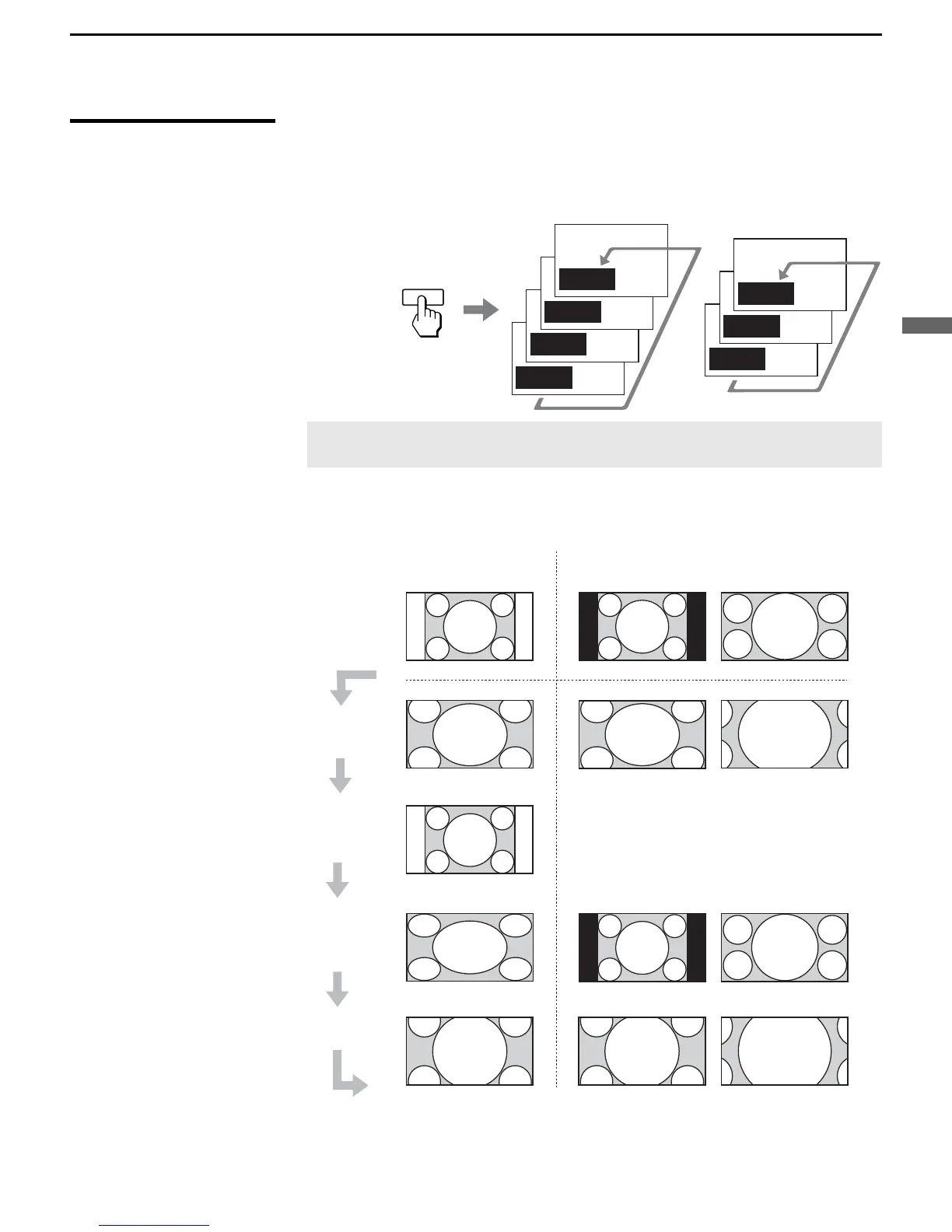
Using the WIDE
Button
Wide screen mode lets you watch 4:3 normal broadcasts in several wide
screen modes (16:9 aspect ratio).
Wide Mode :
Wide Zoom
Wide Mode :
Normal
Wide Mode :
Full
Wide Mode :
Zoom
Wide Mode :
Wide Zoom
Wide Mode :
Full
Wide Mode :
Zoom
WIDE
16:9 Original source
(High definition source)
4:3 Original source
(Standard definition source)
✍ When the TV receives a 720p or 1080i signal, Normal cannot be
selected.
z When the TV receives a
720p or 1080i signal
that is 4:3 aspect ratio
picture with a black bar
at each side, Full
returns the picture to its
original size.
z You can also access the
Wide Mode settings in
the Screen settings. For
details, see page 69.
Changing the wide screen mode
4:3 Original source
This mode is not available
16:9 Original source
ide Zoom
Full
Zoom
Normal
Standard definition High definition



 To Next Page