– 29 –
KDF-E42A10/E50A10
K RM-YD003 RM-YD003
SECTION 3
ELECTRICAL ADJUSTMENTS
3-1. ELECTRICAL ADJUSTMENT BY REMOTE
COMMANDER
By using remote commander (RM-YD003), all circuit adjust-
ments can be made.
NOTE : Test Equipment Required.
1. Pattern Generator (with component outputs)
2. Oscilloscope
3. Digital multimeter
3-1-1. Method of Setting the Service Adjustment
Mode
1. Standby mode. (Power off)
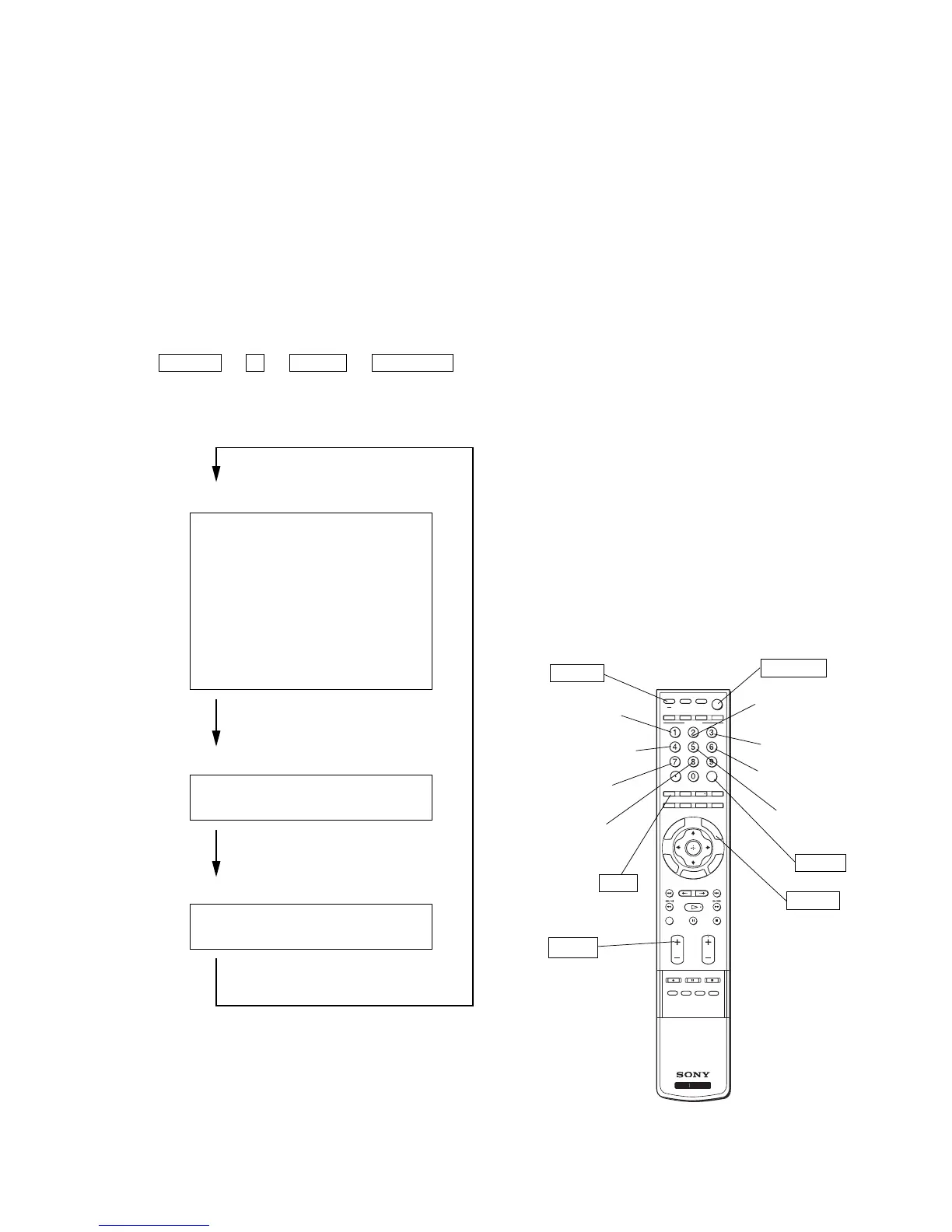
2. DISPLAY t 5 t VOL (+) t TV POWER
on the remote commander.
(Press each button within a second.)
The following service screen will appear.
STATUS 0 SERVICE
SHUTDOWN_LOG1 0 TV MICRO
ATI : H05-01.xx
SAIPH PROGRAM : 1.xxx
BOOT : x.xxx
CHIMERA PROGRAM : 1.xxx
PACK : 1.xxx
OSD : x.xxx
NVM A0 : x.xxx
NVM AC : x.xxx
NVM AE : ----
HDMI : 1.xxx
Press “JUMP” key.
QM 0 0 SERVICE
INFO DTV
Press “JUMP” key.
CONFIGRATION 00 0 SERVICE
CP18_COLOR_SYS
00 00A0 BE Micro
Press “JUMP” key.
<Digiotal Module micro>
3-1-2. Service Mode Adjustment
1. The SCREEN displays the item being adjusted.
2. Press “1” or “4” on the remote commander to select the
adjustment item.
3. Press “3” or “6” on the remote commander to change the data.
4. Press “2” or “5” on the remote commander to select the category.
Every time you press “2” (Category up).
5. If you want to recover the latest values press “-” then
“[ENTER]” to read the memory.
6. Press “[MUTING]” then “[ENTER]” to write into memory.
7. Turn power off.
< Resetting wega (user) menu to factory defaults >
Use the following instructions to restore the User Controls and
Channel Memory settings to the preset factory conditions.
1. Turn the TV on by press [POWER] on the Remote Commander.
2. While holding down the [Q] on the Remote Commander,
press the POWER button on the Front Panel of the set.
The set restarts and displays the initial setup screen, This may
take several minutes.
3-1-3. Memory Write Confirmation Method
1. After adjustment, turn power off with the remote commander.
2. Turn power on and set to service mode.
3. Call the adjusted items again and confirm they were adjusted.
ENT
R
E
T
U
R
N
T
O
O
L
S
TV/VIDEO
MUTING
DVD /
VCR
SAT/
CABLE
FUNCTION
TV
DVR
POWER TV POWER
JUMP ANT MTS/SAP FREEZE
SOUND PICTURE
TV/SAT
SUR
WIDE
WEGA
VISUAL SEARCH
PAU S E
PLAY
STOP
CH
VOL
REC REC PAUSE REC STOP
TOP MENU MENU F1 F2
G
U
IDE
D
ISP
LA
Y
REPLAY ADVANCE NEXTPREV
G
A
T
E



 To Next Page