Connecting the TV
20
KDF-E42A10/KDF-E50A10
2-597-544-11(1)
D:\WINNT\Profiles\fujii\Desktop\Troy book source\2597544111c20_TROY
Source data\01US04INS.fm
masterpage:3 columns Right
About Using
SVIDEO
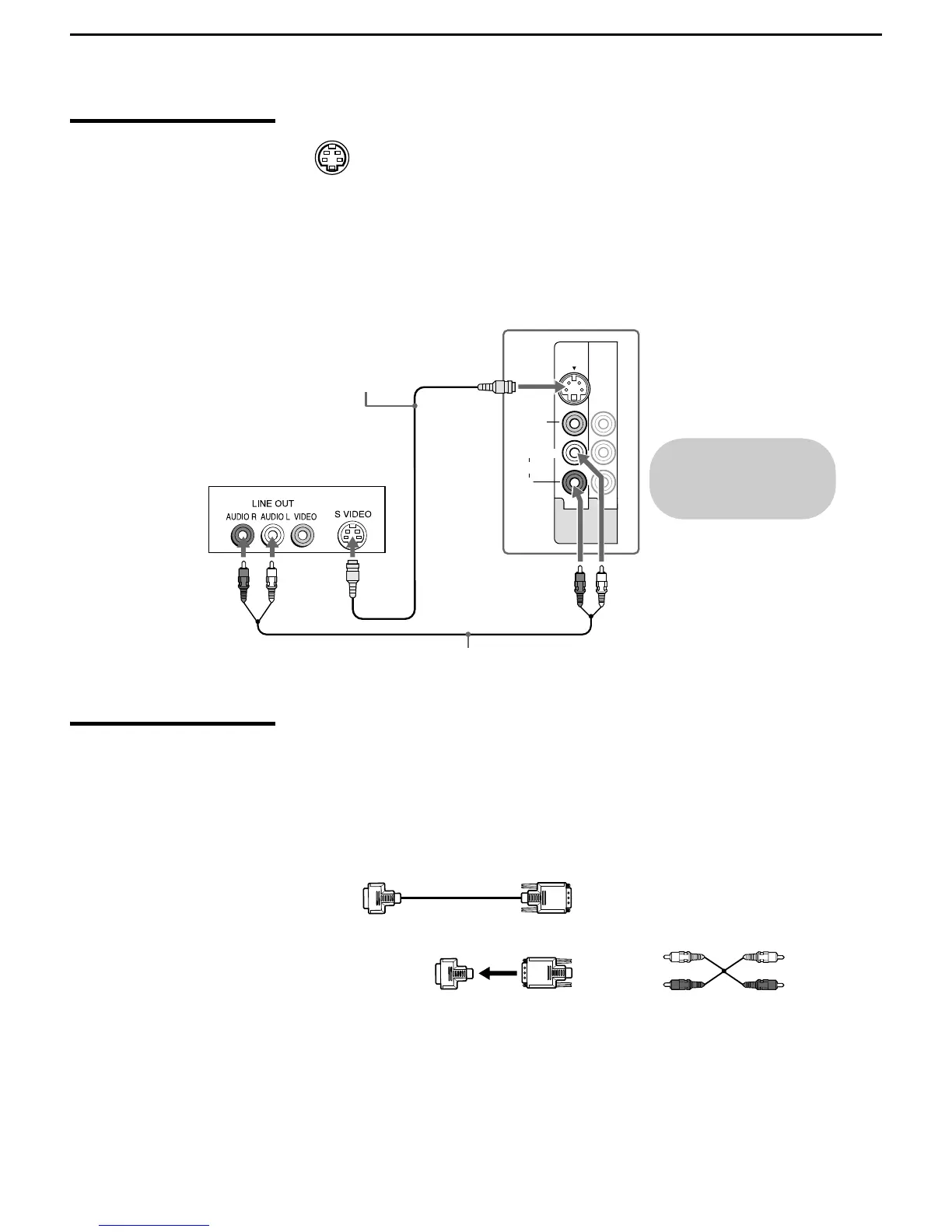
If the optional equipment you are connecting has an S VIDEO jack
(shown at left), you can use an S VIDEO cable for improved picture
quality (compared to an A/V cable). Because S VIDEO carries only
the video signal, you also need to connect audio cables for sound, as
shown below.
Example of an S VIDEO Connection
About Using HDMI
to DVI Adapter
If you are connecting equipment with DVI connector with this TV, you will
need to use an adapter. You can use an HDMI-to-DVI cable or an HDMI
adapter (not supplied). Both are available from your local electronics store.
When you use the adapter, you will also need to use separate audio cables
for sound as DVI connector is for video signals only.
L
R
(MONO)
AUDIO
VIDEO IN
VIDEO
S VIDEO
13
Cables are often
color-coded to connectors.
Connect red to red,
white to white, etc.
Rear of TV
S VIDEO cable
Equipment with S VIDEO
Audio cable
HDMI-to-DVI Cable
Audio cable
HDMI adapter



 To Next Page