Connecting the TV
41
Connecting the TV
KDF-E42A10/KDF-E50A10
2-597-544-11(1)
D:\WINNT\Profiles\fujii\Desktop\Troy book source\2597544111c20_TROY
Source data\01US04INS.fm
masterpage:3 columns Right
Camcorder or
“PlayStation”
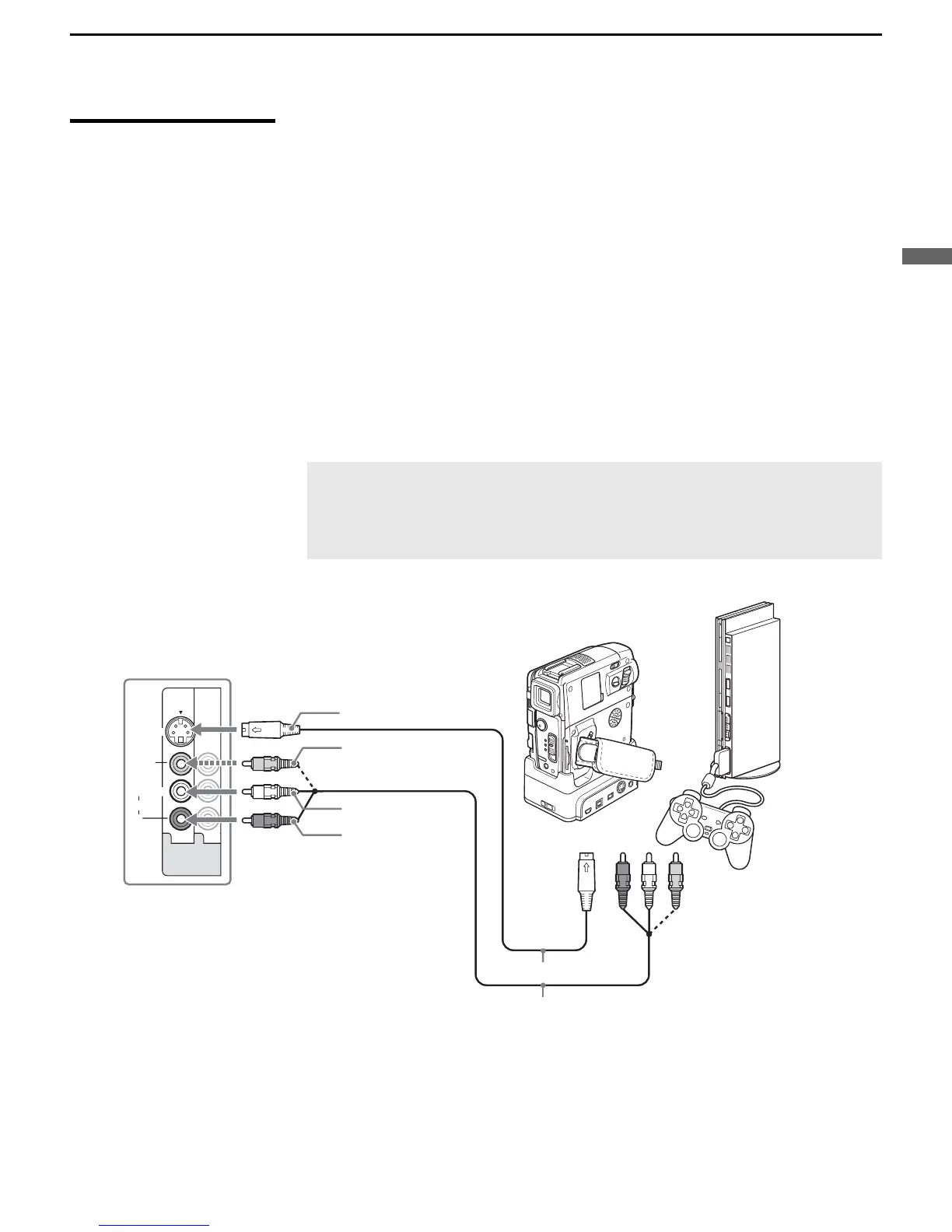
You can connect a camcorder or “PlayStation” to your TV. For easy
connection, use VIDEO IN 2 on the left side of the TV. To use the S VIDEO
jack instead of the VIDEO jack (yellow), use VIDEO IN 1 on the rear panel
of the TV.
To connect a camcorder or “PlayStation” to VIDEO IN 1
Use A/V and S VIDEO cables to connect the AUDIO and S VIDEO OUT
jacks on the camcorder or “PlayStation” to the AUDIO and S VIDEO IN
jacks on the rear panel of the TV, as shown below.
To connect a camcorder or “PlayStation” to VIDEO IN 2
Select Off in the Video 2 (Component) option in the Setup settings (see
page 79). Use an A/V cable to connect the A/V output jacks on the
camcorder or “PlayStation” to the A/V input jacks on the left side of the TV.
✍ If your camcorder is not equipped with S VIDEO, use a VIDEO
cable (yellow) instead of the S VIDEO cable.
✍ If you have a mono camcorder, connect its audio output jack to the
TV’s L MONO audio input jack.
L
R
(MONO)
AUDIO
VIDEO IN
VIDEO
S VIDEO
13
To A/V output jacks
Rear of TV
Camcorder
SVIDEO
VIDEO
AUDIO-L
AUDIO-R
To
SVIDEO
jack
“PlayStation”
or
S VIDEO cable
A/V cable



 To Next Page