1-29 (E)
UP-D898MD/X898MD
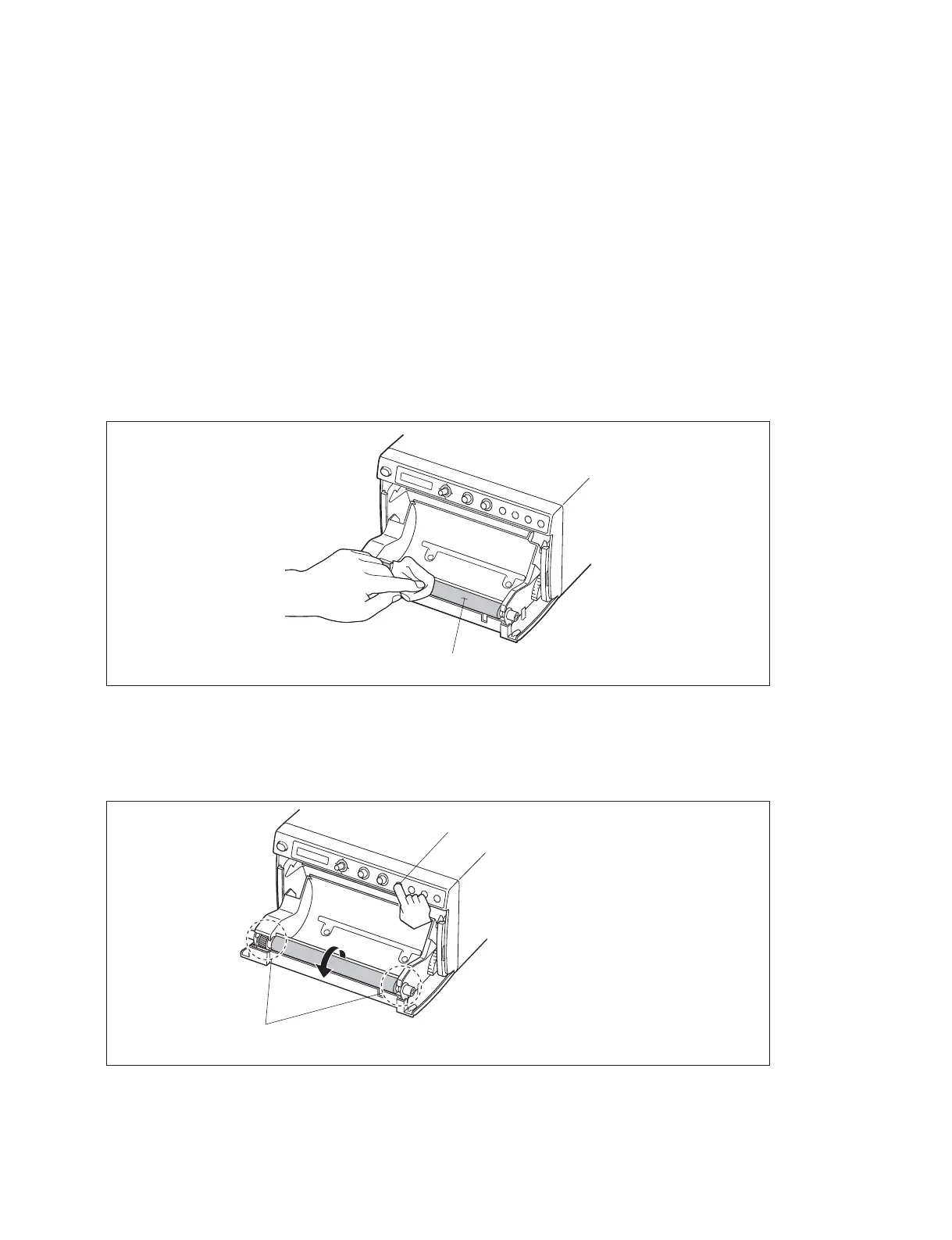
1-11-3. Cleaning the Platen Roller
If the paper cannot be fed smoothly when printing or if the paper can be easily pulled out by hand, the
platen roller may be dirty. In such a case, clean the platen roller with a soft cloth soaked in a 76.9 to 81.4
v/v% concentration of ethanol.
1. Turn on the power switch.
2. Press the [OPEN] button to open the door panel assembly.
3. Wipe the platen roller gently with a soft cloth soaked in ethanol.
n
. After the wiped surface is completely dried, press the [FEED] button to rotate the platen roller and
wipe other portion.
. Do not rotate the platen roller with the hand.
. Do not use the gauze because it generates debris.
4. Press the [FEED] button.
The platen roller rotates by about 120 degrees.
n
After the platen roller stops, start cleaning the platen roller.
5. Repeat steps 3 and 4 and clean the whole surface of the platen roller.
6. After the platen roller has been dried, close the door block assembly manually.
Platen roller
[FEED] button
$
Be careful not to interpose your fingers when the platen roller is in rotation.



 To Next Page