1-10 (E)
UP-D898MD/X898MD
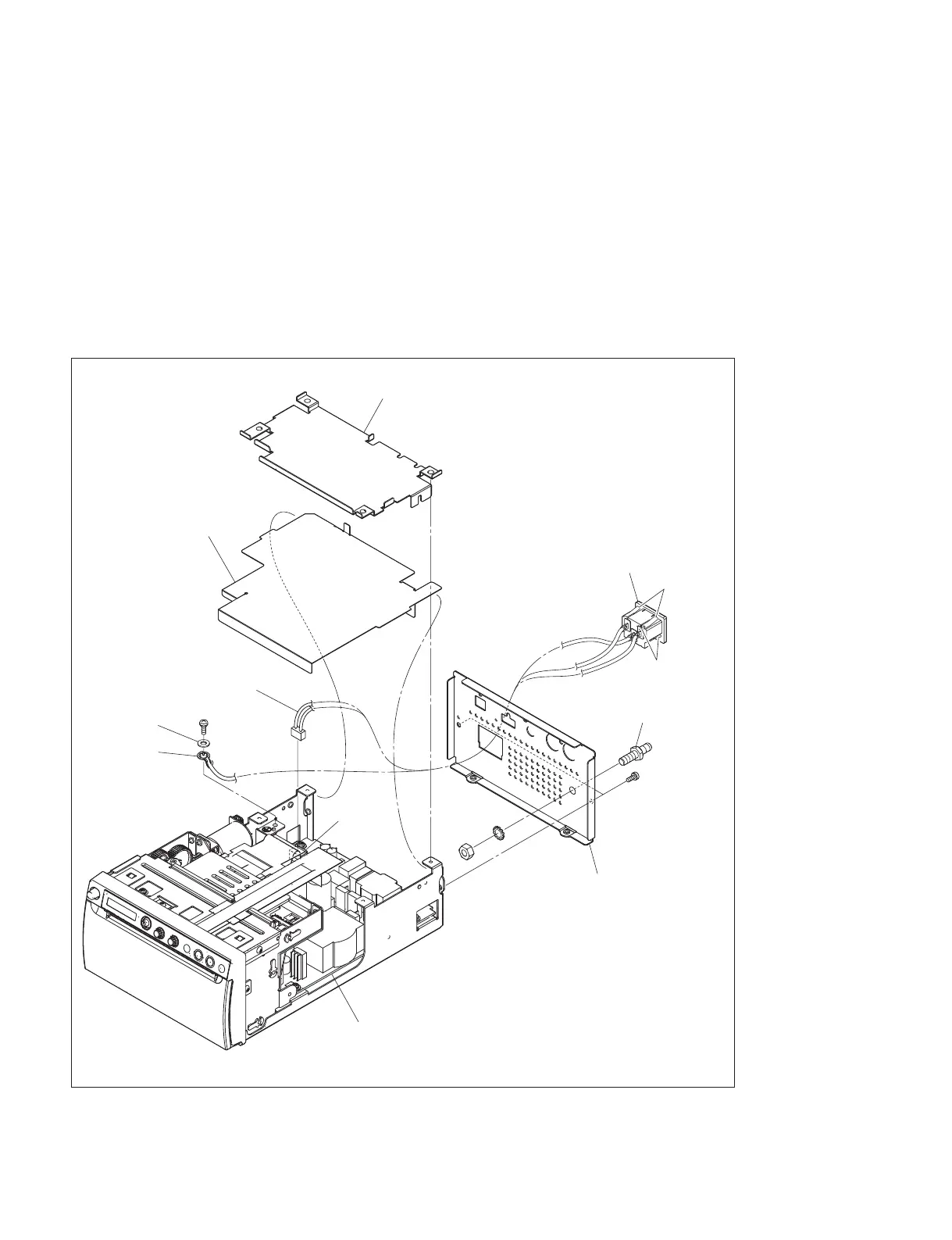
1-5-3. Rear Panel
1. Remove the top cover. (Refer to Section 1-5-1.)
2. Remove the MA-195 board. (Refer to Section 3-1.)
3. Remove the shield plate (MA) and insulating sheet (MA).
4. Remove the screw (PS4 x 8), then remove the washer (W4) and earth terminal.
5. Disconnect the harness from the connector (CN101) on the switching regulator.
6. Remove the two screws (P3 x 4), then remove the rear panel.
7. Remove the four hooks, then remove the AC inlet.
8. Remove the nut (N6) and washer (LW6), then remove the equipotential terminal.
9. To install, reverse the removal procedure.
PS4 ) 8
P3
) 4
The illustration indicates UP-X898MD.
Shield plate (MA)
Insulating sheet (MA)
Earth terminal
W4
Switching regulator
CN101
Harness
Rear panel
AC inlet
N6
LW6
Equipotential terminal
Hooks
Hooks



 To Next Page