3-12 (E)
UP-D898MD/X898MD
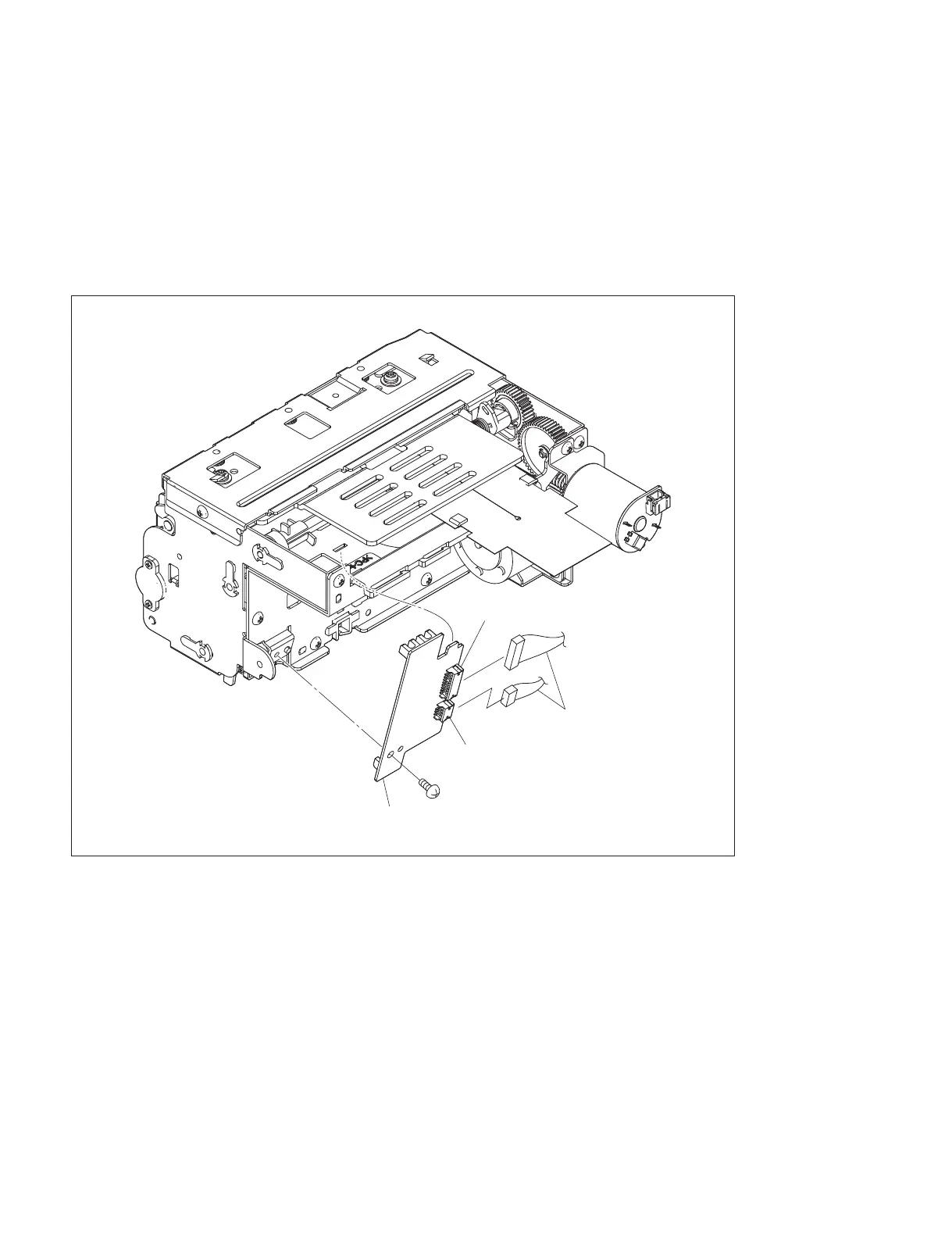
3-3. SE-1142 Board
1. Remove the top cover. (Refer to Section 1-5-1.)
2. Remove the front panel block assembly. (Refer to Section 1-5-2.)
3. Remove the MD general assembly. (Refer to Section 3-6.)
4. Disconnect the two harnesses from the connectors (CN201 and CN202) on the SE-1142 board.
5. Remove the screw, then remove the SE-1142 board.
6. To install, reverse the removal procedure.
n
Remove the slack of the harness connected from the SE-1143 board on the side of the SE-1142 board.
(Refer to Section 3-4.)
7. Perform the check (self-diagnosis). (Refer to Section 3-13.)
BVTT2.6 ) 5
CN201
Harnesses
CN202
SE-1142 board



 To Next Page