3-10 (E)
UP-D898MD/X898MD
3-2. KY-711 Board
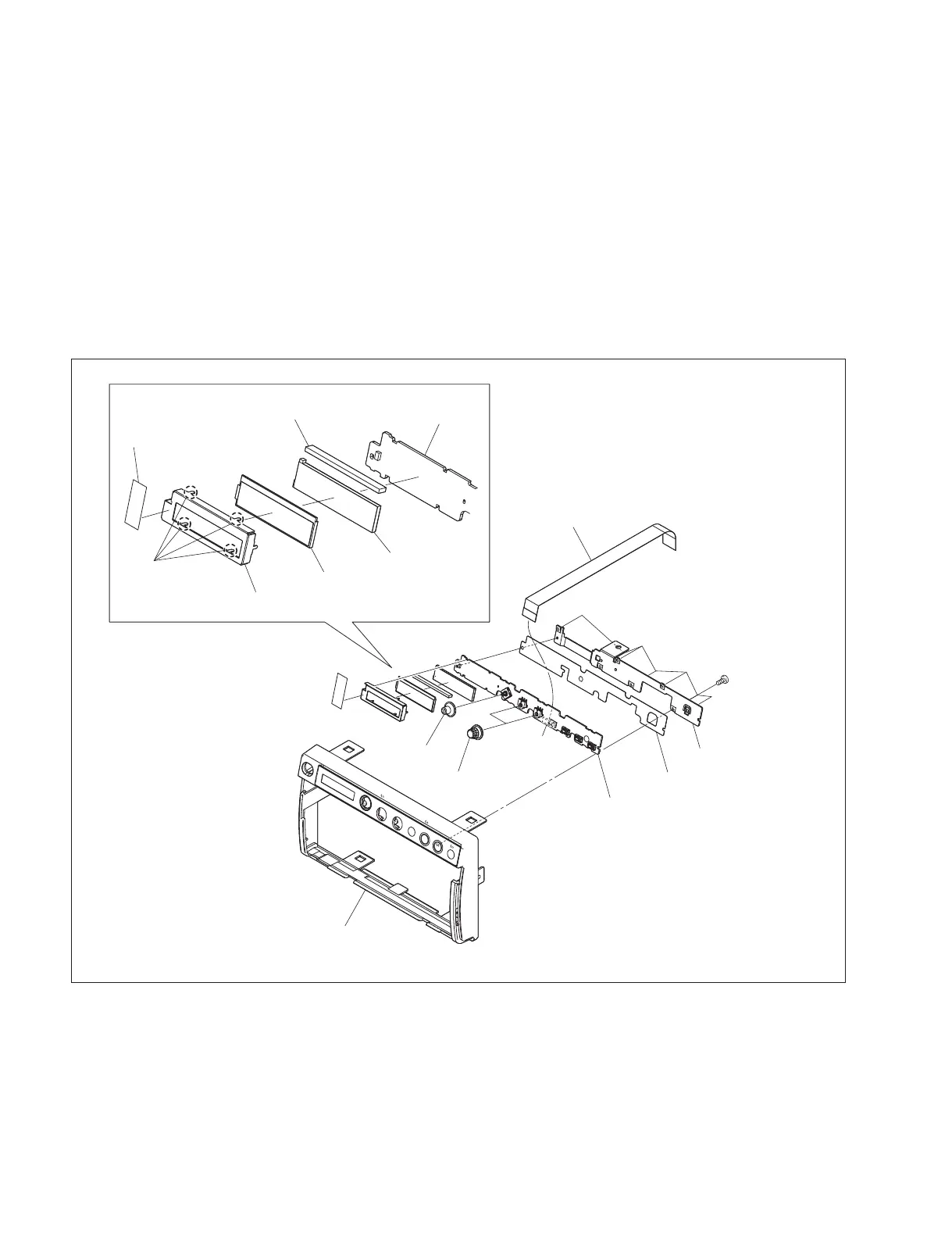
1. Remove the top cover. (Refer to Section 1-5-1.)
2. Remove the front panel block assembly. (Refer to Section 1-5-2.)
3. Remove the seven screws, then remove the KY bracket, insulating sheet (KY) and KY-711 board.
4. Disconnect the flexible flat cable from the connector (CN101) on the KY-711 board.
5. Remove the operation lever and two encoder knobs from the KY-711 board.
6. Remove the tape.
7. Remove the four hooks of the LCD holder, then remove the LCD holder, light guide plate (LCD)
assembly, conductive plate for connection and LCD panel.
P1.7 ) 5
LCD holder
LCD panel
Light guide plate (LCD)
assembly
Conductive plate for connection
Tape
KY-711 board
Hooks
KY-711 board
Front panel assembly
Insulating sheet (KY)
KY bracket
CN101
Operation lever
Encoder knobs
Flexible flat cable
The illustration indicates UP-X898MD.



 To Next Page